

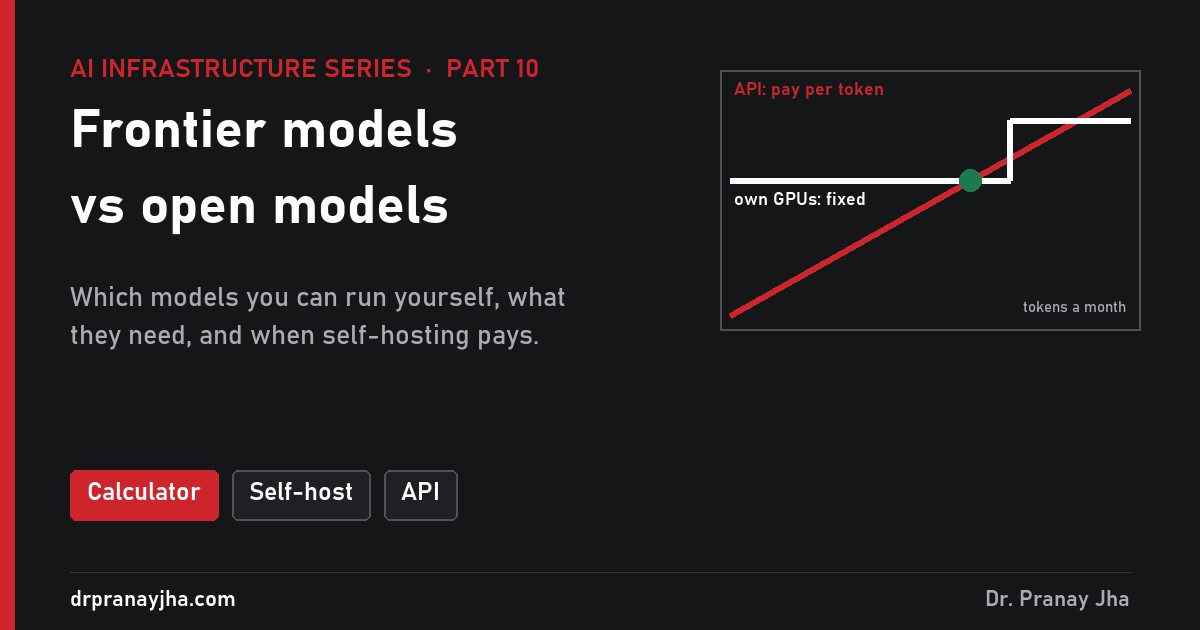
AI Infrastructure series · Part 10 of 24
There are two ways to use a large language model. You can send text to a frontier model such as GPT, Claude or Gemini through its maker’s API and pay for every token. Or you can download an open model and run it on GPUs you control. This part explains what “open” really means, what hardware each model size needs, how the two cost models compare with worked numbers, and how to decide, including using both.
Find the break-even volume for your numbers, check whether a model fits a GPU in 16-bit, FP8 or 4-bit, watch idle hours change the cost of every token, and route part of your traffic to an open model. Presets for an internal chatbot, high-volume classification and regulated data.
What is a frontier model, and what is an open model?
A frontier model is one of the most capable models available at any moment: the front edge of what AI can do. Only a handful of companies build them, because training one takes tens of thousands of GPUs for months (part 15 shows the maths: Llama 3.1 405B alone took about 30.84 million H100 GPU hours). Most frontier models are closed. You never see the weights. You send a request to the maker’s API, their GPUs run the model, and you get text back. Makers usually do not publish the parameter count or the architecture.
An open model has its trained weights published, so anyone can download them and run the model on their own hardware. Llama, DeepSeek and OpenAI’s gpt-oss are well-known families that release open weights, and many other labs do too. Once you have the files, the model is yours to run: on a laptop, on one GPU, or across a cluster, with no call to anyone.
The weights are billions of numbers stored as files (part 9). Running the model means loading them into GPU memory, so the first practical question about any open model is how much memory it needs.
What is the difference between open weights and open source?
The two terms are often used as if they mean the same thing. They do not. A trained model is made of three parts, and a release can share any mix of them:
- Weights (parameters): the trained numbers. With these you can run the model and fine-tune it.
- Code: the code to run the model (inference) and the code that trained it (data processing, training, evaluation).
- Data: what the model was trained on, or at least enough detail about it to rebuild something similar.
Most releases called “open” share the weights and the inference code, under a licence. Very few share the training code and data. The Open Source Initiative’s Open Source AI Definition (version 1.0) sets the bar for “open source”: parameters, complete training and inference code, and enough information about the data that a skilled person could build a substantially equivalent system, all under open terms. By that definition, most popular open models are open weights, not open source. You can run and change them, but you cannot rebuild them from scratch.
What each kind of release gives you. Open weights give you the part you need to run and customise a model; open source also gives you what you would need to rebuild it.
What licences do open models use?
“Open” says nothing about what you may do commercially. That is set by the licence on the model card, and licences fall into four broad types:
| Licence type | Example | What you may do | What to watch for |
|---|---|---|---|
| Permissive | gpt-oss-120b and gpt-oss-20b: Apache 2.0. DeepSeek-V3 code: MIT | Use, change, sell and redistribute, including commercially (OSI-approved licences) | Keep the licence and notices. Apache 2.0 also carries a patent grant |
| Community | Llama 3.1 Community License; DeepSeek-V3 weights under a separate model agreement that allows commercial use | Most commercial use is allowed | Llama 3.1: a separate licence from Meta above 700 million monthly active users, “Built with Llama” shown on products, models trained with it must have names starting “Llama”, plus an acceptable use policy |
| Research only | Meta’s first LLaMA release; many research checkpoints | Experiments, papers, internal evaluation | You cannot ship a product on it, even internally in some cases |
| Closed | Frontier models | Use the outputs as the contract allows | Data retention, whether your data is used for training, rate limits, model retirement dates |
Read the licence of the exact version you deploy, because licences sometimes change between releases of the same family, and review it like any new software dependency.
What do you get, and not get, with each option?
There are really three ways to use a model, not two. Between “frontier API” and “run it yourself” sits a hosted open model: an open model that a cloud or an inference provider runs for you and bills per token. It separates two decisions people often mix up: which model, and who runs the GPUs.
| Question | Frontier API | Hosted open model | Self-hosted open model |
|---|---|---|---|
| Who runs the GPUs? | Model maker | Cloud or inference provider | You |
| How you pay | Per token, in and out | Per token, usually cheaper | Per GPU hour, busy or idle |
| Where your data goes | Maker’s data centres | Provider’s data centres | Your network only |
| Model changes | On the maker’s schedule | You pick a version; provider may retire it | Never, unless you change it |
| Fine-tuning | Limited, through the maker | Often LoRA adapters | Anything the licence allows |
| Scaling to a spike | Instant, within rate limits | Instant, within rate limits | Only as far as your GPUs go |
| Skills you need | API integration | API integration | GPU operations, serving, on-call |
The diagram below follows one request through the two ends of that range. Watch where the data travels and where the meter sits.
One request, two paths (animated). With an API, the prompt leaves your network and you pay for its tokens. Self-hosted, the prompt stays inside, and you pay for the GPU hours whether a request arrives or not.
How big are open models, and what hardware do they need?
Part 7 gave the rule: weights take parameters × bytes per parameter. In 16-bit that is 2 bytes, in FP8 1 byte, and in 4-bit formats about half a byte plus a little for scales (part 18). On top of the weights you need room for the KV cache, which grows with users and context length (part 14), plus a few GB for the runtime. A useful planning margin is 20 to 40% above the weights.
For a Mixture of Experts model (part 12), keep two numbers apart. Total parameters decide memory, because every expert must sit in GPU memory. Active parameters decide speed and compute per token, because each token only passes through a few experts. That is why gpt-oss-120b, with 117 billion total but about 5.1 billion active, generates tokens much faster than a 70B dense model, yet still needs more memory than one.
| Model (maker’s figures) | Total / active | 16-bit | FP8 | 4-bit | Smallest sensible home |
|---|---|---|---|---|---|
| Llama 3.1 8B | 8B dense | 16 GB | 8 GB | ~4.5 GB | Laptop (4-bit) or one GPU |
| gpt-oss-20b | 21B / 3.6B | 42 GB | 21 GB | ~12 GB | Runs within 16 GB as shipped (MXFP4) |
| Llama 3.1 70B | 70B dense | 140 GB | 70 GB | ~37 GB | 2 × 80 GB GPUs in 16-bit |
| gpt-oss-120b | 117B / ~5.1B | 234 GB | 117 GB | ~62 GB | One 80 GB GPU as shipped (MXFP4) |
| Llama 3.1 405B | 405B dense | 810 GB | 405 GB | ~215 GB | One 8-GPU server in FP8 |
| DeepSeek-V3 | 671B / 37B | 1,342 GB | 671 GB | ~356 GB | 8 × H200 or B200, in its native FP8 |
| Largest releases | around a trillion total, tens of billions active | 1 TB and up even in 8-bit | Several servers, or a rack-scale system | ||
Weights only. 4-bit assumes about 4.25 bits per value including block scales (MXFP4 style). gpt-oss keeps attention and other small layers in 16-bit, so its shipped size sits between the FP8 and 4-bit columns.
Those sizes map onto four hardware tiers. Each step up roughly multiplies both the memory and the cost by five to ten.
Where open models land. Pick the tier by the weights at your chosen precision plus 20 to 40% for KV cache and runtime. Costs are relative and illustrative.
Quantization often moves a model down a tier: Llama 3.1 70B in 4-bit fits one 80 GB GPU instead of two. The jump from one server to several is the hardest, because the model is then split across a network far slower than NVLink. If a model only fits multi-node, a hosted version usually makes more sense unless you already run a GPU cluster (part 8, part 6).
How far behind are open models on quality?
The strongest closed frontier models are usually ahead on the hardest work: long chains of reasoning, difficult code across large projects, reliable use of many tools in a row, and following long, complex instructions. The largest open models are close behind, and the gap at the top has narrowed with each generation. Benchmark tables change every few months, so treat any published ranking as a starting point rather than an answer.
The more useful fact is that most business tasks are not frontier tasks. Classifying support tickets, pulling fields out of invoices, summarising calls, routing emails and answering questions over your own documents with retrieval often work well on a small or medium open model, and better still after fine-tuning on a few thousand of your own examples. So the question to ask is not “which model is best?” but “what is the smallest model that does this task well enough?” Answer it the same way for every candidate:
Collect 200 to 500 real examples of the task, with the answer you would accept. Include the hard and unusual ones.
Run them through a frontier API to set the ceiling, then through two or three open models of different sizes, with the same prompt.
Score them the same way: exact match for fields, a rubric or a second model as judge for free text, and a human check on a sample.
Pick the smallest model within your tolerance, then check whether fine-tuning closes the remaining gap (part 19).
Keep this set: it is your own benchmark, rerun every time a new model appears.
How do the two cost models work?
The two options are billed in different units, and that is the whole difficulty in comparing them.
Cost = input tokens × input price + output tokens × output price. Output tokens usually cost several times more than input tokens, because generating them is the slow, memory-bound decode phase (part 13). Zero traffic costs zero. Double the traffic, double the bill.
Cost = GPUs × hours × price per GPU-hour, whether the GPUs are busy or not. What you get for that money is capacity: a number of tokens per second. Cost per token = monthly GPU cost ÷ tokens actually served. Idle hours raise the cost of every token you do serve.
To compare them, turn both into dollars per million tokens. For the API side, blend the two prices by your mix of input and output. For self-hosting, divide the fixed monthly cost by the tokens you will really serve, which depends on utilisation: the share of the GPUs’ sustained capacity you use on average across the month.
How many tokens a month is a real workload? A worked example
Take an internal assistant for a company of 1,000 staff. All prices are illustrative.
Requests. 1,000 staff × 10 questions a day × 22 working days = 220,000 requests a month.
Tokens per request. System prompt, chat history and retrieved document text make about 1,500 input tokens. The answer is about 400 output tokens. Total 1,900.
Monthly tokens. 220,000 × 1,500 = 330 million input; 220,000 × 400 = 88 million output. About 418 million tokens in all.
API bill. At an illustrative $3 per million input and $15 per million output: 330 × $3 = $990, plus 88 × $15 = $1,320. Total $2,310 a month, a blended $5.53 per million tokens.
Self-hosting. A 70B open model on 2 GPUs at an illustrative $2.50 per GPU-hour: 2 × $2.50 × 730 hours = $3,650 a month for the GPUs alone, before anyone runs them.
Result. The API is cheaper by about $1,340 a month on GPU cost alone, and by much more once people are counted. At this volume, price is not a reason to self-host.
Where is the break-even point?
Keep the same 2-GPU, 70B setup and an API blended at $6 per million tokens (which is what $3 in and $15 out gives with three input tokens to every output token). Assume the pair can sustain about 900 tokens per second of mixed chat traffic with a serving engine such as vLLM (an illustrative figure; part 17 explains what drives it).
Below about 608 million tokens a month, the API is cheaper even if your GPUs were free to run. Above it, self-hosting can win, but the chart shows something the single number hides. GPUs come in whole units. When volume passes what one pair can serve at your utilisation, you add a second pair, and the self-hosted cost jumps.
Break-even is not a single point. At 30% utilisation, self-hosting wins only just after each new GPU pair fills up, and loses again when the next pair is added. At 50% the steps are further apart and self-hosting wins almost everywhere past about 1.2 billion tokens. GPU cost only, illustrative prices.
Look at what drives the gap. At 30% utilisation the self-hosted cost per million is $3,650 ÷ 710 = $5.14, only 14% below the API’s $6. That margin is easily swallowed by the steps and by the costs in the next section. At 50% it is $3.09, nearly half the API price. Utilisation matters more than any other input, so it deserves its own explanation.
Why does utilisation decide the cost per token?
You cannot run GPUs at 100% all month, for two reasons. Traffic is uneven, and you must size for the peak, not the average. And you need headroom at the peak too, because a GPU run flat out queues requests and every user waits longer for the first token. Suppose you plan the peak at 80% of sustained capacity. The chart shows a typical weekday for an internal tool.
One weekday of an internal tool (illustrative). Everything hatched is GPU time you pay for and do not use. Weekends are quieter still, which pulls the monthly average down further.
Work it through. The weekday average is 44% of peak. If weekends run at about 15% of peak, the weekly average is (5 × 44% + 2 × 15%) ÷ 7 ≈ 36% of peak. The peak itself is planned at 80% of capacity, so average utilisation is 36% × 0.8 ≈ 29%. That is where the 30% in the break-even example comes from, and it is typical for tools people use during office hours. The table shows what each utilisation level does to the same $3,650 a month.
| Average utilisation | Typical of | Tokens served a month | Cost per million tokens | vs API at $6 |
|---|---|---|---|---|
| 5% | Pilot, a few teams | 118M | $30.90 | 5.2 × dearer |
| 10% | Office-hours tool, oversized | 237M | $15.40 | 2.6 × dearer |
| 30% | Office-hours tool, well sized | 710M | $5.14 | 14% cheaper |
| 50% | Several apps sharing GPUs, global users | 1.18B | $3.09 | 49% cheaper |
| 70% | Steady batch work, queued overnight | 1.66B | $2.20 | 63% cheaper |
Cost per million tokens, 70B model on 2 GPUs at $2.50 per GPU-hour, 900 tokens per second sustained. GPU cost only, illustrative.
Utilisation can be raised on purpose. Run several applications on the same model so their peaks overlap less. Move batch jobs such as document summarising or nightly classification into the quiet hours. Scale replicas down at night if your GPUs are rented by the hour and can be released (owned GPUs cannot). Each of these moves you down the table without changing the hardware.
What does self-hosting cost beyond the GPUs?
The break-even above counts GPUs only. A production service needs more, and the largest item is usually people. The figures below are illustrative for the same 2-GPU service.
| Cost | Why it exists | Illustrative per month |
|---|---|---|
| GPUs | 2 × 80 GB at $2.50 per hour, around the clock | $3,650 |
| Spare capacity | A second pair so one failure or an upgrade does not take the service down (N+1) | $3,650 |
| People | Half of one engineer for serving, upgrades, on-call and capacity planning, at $150,000 a year | $6,250 |
| Platform | Monitoring, storage for weights, logs, metrics, load balancer, Kubernetes | $300 |
| Total | $13,850 |
With the full $13,850, break-even against a $6 API moves from 608 million to about 2.3 billion tokens a month. That is why self-hosting usually only wins on price for organisations that already run GPU platforms, where the people and spares are shared across many services. Other costs are harder to price but real:
- Model upgrades. A new open model means testing it on your own benchmark, possibly new quantization, new serving flags and a careful switch. With an API this happens for you, for better or worse.
- Idle GPUs during growth. You buy or reserve ahead of demand, so capacity sits unused while adoption catches up.
- Hardware commitments. Owned or reserved GPUs are cheaper per hour but lock you in for one to three years, while models and GPUs keep changing.
- Security and governance. Patching the serving stack, access control, logging prompts safely, licence reviews and output checks.
APIs have hidden costs too: rate limits at peak, price changes and model retirements you do not control. See my token cost post for how API bills add up, including prompt caching.
When do data residency, latency and customisation decide it?
Three things often settle the decision before cost is even calculated.
Data residency, privacy and control
With a frontier API, every prompt and every retrieved document travels to the provider’s data centres. Enterprise contracts can limit retention, rule out training on your data and sometimes keep processing in a chosen region, but the data still leaves your network. For some data that is simply not allowed: patient records, certain financial data, government and defence work, or anything a regulator says must stay in-country. In those cases a self-hosted open model, or one hosted in a cloud region and account you control, is the only option, and the cost question becomes “what is the cheapest way to self-host?” Running it yourself also means the model never changes without your decision, which matters when outputs feed audited processes.
Latency
Frontier APIs run on very large fleets and are often fast, but response times vary with their load and rate limits apply. Self-hosted, you control the queue: a small batch for a low time to first token, GPUs next to the application, even a site with no internet. You also own every slow moment.
Customisation
With open weights you can fine-tune the model itself. LoRA trains a small set of extra weights instead of the whole model: for Llama 3.1 8B at rank 16 that is about 42 million parameters, roughly 84 MB, against 16 GB for the full model. A serving engine can then load many adapters on one copy of the base model and pick one per request, so each team or customer gets its own tuned version on shared GPUs. Part 19 covers this in depth. API makers offer fine-tuning for some models, but you get a hosted result, not weights you can take elsewhere.
How do you decide, step by step?
Ask the questions in this order. The early ones are yes or no and end the discussion quickly; cost comes last because it only matters once the other questions allow a choice.
Decision order. Residency and quality are hard limits; volume and skills decide between running it yourself and paying someone per token.
How does a hybrid setup work?
Most organisations that run open models also use a frontier API. They put a router in front of both and decide per request. Simple, high-volume work such as classification, extraction and short answers goes to the open model on their own GPUs, where it keeps utilisation high. Hard requests, such as long multi-step reasoning or anything the small model is unsure about, go to the API.
Hybrid routing (animated). The open model takes the steady bulk and stays busy; the API takes the hard tail and the spikes. Shares are illustrative.
Put numbers on it with the earlier example scaled up to 2 billion tokens a month. All-API at $6 per million is $12,000. Route 80% (1.6 billion) to a 70B model at 50% utilisation, which needs two GPU pairs ($7,300), and send the remaining 400 million to the API ($2,400): $9,700 for GPUs and API. The saving is modest and depends on the router keeping quality up. The stronger reasons are often that sensitive requests stay inside and an API outage no longer stops everything.
The plumbing is simpler than it sounds because vLLM serves an OpenAI-compatible API (part 16). The same client code talks to both; only the base URL and model name change.
# one open model per GPU pair, OpenAI-compatible on port 8000
vllm serve meta-llama/Llama-3.1-70B-Instruct --tensor-parallel-size 2
# or the MoE that fits one 80 GB GPU as shipped
vllm serve openai/gpt-oss-120b

# the client picks a backend per request
from openai import OpenAI
local = OpenAI(base_url="http://llm.internal:8000/v1", api_key="unused")
cloud = OpenAI()   # frontier provider, key from the environment

def ask(task, prompt):
    client, model = (local, "meta-llama/Llama-3.1-70B-Instruct") if task in EASY else (cloud, FRONTIER_MODEL)
    return client.chat.completions.create(model=model, messages=[{"role": "user", "content": prompt}])
To know your real utilisation, do not trust the GPU utilisation percentage from nvidia-smi alone: it shows that a kernel was running, not how much of the GPU’s capacity you used. Count tokens instead. vLLM exposes Prometheus counters such as vllm:prompt_tokens_total and vllm:generation_tokens_total, and gauges such as vllm:num_requests_running. Tokens served per hour divided by the sustained tokens per hour you measured in a load test is the utilisation that drives your cost per token. Plot it by hour for a month before you buy the next GPU.
What are the common mistakes?
- Comparing a GPU-hour price with a token price directly. A GPU costs the same at 3 a.m. Without a utilisation figure, any comparison flatters self-hosting.
- Using only the input or only the output price. Blend by your real mix. A RAG chatbot is mostly input; a report writer is mostly output.
- Saying a model “fits” when only the weights fit. Llama 3.1 70B in FP8 is 70 GB, which leaves almost nothing on an 80 GB GPU for KV cache, so it serves very few users. Leave 20 to 40% headroom.
- Mixing up total and active parameters. An MoE model’s active count sets its speed, but memory is set by the total. DeepSeek-V3 has 37B active and still needs 671 GB in FP8.
- Choosing the largest open model by default. Test the smallest one first. A model a tier smaller is a tier cheaper in hardware.
- Treating “open” as “free to use for anything”. Read the licence: user thresholds, naming rules and acceptable-use policies apply to some well-known families.
- Trusting public benchmarks for your task. They measure someone else’s task. Your own set of examples is the only test that counts.
- Forgetting people, spares and upgrades. In the example above they nearly quadruple the monthly cost.
Questions people ask
Can I run a frontier model on my own servers?
Generally not. Closed frontier models do not release weights. Some makers sell dedicated capacity or private deployments through cloud partners, but you still do not get the weights, and the model still runs on their software stack.
Is a self-hosted open model safe for confidential data?
The model itself does not send data anywhere; it is a file of numbers loaded into your GPUs. The risk moves to your own stack: who can call the endpoint, where prompts are logged, and how the serving software is patched. Secure it like any internal service holding sensitive data.
What is the cheapest way to try an open model?
On a laptop or a desktop with a gaming GPU, run gpt-oss-20b or Llama 3.1 8B in 4-bit with a local runner such as Ollama or llama.cpp. For bigger models, use a hosted open model and pay per token while you test, before buying any GPUs.
How many GPUs does a 70B model need?
About 140 GB of weights in 16-bit, so two 80 GB GPUs with some room for KV cache, or four for many users and long contexts. In 4-bit it fits on one. Part 20 works through sizing in full.
Do open models get updated?
New versions are new downloads. Nothing changes until you choose to switch, which is good for stability and audit, but it means upgrades are your job. API models are updated and retired on the maker’s schedule.
- What is the smallest model that passes your own 200 to 500 examples?
- Can the data leave your network or country? If not, the decision is made.
- How many tokens a month, in and out, and how steady? Work out utilisation, not only volume.
- What is the break-even with people, spares and platform costs included?
- Does the model fit your GPUs at your chosen precision with 20 to 40% headroom?
- Does the licence allow your use, at your scale?
- Would a hybrid split give you most of the saving with less risk?
Sources: model sizes and licences from the makers’ model cards (OpenAI gpt-oss-120b and gpt-oss-20b, DeepSeek-V3, Meta Llama 3.1 and its Community License); gpt-oss attention layout from its published config. Open Source AI Definition 1.0 from the Open Source Initiative. Llama 3.1 405B GPU hours from Meta’s model card. The newest open models change quickly, so check the official model card for current sizes and licences. All prices, throughput figures and utilisation levels are illustrative estimates, not quotes.
About The Author



 DrJha