

Replication and Proxy Cache
By now you have pushed images, scanned them, locked them down, and cleaned them up, all inside your own project. This part looks outward. Harbor does not have to live on its own island. It can talk to other registries in two different ways, and they solve two different problems. We will go through both, then poke at the real proxy cache that already exists in the lab.
Heads up before we start, the same as Part 7 and Part 10. Setting these up is a system-admin job. It needs the Administration menu, which your account does not have. So this part is mostly look, not touch. The good news is the lab already has a working proxy cache, so you can see a real one instead of just reading about it.
The two ways Harbor connects to other registries
Replication and proxy cache sound similar because both move images between registries. The difference is who starts the copy and when.
| Replication | Proxy cache | |
|---|---|---|
| What it does | Copies images between two registries, in bulk. | Mirrors one upstream registry, on demand. |
| When it copies | On a schedule, or when you click run. | The first time someone pulls an image. |
| Good for | Mirroring a whole project to another site, backups, multi-region copies. | Caching public images locally so you pull from the internet once, not every time. |
| Set up by | System admin (Administration, then Registries and Replications). | System admin creates the project. You just pull through it. |
What a proxy cache does
A proxy cache is a special kind of project. It does not hold images you push. Instead it sits in front of an upstream registry and keeps a local copy of whatever gets pulled through it. The first pull goes out to the upstream and is a little slow. Harbor keeps that copy, so every pull after that is served from inside the lab and is fast.
Why bother? Two reasons. You save bandwidth, because a popular image is downloaded from the internet once and then shared from inside the lab. And you keep working even if the upstream is slow or briefly unreachable, because the copy is already local.
What replication does
Replication is the bulk option. An admin points Harbor at another registry, writes a rule for which repositories to copy, and picks when it runs. Then Harbor copies images across in batches, either on a timer or when someone kicks it off by hand. It is the tool you reach for when you want a whole project mirrored to a second site, or a backup somewhere else.
One way to picture it if you come from vSphere: replication is a lot like a Content Library subscription that syncs on a schedule, while a proxy cache is more like a pull-through mirror that only fetches what someone actually asks for.
Find the proxy cache in the project list
You do not need admin rights to spot a proxy cache. The project list tells you which is which.
- Open the Projects page.
- Look at the Type column. Almost every row says
Project. - Find the one that says Proxy Cache. In this lab it is the project named
nvidia-cache.
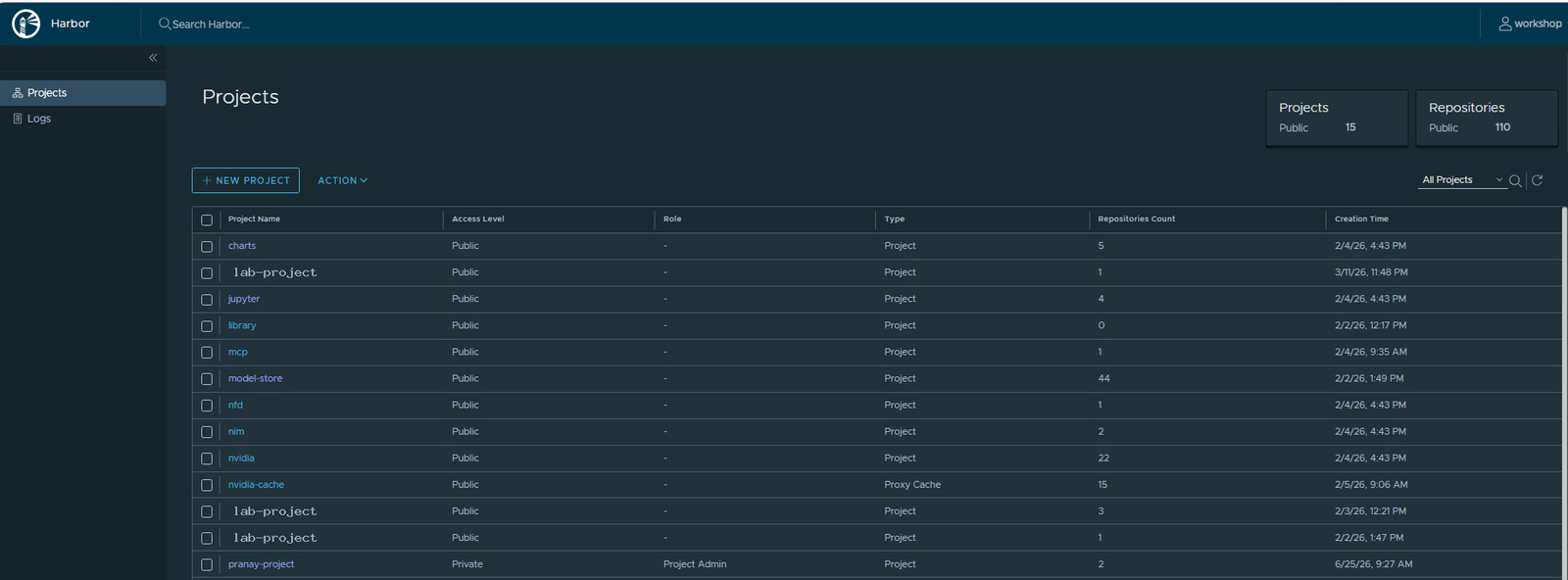
That one word in the Type column is the whole difference. A normal project stores what you push. A proxy cache stores what gets pulled through it from somewhere else.
Look inside the proxy cache
Click nvidia-cache to open it. Under the name you will see the label Proxy Cache, so there is no doubt about what kind of project this is. Open the Repositories tab.
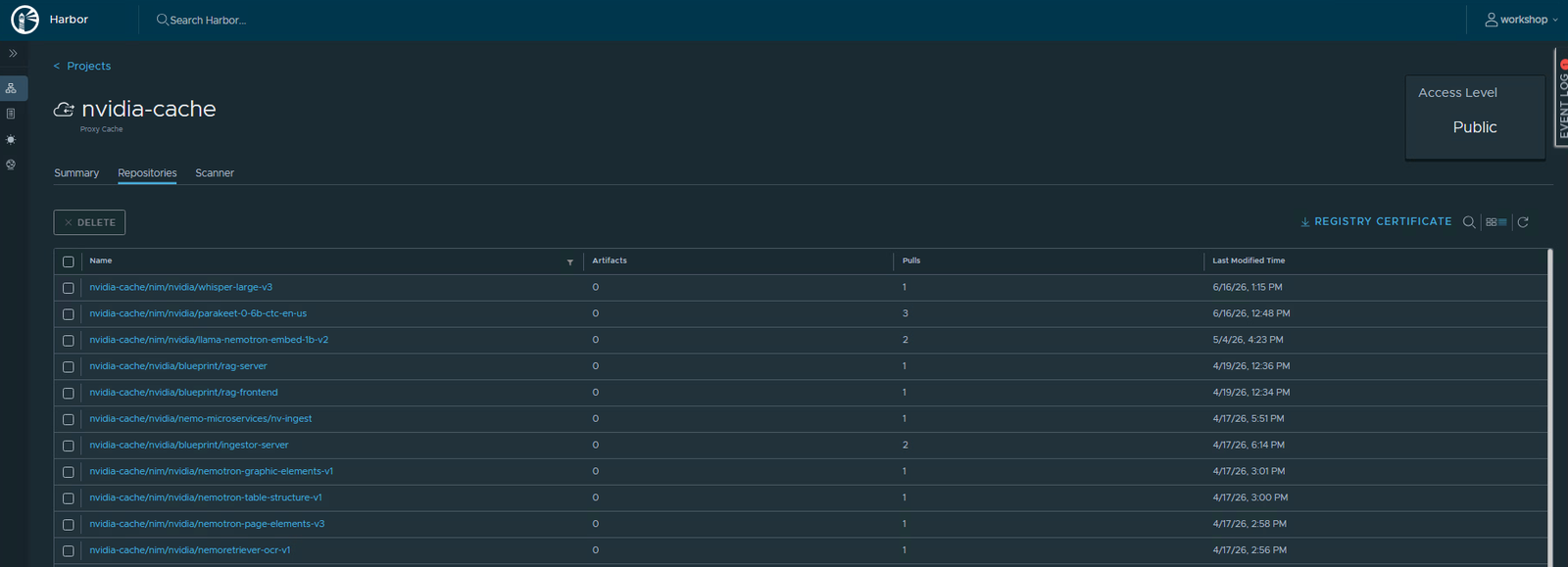
Read it like this. Each row is an image that someone pulled at least once. The Pulls column shows how many times it has been requested, and the Last Modified Time shows when the cache last refreshed it. Nobody pushed any of these by hand. They are here purely because a pull came through and Harbor saved a copy on the way back.
Pulling an image through the cache
The trick to using a proxy cache is the name you pull. You address the image through the cache project, and Harbor handles the rest. The shape is the same host/project/image:tag pattern from Part 3, with the cache project sitting in the project slot.
./crane pull registry.lab.internal/nvidia-cache/<upstream-image>:<tag> out.tar --insecureThe first time you run that, Harbor checks its cache, does not find the image, fetches it from the upstream registry, hands it to you, and keeps a copy. Pull the same image again and it comes straight from the cache, no trip to the internet. If you watch the Repositories tab, the image appears there after that first pull, and its Pulls count ticks up each time.
The host is shown here as registry.lab.internal on purpose. Use your real lab Harbor host in its place, and pick an image path the cache is actually set up to mirror.
Why this part is mostly look, not touch
Creating a proxy cache and setting up replication both happen in the Administration area, under Registries and Replications. That menu only shows up for system admins. On the shared lab you are a project admin in your own sandbox, not a system admin, so you will not see it. That is normal and nothing is wrong with your account.
It is still worth knowing the two moving parts, because that is what an admin actually configures. First a registry endpoint, which is just Harbor’s saved address and login for the other registry. Then a rule that uses it, either a replication rule with a filter and a schedule, or a proxy cache project pointed at that endpoint. Endpoint first, rule second. That order is the whole mental model.
What you can take away
You do not need admin rights to understand this, and now you do. You can tell a proxy cache from a normal project at a glance, you know that its contents got there by being pulled and not pushed, and you know that replication is the bulk, scheduled cousin for mirroring whole projects. If you ever do get system-admin access, you already know the two pieces to look for.
Next part
Part 12, the finale. We tie everything back together and follow a model image through a real Private AI workflow, from the registry shelf to a running endpoint.
Harbor for Beginners, Part 11 of 12. Product names belong to their owners. The host and any credentials shown are stand-ins, and the lab project names in the screenshots have been blanked out.
About The Author








 DrJha
DrJha