

AI Infrastructure series · Part 20 of 24
“How many GPUs do we need?” is usually the first question in an AI infrastructure project, and “it depends” is an unhelpful answer. It does depend, but on a short list of numbers: the model and its format, how long the conversations are, how many requests run at the same moment, how fast each user needs the words, how much new text each request brings, and how much spare capacity you want. This part turns those numbers into a GPU count, one step at a time, using what parts 4 to 19 explained, and works it through for three real kinds of workload.
Four tabs: turn daily users into users at once, size the GPUs (with a prefill check), see how speed per user falls as users are added, and compare L40S, H100, H200 and B200 on the same workload. Presets load the chatbot, RAG and coding examples from this post.
What do you need to know before you size anything?
Six inputs decide almost the whole answer. Most come from the business, not the GPU catalogue.
- The model and its parameter count. For MoE models the total count, not the active count, decides memory (part 12).
- The format of the weights (16-bit, FP8 or 4-bit) and of the KV cache (16-bit or FP8), from part 18.
- Conversation length: everything the model holds for one request, meaning system prompt, history, retrieved documents and the answer, in tokens.
- Users at once: requests being generated at the same moment at peak. Not total users and not requests per day; the next section shows how to convert.
- Speed per user: tokens per second while an answer is being written. People read at 5 to 10; agents and code tools often want 50 or more.
- New prompt tokens per request: how much text the GPU has to read before it can write the first word. This drives prefill, which most quick estimates leave out.
Conversation length varies more between workloads than any other input. These are typical shapes, not measurements from one system:
| Workload (illustrative) | Conversation length | New tokens per request | Answer length | Speed wanted |
|---|---|---|---|---|
| Internal chatbot | 2,000 to 4,000 | 200 to 1,000 (history is cached) | 300 to 500 | 15 to 25 tokens/s |
| RAG over documents | 8,000 to 16,000 | 5,000 to 15,000 (new chunks each time) | 300 to 800 | 15 to 25 tokens/s |
| Coding assistant or agent | 16,000 to 64,000 | 1,000 to 4,000 (repository context cached) | 300 to 1,000 | 40 to 100 tokens/s |
| Document summarisation | 16,000 to 128,000 | almost all of it | 500 to 1,500 | often batch, no target |
With those inputs, the method is a fixed sequence. Each step uses an earlier part of the series, and each step can only make the answer bigger, never smaller.
Sizing flow. Steps 2 to 5 are memory and bandwidth arithmetic, step 6 checks compute for prompts, step 7 adds resilience, and a benchmark on your own traffic replaces the estimate for users per copy before you buy.
How do daily users become users at once?
A business case says “2,500 people will use it”. A GPU does not care about that. It cares how many requests are being generated at the same moment, because each of those holds a KV cache in memory and takes part in every decode step. The link between the two is Little’s law from queueing theory: average number in the system = arrival rate × time each one spends in it.
For an internal chatbot, the conversion goes like this (illustrative inputs):
Requests a day. 2,500 people use it on a busy day and send 8 requests each: 20,000 requests.
Average rate. Most use falls inside an 8-hour working day: 20,000 ÷ 28,800 seconds = 0.69 requests a second.
Peak rate. Mornings and after lunch run about 3 times the daily average: 2.08 requests a second. Size for the peak hour, not the day.
Time per request. A 400-token answer at 20 tokens a second takes 20 seconds, plus about 1 second waiting for the first token: 21 seconds.
Users at once. 2.08 × 21 = 43.75, so plan for 44 requests in flight. That is under 2% of the 2,500 people.
Time spent reading and typing between messages does not count, because nothing is being generated then. The diagram shows the same law with smaller numbers so you can count the bars.
Little’s law with even spacing, for readability. Real arrivals are random, so the count wanders above and below the average; the demo’s first tab simulates random arrivals and shows the peaks, which is why you round up and keep headroom.
Doubling the answer length doubles users at once with the same number of people. A faster speed target works the other way: requests leave sooner, but each copy holds fewer users, as the next sections show.
How much memory does one copy need?
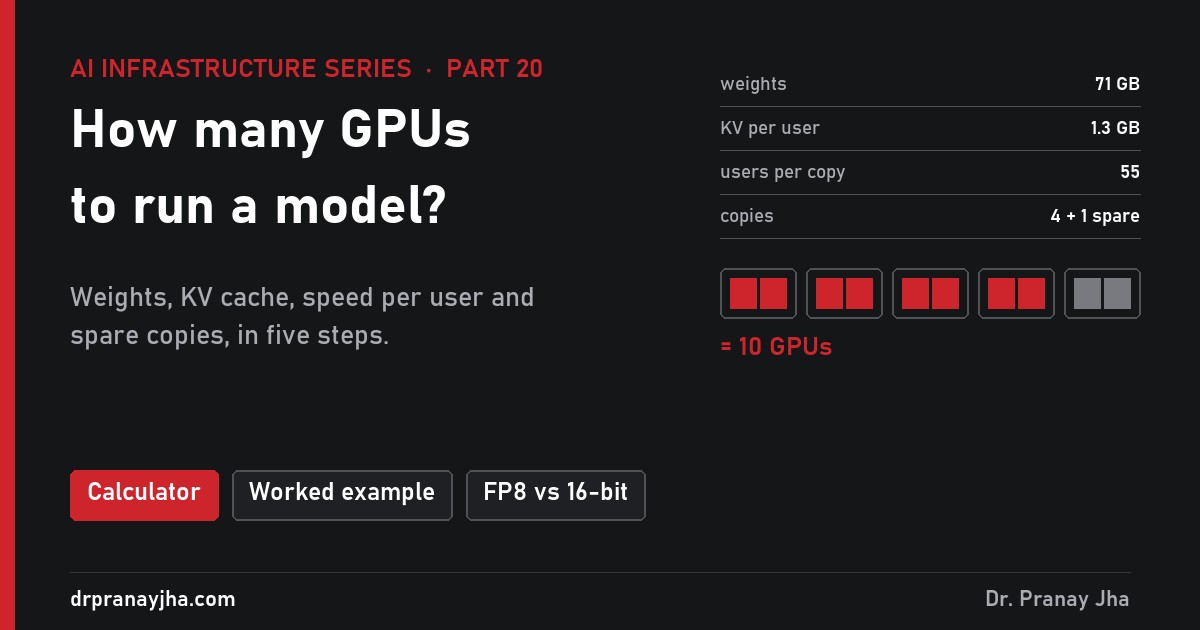
A copy (a replica) is one running instance of the model, spread over one or more GPUs that work together on every token. Its memory holds three things: the weights, the KV cache for every user it serves, and working space the engine keeps free. Take the worked example used throughout this post: Llama 3.1 70B in FP8 with an FP8 KV cache, on H100 80 GB GPUs, 200 users at once, 8,000-token conversations, 20 tokens a second each.
One H100 has 72 GB usable, which the weights almost fill: room for one user. Two H100s give 144 GB, so 73.4 GB is left for KV cache, which holds 73.4 ÷ 1.31 = 55 users. That is the memory limit for this copy. The 10% kept free is for activations, CUDA graphs and fragmentation; vLLM’s default --gpu-memory-utilization 0.9 reflects the same habit.
Memory per copy for Llama 3.1 70B in four set-ups (illustrative, 8,000-token conversations). Quantization halves the weights and the KV cache; the H200’s 141 GB fits the FP8 model on one GPU with room for 42 users.
Memory alone already shows why format choices matter. In 16-bit, the same model needs 4 H100s per copy for the same 55 users. In FP8 it needs 2. That halves the fleet before any other choice is made.
Why does every extra user slow each user down?
Memory says how many users fit. It does not say how fast they are served. For that, recall from part 4 and part 13 what one decode step does: to produce one new token for every user in the batch, the GPUs read all of the weights once and every user’s KV cache once. The arithmetic is small compared with the reading, so the step time is close to bytes read ÷ memory bandwidth.
One decode step, animated: the weights stream from HBM first, then each user’s KV cache, then every user receives exactly one token. Add a user and the step reads 1.31 GB more, so every user waits slightly longer. Figures illustrative, from the method used in the demo.
Work it through for the example. Two H100s have 6.7 TB/s of bandwidth between them; real engines reach roughly 60% of peak on decode, so plan on 4.02 TB/s, which is 4.02 GB per millisecond. With 55 users, one step reads 70.6 + 55 × 1.31 = 142.7 GB, which takes 35.5 ms. Each user gets one token per step, so 1,000 ÷ 35.5 = 28 tokens a second. That beats the 20 target, so memory, not speed, is the limit.
Now turn it around to find the speed limit. At 20 tokens a second a step may take at most 50 ms, and in 50 ms the GPUs can read 201 GB. Take away 70.6 GB of weights and 130 GB is left for KV cache, which is 99 users. Above 99 users each person drops below 20 tokens a second, even if the memory could hold them.
Per-user speed (red) and copy throughput (dashed) against users per copy, illustrative. The copy stops at whichever comes first: the memory wall at 55 or the speed limit at 99. Here memory comes first, so this copy is memory-limited.
The chart explains why batching matters so much (part 17). One user alone gets 56 tokens a second while the copy writes only 56 tokens a second in total. With 55 users, each gets 28 but the copy writes 1,550: about 28 times more output from the same hardware.
Each copy ends up in one of three regimes, and the regime tells you what to change:
| Regime | What runs out | Typical cause | What helps | What does not help |
|---|---|---|---|---|
| Memory-limited | Room for KV cache | Long conversations, 16-bit KV, GPU barely larger than the weights | FP8 KV, shorter context, more GPU memory (H200, B200), more GPUs per copy | More bandwidth alone |
| Speed-limited | Time per step | High speed target (50+ tokens/s), slow memory (L40S) | More bandwidth, fewer bytes per weight, more GPUs per copy | More memory alone |
| Compute-limited | Arithmetic per step | Very large batches, long prompts (prefill) | More FLOPS (FP8, newer GPUs), prefix caching, separate prefill servers | More memory or bandwidth |
What do long prompts add?
Everything so far is about decode. Before a request can decode, the GPU has to prefill: read the whole new prompt and build its KV cache. Prefill is compute-bound, not bandwidth-bound, and costs about 2 × parameters FLOPs per prompt token (the same 2 × params per token from part 15). For an 8,000-token prompt on the 70B model that is 2 × 70.6 billion × 8,000 = 1.13 × 10¹⁵ FLOPs. Two H100s at 50% of their 1,979 dense FP8 TFLOPS each deliver 1,979 TFLOPS together, so the prefill takes about 0.57 seconds. That is the floor for time to first token (TTFT) when the queue is empty.
Prefill also takes time away from decode, because both run on the same GPUs. A simple way to account for it is a time budget per second for each copy. To give every user 20 tokens a second, the copy must run 20 decode steps each second; with 200 users spread over 4 copies (50 each) a step takes 33.9 ms, so decode uses 68% of the second. Whatever is left is the time available for prefill. Each new request brings its prompt, so prefill needs (requests per second per copy) × (prefill time per request).
In the worked example, 200 users each writing a 500-token answer at 20 tokens a second means requests last about 25 seconds, so about 8 new requests arrive every second, 2 per copy. If each brings 1,000 new tokens (chat history comes from prefix cache), prefill takes 71 ms per request and 14% of each second. It fits:
If the same requests each bring 8,000 tokens that are not cached, each prefill takes 571 ms and the budget breaks. The method keeps adding copies until decode plus prefill fit in one second: 9 copies instead of 4, or 20 GPUs instead of 10. For a RAG system with 15,000 new tokens per request (the scenario later in this post), three decode-sized copies would need 159% of every second:
Three ways reduce prefill load. Prefix caching keeps the KV cache for repeated text (system prompts, chat history, a shared document) so it is not recomputed. Chunked prefill mixes pieces of long prompts into decode steps, which smooths latency but does not remove the work. Disaggregated serving puts prefill and decode on separate GPU pools so each can be sized on its own terms; llm-d (part 22) does this on Kubernetes. This simple model leaves out the attention cost of very long prompts, which grows with the square of the length, so treat it as a lower bound above about 32,000 tokens.
How many GPUs should one copy span?
Steps 4 and 5 try 1, 2, 4 and 8 GPUs per copy and keep the option that needs the fewest GPUs in total. A copy larger than one GPU uses tensor parallelism (part 5): each layer’s matrices are split across the GPUs, every GPU reads only its share of the weights and KV cache, and the GPUs exchange partial results twice per layer on every step. That exchange is why the GPUs of one copy must sit in one server on a fast link.
GPUs per copy in practice. On an NVLink server any group of 2, 4 or 8 GPUs makes a good copy; on a PCIe-only server the exchange between GPUs is roughly 7 times slower than NVLink 4, so large copies lose much of their speed.
Bigger copies are not automatically better. Going from 2 to 4 H100s in the worked example triples users per copy (55 to 165) because the weights are paid for once and the extra memory all goes to KV cache, but the fleet becomes 2 copies plus a spare of 4 GPUs: 12 GPUs instead of 10. The spare is the reason. A smaller copy means a smaller spare, and a finer step when traffic grows. Prefer the smallest copy that holds the weights with real room left for KV cache, unless the speed target forces a larger one. In vLLM the choice is one flag:
vllm serve meta-llama/Llama-3.1-70B-Instruct \
  --quantization fp8 --kv-cache-dtype fp8 \
  --tensor-parallel-size 2 \
  --max-model-len 8192 \
  --gpu-memory-utilization 0.90
At start-up vLLM logs how many KV cache blocks it could allocate and the resulting maximum concurrency at the configured length; compare that figure with the 55 users from step 5.
How many copies, and how much spare capacity?
Copies = users at once ÷ users per copy, rounded up: 200 ÷ 55 = 3.6, so 4 copies. Then add resilience. GPUs fail more often than CPUs, drivers and engines get upgraded, and a copy restarting a 70B model takes minutes while the weights load. The question is what you must survive at peak:
| Design (worked example) | Copies | GPUs | Survives | Extra over 4 copies |
|---|---|---|---|---|
| No spare | 4 | 8 | Nothing at peak; one failure leaves 165 slots for 200 users | 0% |
| N+1 | 4 + 1 | 10 | One copy down or one rolling upgrade | 25% |
| N+2 | 4 + 2 | 12 | A failure during an upgrade | 50% |
| Three zones, survive one | 2 per zone × 3 | 12 | Loss of a whole site or zone | 50% |
| Two zones, survive one | 4 per zone × 2 | 16 | Loss of a whole site, full peak in each | 100% |
Spares cost proportionally more for small fleets and for big copies. The chatbot scenario below needs one 2-GPU copy, so N+1 doubles it. A 405B model on 8 GPUs per copy pays 8 GPUs for every spare.
Peak versus average is the other half. The chatbot peaks at 3 times its daily average and is nearly idle at night. Hardware sized for peak runs at about a third of capacity on average; put that in the cost model. Autoscaling helps in a cloud or a shared Kubernetes pool, but a new copy of a 70B model has to pull 71 GB of weights and warm up, which takes minutes, so keep enough headroom for the first burst. Scale on what the engine reports, such as requests waiting and KV cache use, not on CPU or GPU utilisation, which sit near 100% whenever any request is running.
What does it cost, and which GPU is cheapest?
Monthly cost is GPUs × price per GPU-hour × 730 hours. At an illustrative $2.50 per H100-hour, 10 GPUs cost about $18,250 a month. Cost per million tokens needs the output rate: 4 working copies × 55 users × 28.2 tokens a second = 6,200 tokens a second, or 16.3 billion tokens in a month if every slot were always busy. $18,250 ÷ 16,300 million tokens = $1.12 per million output tokens. That is a floor. At a realistic 30% average use the same fleet costs about $3.70 per million. Prices for GPU-hours vary several times over between providers, contracts and owning the hardware, so use your own.
The same workload on four GPUs, each at its own illustrative price:
| GPU (illustrative price) | GPUs per copy | Users per copy | Limited by | Total GPUs | Per month | Per M tokens |
|---|---|---|---|---|---|---|
| L40S 48 GB ($1.00/h) | 8 | 104 | speed | 24 | $17,520 | $1.60 |
| H100 80 GB ($2.50/h) | 2 | 55 | memory | 10 | $18,250 | $1.12 |
| H200 141 GB ($3.00/h) | 1 | 42 | memory | 6 | $13,140 | $1.04 |
| B200 192 GB ($5.00/h) | 1 | 77 | memory | 4 | $14,600 | $0.86 |
The L40S line looks competitive on paper but needs 8 cards per copy over PCIe, which this estimate does not penalise; in practice it would be slower. The H200 wins here because 141 GB lets one GPU hold the whole FP8 model, which halves the spare. Memory per GPU decides as much as speed. Other choices move the answer just as much (all at 200 users, 20 tokens a second, one spare copy):
| Model and set-up | GPUs per copy | Users per copy | Total GPUs |
|---|---|---|---|
| Llama 3.1 8B, 16-bit, H100, 8K tokens | 1 | 53 | 5 |
| Llama 3.1 8B, 16-bit, L40S, 8K tokens | 2 | 34 | 14 |
| Llama 3.1 70B, 16-bit, H100, 8K tokens | 4 | 55 | 20 |
| Llama 3.1 70B, FP8, H100, 8K tokens | 2 | 55 | 10 |
| Llama 3.1 70B, FP8, H200, 8K tokens | 1 | 42 | 6 |
| Llama 3.1 70B, FP8, H100, 32K tokens | 4 | 41 | 24 |
| Llama 3.1 405B, FP8, H100, 8K tokens | 8 | 82 | 32 |
| Llama 3.1 405B, FP8, H200, 8K tokens | 8 | 295 | 16 |
Quantization halves the 70B fleet. Going from 8,000 to 32,000 tokens per conversation more than doubles it. The speed target matters too: raising it from 20 to 50 tokens a second makes the copy speed-limited, and the answer grows from 10 GPUs to 16 (4 per copy).
How does the method work on three real workloads?
Each scenario uses Llama 3.1 70B in FP8 with an FP8 KV cache. Load the matching preset in the demo to see every number below. All figures are illustrative.
- Users at once: 20,000 requests a day over 8 hours, peak 3 times average = 2.08 a second × 21 seconds = 44.
- On H100: weights 71 GB need 2 GPUs; KV is 0.66 GB per user, so memory allows 111 users and speed allows 198.
- Copies: 44 ÷ 111 = 1 copy. Prefill: 500 new tokens per request take 36 ms; decode uses 49% and prefill 7% of each second. Fits.
- Spare: one more copy of 2 GPUs.
- Users at once: 30,000 requests a day over 8 hours, peak 2.5 times = 2.60 a second × 27 seconds = 71.
- On H100, 2 per copy: KV is 2.6 GB per user, so memory allows only 27 users per copy. Decode alone: 3 copies.
- Prefill: each request’s 15,000 retrieved tokens take 1.07 seconds on 2 H100s. Three copies would need 159% of every second, so the method adds copies until it fits: 6 copies of 12 users, decode 51% and prefill 46%.
- Spare: one copy. TTFT with an empty queue is about 1.1 seconds.
- Users at once: agents make about 150 calls per developer a day, 60,000 over 8 hours, peak 2 times = 4.17 a second × 14 seconds (600 tokens at 50 a second plus 2 s) = 59.
- KV is 5.2 GB per user. At 50 tokens a second a step must finish in 20 ms, so speed, not memory, is the limit: 2 H200s allow only 8 users per copy, 4 H200s allow 30 (memory would allow 83).
- Copies of 4 × H200: 59 ÷ 30 = 2. Prefill of 2,000 new tokens per call pushes that to 3 copies of 20 users.
- Spare: one copy of 4 GPUs.
| Scenario | Users at once | Main limit | H100 fleet | H200 fleet | B200 fleet |
|---|---|---|---|---|---|
| Internal chatbot | 44 | memory, then the spare | 4 ($7,300) | 2 ($4,380) | 2 ($7,300) |
| RAG over documents | 71 | prefill compute | 14 ($25,550) | 12 ($26,280) | 6 ($21,900) |
| Coding assistant | 59 | speed (bandwidth) | 24 ($43,800) | 16 ($35,040) | 10 ($36,500) |
Similar users at once, fleets six times apart, for three different reasons.
How do you check the estimate before buying?
The method gives a first estimate, good for a budget or to compare options. Before a purchase order, measure one copy with your own prompts. The only number that needs replacing is users per copy; everything after step 5 scales from it.
- Start one copy exactly as you will run it: same model build, quantization, tensor-parallel size and maximum length.
- Use realistic traffic. Prompt and answer lengths from your logs or a sample, not a fixed 128-token test. Prefix cache hits matter, so include repeated system prompts if production will have them.
- Ramp the load: run at 10, 20, 40, 60 and 80 concurrent requests, a few minutes each.
- Record at each step: TTFT (median and p95), inter-token latency, output tokens per second per user and in total, KV cache use, and requests waiting.
- Read off users per copy as the highest concurrency where p95 TTFT and per-user speed still meet the target with nothing queued, then rerun steps 6 and 7.
# one load step: 40 requests in flight, 1,000 tokens in, 500 out
vllm bench serve --model meta-llama/Llama-3.1-70B-Instruct \
  --dataset-name random --random-input-len 1000 --random-output-len 500 \
  --max-concurrency 40 --num-prompts 400
While it runs, the engine’s Prometheus endpoint shows what is happening inside: vllm:num_requests_running and vllm:num_requests_waiting for queueing, vllm:kv_cache_usage_perc for the memory wall, and the vllm:time_to_first_token_seconds and vllm:inter_token_latency_seconds histograms for speed. When requests start waiting while KV use is near 1.0, the copy is memory-limited; when inter-token latency rises with KV use still low, it is speed-limited. Part 23 covers measurement in more depth.
Which sizing mistakes come up most often?
- Using daily or named users as users at once. 2,500 people became 44 requests in flight; sizing for 2,500 buys more than 50 times too much.
- Sizing for weights only. A 70B FP8 model “fits on one H100”, but with room for one user.
- Ignoring prefill. RAG and summarisation spend much of their time reading prompts; a decode-only estimate came out at 8 GPUs where 14 were needed.
- Testing with short prompts. A benchmark with 128-token inputs reports users per copy that production will never reach.
- Forgetting the spare, or forgetting that a spare for an 8-GPU copy is 8 GPUs.
- Comparing GPUs on price per hour. Compare on cost per month for your workload; the dearer GPU was cheaper twice in this post.
Quick answers
Is there a rule of thumb for GPUs per user?
No reliable one. The three scenarios had similar users at once and fleets six times apart. Work out the six inputs and run the method; it takes minutes.
Does a bigger GPU always mean fewer GPUs?
Usually, when memory is the limit, because a whole model per GPU makes copies and spares smaller. When prefill compute is the limit, as in RAG, more memory alone helps little: H200 has the same compute as H100.
Should I size for average or peak traffic?
Peak hour, plus spare. Average traffic sets the cost per token you will actually pay, not the number of GPUs you need.
Can I run 4-bit to save GPUs?
Often, for weights. It reduces memory and bytes read per step, so both limits move. Check quality on your own tasks first (part 18).
- Collect: model, weight and KV format, conversation length, new tokens per request, answer length, speed per user.
- Convert daily users to users at once with Little’s law at the peak hour.
- Find the smallest GPUs per copy that hold the weights with real room for KV cache.
- Users per copy = the lower of the memory limit and the speed limit.
- Check prefill fits in the time decode leaves; add copies if it does not.
- Copies = users at once ÷ users per copy, plus at least one spare (or per-zone capacity).
- Compare GPUs on cost per month for this workload, not on hourly price.
- Replace users per copy with a benchmark on your own prompts before buying.
Sources: GPU memory, bandwidth and dense FP8 throughput from NVIDIA’s published specifications (L40S 48 GB, 864 GB/s, 733 TFLOPS FP8; H100 SXM 80 GB, 3.35 TB/s, 1,979 TFLOPS FP8; H200 141 GB, 4.8 TB/s; B200 192 GB, 8 TB/s; NVLink 4 900 GB/s per GPU). KV cache sizes from Meta’s Llama 3.1 model configurations. Little’s law (J. D. C. Little, 1961). vLLM flags, vllm bench serve options and metric names from the vLLM documentation. All GPU counts, speeds, prices and costs are illustrative estimates from the method above, assuming 60% of memory bandwidth and 50% of dense compute are reached.
About The Author







 DrJha