

AI infrastructure · Kubernetes · NVIDIA GPU Operator · Day-2 operations
Monitoring tells you a GPU node has a problem. Logs tell you why. This post is about what you do next: how a GPU node joins the cluster, gets upgraded, gets repaired after a hardware fault and finally leaves, without killing a training job that has been running for three days. There is a live demo where you can run every one of these operations and watch each step.
A simulated cluster of four H100 nodes with real workloads. Run a rolling driver upgrade, repair a node after an Xid error, switch a node to MIG, add a node and retire one. Every cordon, drain and GPU Operator label is shown as it happens.
The differenceWhy GPU nodes are harder than CPU nodes
The Kubernetes tools are the same: cordon, drain, uncordon. What changes is the cost of getting them wrong.
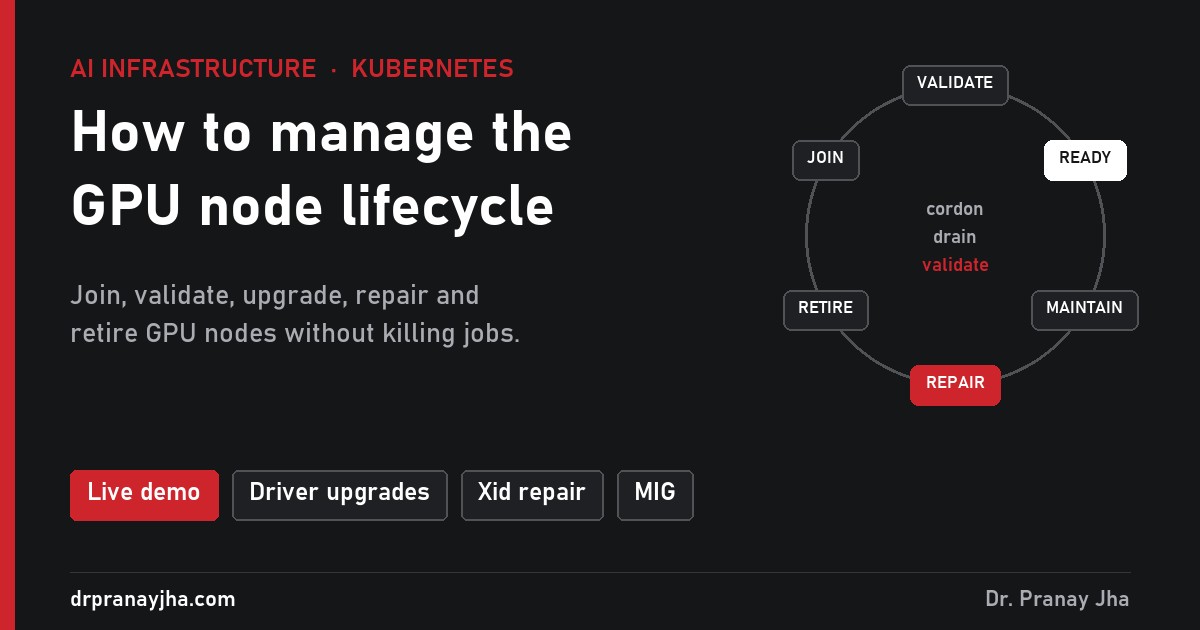
The mapSix stages of a GPU node
Every GPU node goes round the same loop. Most of its life is spent in Ready. Every maintenance task, planned or not, goes through the same three moves: cordon, drain, validate.
A repaired or upgraded node never goes straight back to Ready. It goes through validation first, the same checks a brand new node gets.
The machine joins the cluster. The GPU Operator installs the driver, device plugin and DCGM exporter, and labels the node with its GPU model and count.
Done when:nvidia.com/gpu.present=true and allocatable GPUs appear.Prove the hardware before any real job lands. Run DCGM diagnostics on each GPU and an NCCL all-reduce test across GPUs and nodes.
Done when: diagnostics pass and bandwidth matches the other nodes.Uncordoned and running work. Monitoring and logging, from parts 1 and 2, watch it all the time.
Stays here until: a planned change or a fault.Driver, firmware, OS or MIG changes. Cordon, drain without breaking jobs, change, then validate again.
Done when: validation passes and the node is uncordoned.A GPU fault. Cordon at once, drain, reset or reboot, run long diagnostics. If they fail, raise a hardware ticket.
Done when: the card passes long diagnostics, then normal validation.End of life or end of lease. Drain, remove from the cluster, and wipe local disks that held model weights or data.
Done when: the node is out of Kubernetes, monitoring and inventory.Stage 1 and 2Joining and validating a new node
With the GPU Operator installed, a new node needs almost no manual work. The operator sees an NVIDIA device and rolls out its pods. GPU Feature Discovery then adds labels such as nvidia.com/gpu.product, nvidia.com/gpu.count, nvidia.com/gpu.memory and nvidia.com/cuda.driver.major. Jobs can use these labels to pick the right hardware.
What the operator does not do is prove the hardware is good. A new node can join with a weak GPU, a bad cable or a slow NVLink, and pass every Kubernetes check. So keep new nodes away from real work until they pass a burn-in:
# keep the node out of the pool while you test it
kubectl cordon gpu-node-e

# long DCGM diagnostics on every GPU (run in a privileged pod or on the host)
dcgmi diag -r 3

# bandwidth between all GPUs on the node, compare with your other nodes
all_reduce_perf -b 8 -e 8G -f 2 -g 8

# only now open it for work
kubectl uncordon gpu-node-envidia.com/gpu=present:NoSchedule, so ordinary CPU pods never take up space on an expensive machine. Only pods that tolerate the taint and ask for nvidia.com/gpu land there.Stage 4Upgrading drivers without breaking jobs
Driver upgrades are the maintenance task you will do most often. The GPU Operator has an upgrade controller that does them one node at a time. You change the driver version in its ClusterPolicy, and the controller walks each node through a series of states, recorded in a node label:
Watch it live with kubectl get nodes -L nvidia.com/gpu-driver-upgrade-state. If a node shows upgrade-failed, it stays cordoned until you look at it.
The settings that matter sit under driver.upgradePolicy:
apiVersion: nvidia.com/v1
kind: ClusterPolicy
metadata:
  name: cluster-policy
spec:
  driver:
    version: "575.57.08"
    upgradePolicy:
      autoUpgrade: true
      maxParallelUpgrades: 1        # one node at a time
      maxUnavailable: 25%
      waitForCompletion:
        podSelector: "app=llama-finetune"   # let these jobs finish first
        timeoutSeconds: 3600
      drain:
        enable: true
        force: false
        timeoutSeconds: 600
        deleteEmptyDir: true
Firmware, OS patches and MIG changes follow the same loop: cordon, drain, change, reboot if needed, validate, uncordon. For MIG, you set a label such as nvidia.com/mig.config=all-1g.10gb and the MIG manager does the rest. Remember that a MIG node stops offering nvidia.com/gpu and offers MIG slices instead, so pods asking for whole GPUs will no longer fit there.
Make your workloads safe to drain
The upgrade controller can only be as gentle as your workloads allow. Three settings decide whether a drain is a non-event or an outage.
Stops a drain from removing the last running replica. The drain waits until a replacement is up somewhere else.
apiVersion: policy/v1
kind: PodDisruptionBudget
metadata:
  name: vllm-chat
spec:
  minAvailable: 1
  selector:
    matchLabels:
app: vllm-chatWithout this, the scheduler may pack both replicas onto one node, and draining that node takes out both. The demo shows this happening.
topologySpreadConstraints:
- maxSkew: 1
  topologyKey: kubernetes.io/hostname
  whenUnsatisfiable: DoNotSchedule
  labelSelector:
    matchLabels:
app: vllm-chatA drain sends SIGTERM. Catch it, save a checkpoint, exit. Give the pod enough grace time to finish writing.
spec:
  terminationGracePeriodSeconds: 600
  containers:
  - name: trainer
    # train.py saves a checkpoint
    # when it receives SIGTERM
Stage 5Repairing a node after a GPU fault
When a GPU fails, the device plugin removes it from the node’s allocatable count, but the node itself stays Ready. Other GPUs on it keep taking new work, and a sick node keeps failing jobs. The fix is a short, fixed routine.
DCGM_FI_DEV_XID_ERRORS > 0 from part 1, or the NVRM: Xid log line from part 2.
kubectl cordon. No new jobs land on a node you are about to work on. This can be automated: Node Problem Detector or a small controller can cordon on the alert.
Same drain as an upgrade, so checkpoints and disruption budgets still apply.
Many faults, including some Xid 79 cases, clear after a reboot.
dcgmi diag -r 3, not the quick level.
Stage 6Retiring a node
Cordon and drain
Exactly as for maintenance, so running jobs checkpoint and services keep their replicas.
Delete the node from Kubernetes
kubectl delete node gpu-node-c, then remove the machine from its node pool or autoscaler so it is not added back.Wipe local disks
GPU nodes often cache model weights, datasets and sometimes tokens on local NVMe for speed. Wipe them before the machine is returned, resold or recycled.
Clean up everything that knew about it
Monitoring targets, alert silences, inventory, the hardware ticket history, and your capacity plan. Fewer GPUs means some jobs that fit last month may now wait in the queue.
- New nodes stay cordoned until DCGM diagnostics and an NCCL test pass.
- Driver upgrades go through the GPU Operator one node at a time, never by hand on a live node.
- Every inference service has a PodDisruptionBudget and spreads its replicas across nodes.
- Training jobs save a checkpoint on SIGTERM and have enough grace time to finish writing it.
- A GPU fault cordons the node automatically, not when someone notices.
- Xid errors are tracked per GPU serial, so repeat offenders get replaced.
- Retired nodes have their local disks wiped.
Open GPU Node Lifecycle, start a rolling driver upgrade, then break a GPU on another node while it runs. Watch the upgrade controller wait, the disruption budget block an eviction and the training job resume from its checkpoint.
The full series: How to monitor GPUs in Kubernetes, How to read GPU logs in Kubernetes and this post. Hands-on practice: the AI Infrastructure Lab Workbook.
About The Author





 DrJha
DrJha