

AI Infrastructure series · Part 18 of 24
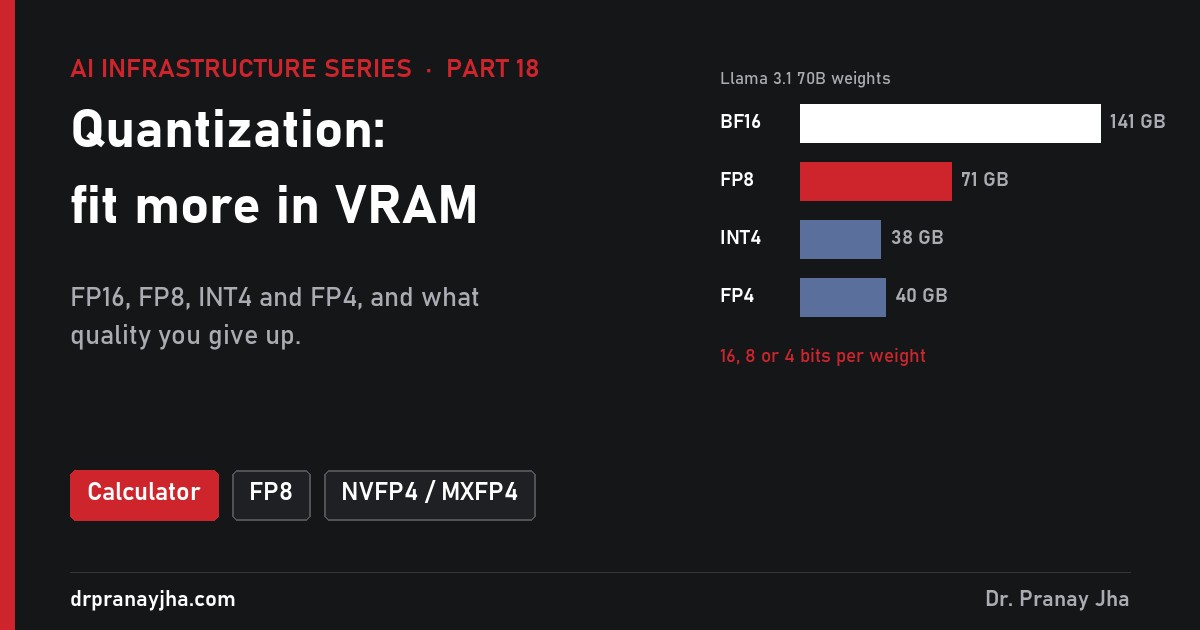
A 70-billion-parameter model in its original 16-bit form needs 141 GB just for its weights: two H100s before a single user connects. Stored in 8-bit it needs about 71 GB, and in 4-bit under 40 GB. That is quantization: keeping each weight in fewer bits. This part shows how a GPU stores a number bit by bit, works through quantizing real-looking weights by hand in INT8, INT4 and FP4, explains why outliers and block scales matter, and ends with the vLLM commands and a decision guide for FP16/BF16, FP8 and FP4.
Four tabs: check whether a model fits and how fast it decodes, type a number and see how BF16, FP8 and FP4 store it bit by bit, step through quantizing eight weights, and compare one shared scale against blocks of 16, 32 or 128.
What is quantization, and why does it matter so much?
A model is mostly weights: billions of numbers learned during training (part 9). Most models are trained and released in a 16-bit format, BF16 or FP16, so each weight takes 2 bytes. Quantization stores those same weights in fewer bits: 8 bits (1 byte) or 4 bits (half a byte). Fewer bits means fewer possible values, so every weight is rounded to the nearest value the smaller format can hold.
Three things improve at once. The weights take less memory, so a model fits on fewer or smaller GPUs (part 7). The memory freed goes to the KV cache, so more conversations fit (part 14). And decode gets faster, because generating each token means reading every active weight from memory, and fewer bytes take less time to read (part 4). The price is rounding error. The rest of this part is about where that error comes from and how to keep it small.
How does a GPU store a number?
A floating-point number has three parts, like scientific notation in binary. The sign bit says positive or negative. The exponent picks a power of two, which sets how big the number is: its range. The mantissa (also called the fraction) says where the number sits between that power of two and the next one: its precision. The value is roughly sign × 1.mantissa × 2^exponent. Every format is a trade between those two budgets. More exponent bits reach bigger and smaller numbers; more mantissa bits put the steps closer together.
Each format storing π. BF16 keeps FP32’s 8 exponent bits and drops 16 mantissa bits, so it has the same range but only about 3 significant digits. FP8 and FP4 cannot get close to π on their own; INT8 and INT4 store a whole-number code that is multiplied by a scale shared with other values (here the largest value in the block is assumed to be 4).
The table puts numbers on that trade. “Step near 1” is the gap between 1 and the next value the format can store, which is the best relative precision it offers.
| Format | Bits (S + E + M) | Largest value | Smallest normal value | Step near 1 | Used for |
|---|---|---|---|---|---|
| FP32 | 1 + 8 + 23 | 3.4 × 10^38 | 1.2 × 10^-38 | 0.00000012 | Optimizer master weights in training |
| BF16 | 1 + 8 + 7 | 3.4 × 10^38 | 1.2 × 10^-38 | 0.0078 | Training and release format |
| FP16 | 1 + 5 + 10 | 65,504 | 0.000061 | 0.00098 | Older release format, activations |
| FP8 E4M3 | 1 + 4 + 3 | 448 | 0.0156 | 0.125 | Weights and activations |
| FP8 E5M2 | 1 + 5 + 2 | 57,344 | 0.000061 | 0.25 | Gradients, some KV caches |
| FP4 E2M1 | 1 + 2 + 1 | 6 | 1 (0.5 as subnormal) | 0.5 | Blackwell 4-bit, always with block scales |
| INT8 | 8-bit integer | 127 × scale | 1 × scale | even steps | W8A8 on any modern GPU |
| INT4 | 4-bit integer | 7 × scale | 1 × scale | even steps | Weight-only 4-bit (GPTQ, AWQ) |
Two things stand out. First, FP8 E4M3 can only reach 448, and FP4 only 6. Real weights are small numbers, mostly well under 1, but activations can be in the hundreds. So low-bit formats always come with a scale factor: the values are divided by a scale before rounding, so they land inside the format’s range, and multiplied by it again when used. Second, integers and floats spread their values differently. INT4 has 15 evenly spaced levels. FP4 E2M1 has 15 values packed closely near zero and spread out towards 6. Trained weights follow roughly a bell curve, with most values near zero and a few large ones, so FP4’s spacing matches them better.
FP4 E2M1 against INT4 with the same maximum. FP4 spends its values where weights are dense (steps of 0.5 near zero) and accepts big gaps (4 to 6) where few weights live. INT4 uses the same step everywhere.
How does quantization work, step by step?
The simplest method is called absmax (or round-to-nearest) quantization, and every other method builds on it. It works on a group of weights at a time:
Find the largest absolute value in the group, the absmax. This is the number that must still fit after rounding.
Work out the scale: absmax divided by the largest code the format can hold. That is 127 for INT8, 7 for INT4, 6 for FP4 and 448 for FP8 E4M3.
Divide every weight by the scale and round to the nearest value the format can store. This gives the stored codes.
Store the codes plus the scale. The scale is kept in higher precision (FP16, FP32 or FP8, depending on the format).
At run time, multiply each code by the scale (dequantize) to get back an approximation of the original weight. The difference is the quantization error.
The animation shows the same flow for one block of 16 weights in NVFP4, split between what happens once (when someone quantizes the model) and what happens for every token while it is served.
Quantizing and serving one NVFP4 block. Real NVFP4 also keeps one FP32 scale for the whole tensor; it is left out to keep the numbers simple. On GPUs without FP4 tensor cores, step 8 runs in BF16, so you keep the memory saving but not the faster maths.
A worked example in INT8, INT4 and FP4
Take eight weights from one row of a layer: 0.12, -0.45, 0.03, 0.88, -0.27, 0.51, -0.09 and 0.34. The absmax is 0.88. The three scales are 0.88 ÷ 127 = 0.00693 for INT8, 0.88 ÷ 7 = 0.1257 for INT4 and 0.88 ÷ 6 = 0.1467 for FP4. Divide, round, multiply back:
| Weight | INT8 code | INT8 back | INT4 code | INT4 back | FP4 (w ÷ s) | FP4 value | FP4 back |
|---|---|---|---|---|---|---|---|
| 0.12 | 17 | 0.1178 | 1 | 0.1257 | 0.82 | 1.0 | 0.1467 |
| -0.45 | -65 | -0.4504 | -4 | -0.5029 | -3.07 | -3.0 | -0.4400 |
| 0.03 | 4 | 0.0277 | 0 | 0.0000 | 0.20 | 0 | 0.0000 |
| 0.88 | 127 | 0.8800 | 7 | 0.8800 | 6.00 | 6.0 | 0.8800 |
| -0.27 | -39 | -0.2702 | -2 | -0.2514 | -1.84 | -2.0 | -0.2933 |
| 0.51 | 74 | 0.5128 | 4 | 0.5029 | 3.48 | 3.0 | 0.4400 |
| -0.09 | -13 | -0.0901 | -1 | -0.1257 | -0.61 | -0.5 | -0.0733 |
| 0.34 | 49 | 0.3395 | 3 | 0.3771 | 2.32 | 2.0 | 0.2933 |
| Average error | 0.0011 (about 0.3% of the weights’ average size of 0.34) | 0.0234 (about 7%) | 0.0279 (about 8%) | ||||
INT8 has 255 levels, so every weight lands within 0.003 of where it started. INT4 has only 15, and 0.03 rounds to zero. FP4 does a little worse than INT4 on this particular set, because its gaps widen away from zero: 0.51 falls between the stored values 0.44 and 0.59 and loses 0.07. On a full layer, with thousands of weights clustered near zero, FP4’s spacing usually helps; on eight hand-picked numbers it can go either way. Every error in a layer is small, but a model has billions of them, and they add up through 80 layers. That is why the method used to pick the rounding matters so much at 4 bits, and much less at 8.
Why do outliers hurt, and how do block scales fix them?
The weakness of absmax is that one large value sets the scale for everyone. Large language models are known for this: Dettmers and colleagues, in the LLM.int8() paper, found that from about 6.7 billion parameters, a few hidden dimensions carry values far larger than the rest. If one weight in a group is 1.6 and the others are around ±0.1, the INT4 scale becomes 1.6 ÷ 7 = 0.229, and every weight smaller than half of that, 0.114, rounds to zero.
Illustrative: 32 weights drawn from a bell curve with one outlier (1.6, drawn cut off), quantized to INT4 with absmax scaling. Grey bars are the originals, red dots the stored values, pink lines the levels available. With one scale, most weights collapse to zero. With a scale per 16 weights, the outlier only damages its own block.
The fix is to give small groups of weights their own scale. This is called group-wise or block scaling. The cost is storage: each block needs its scale, so the real size per weight grows. With a 16-bit scale per 128 weights, INT4 costs 4 + 16 ÷ 128 = 4.125 bits per weight; per 32 weights it is 4.5 bits. The benefit, for the same 32 weights, looks like this:
Average absolute error for the 32 illustrative weights above, INT4 absmax per block.
The two FP4 formats on Blackwell build this idea into the hardware. Both use the same 4-bit E2M1 values; they differ in block size and in what the scale can be.
Memory layout for 32 values. NVFP4 pays slightly more storage for smaller blocks and a scale that can take fractional values. MXFP4’s power-of-two scale is cheaper to apply in hardware but wastes part of FP4’s range in most blocks.
NVFP4’s finer scale and smaller blocks are designed to keep more accuracy than MXFP4 at almost the same size. MXFP4 is an open standard from the Open Compute Project, supported beyond NVIDIA, and it is the format OpenAI chose for the expert weights of gpt-oss: that is how the 117-billion-parameter gpt-oss-120b fits on one 80 GB GPU.
What can you quantize: weights, activations or the KV cache?
Three different things in GPU memory can be stored in fewer bits, and each one speeds up a different part of serving. Recall from part 13 that prefill (reading the prompt) is limited by compute, and decode (one token at a time) is limited by memory bandwidth.
What sits in GPU memory (HBM) and what the streaming multiprocessors compute with, for each kind of quantization. Bar widths show bytes per value. The three can be combined: FP8 weights and activations with an FP8 KV cache is a common production setting.
| Scheme | What is stored small | Maths runs in | Memory saved | Speeds up | GPUs |
|---|---|---|---|---|---|
| W4A16 (GPTQ, AWQ) | Weights, 4 bits | BF16 | about 3.7× on weights | Decode at small batch | Any recent NVIDIA GPU |
| W8A16 | Weights, 8 bits | BF16 | 2× on weights | Decode | Any; how FP8 checkpoints run on Ampere |
| W8A8 INT8 | Weights and activations | INT8 | 2× on weights | Decode and prefill | Ampere and newer |
| W8A8 FP8 | Weights and activations | FP8 | 2× on weights | Decode and prefill | Ada, Hopper, Blackwell |
| NVFP4 / MXFP4 (W4A4) | Weights and activations | FP4 | about 3.6× on weights | Decode and prefill | Blackwell |
| FP8 KV cache | Keys and values | attention in 16-bit or FP8 | 2× on KV cache | Long context, batch size | Ada, Hopper, Blackwell |
Why does weight-only 4-bit not speed up prefill? In prefill the GPU multiplies the weights by thousands of prompt tokens at once, so it does many calculations per byte read and the limit is tensor-core speed, not memory. W4A16 still does the maths in BF16, at BF16 speed, plus the extra work of unpacking. At large batch sizes it can even be slightly slower than FP8. W8A8 and W4A4 change the maths itself, which is why they help both phases.
How much memory and speed do you gain?
Start with memory. The table uses the makers’ published parameter counts, and includes the block scales for 4-bit formats (INT4 with group scales and MXFP4 about 4.25 bits per weight, NVFP4 about 4.5). Real checkpoints keep a few layers, such as embeddings and the output layer, in 16-bit, so files come out slightly larger.
| Model | Parameters | BF16 | FP8 / INT8 | INT4 / MXFP4 | NVFP4 |
|---|---|---|---|---|---|
| Llama 3.1 8B | 8.03B | 16.1 GB | 8.0 GB | 4.3 GB | 4.5 GB |
| Llama 3.1 70B | 70.6B | 141 GB | 71 GB | 37.5 GB | 39.7 GB |
| gpt-oss-120b (MoE) | 117B (5.1B active) | 234 GB | 117 GB | 62 GB | 66 GB |
| Llama 3.1 405B | 405B | 810 GB | 405 GB | 215 GB | 228 GB |
| DeepSeek-V3 (MoE) | 671B (37B active) | 1,342 GB | 671 GB | 356 GB | 377 GB |
That memory turns straight into users. Take Llama 3.1 70B, with its KV cache of 320 KB per token in 16-bit, and conversations of 8,000 tokens (2.6 GB each). Keep 10% of each GPU free, so an H100 offers 72 GB:
Illustrative: conversations that fit at once, from memory alone. Real engines also reserve memory for activations and CUDA graphs.
Why do fewer bytes make decode faster? A worked calculation
For one user, generating one token means reading every weight once. The time cannot be shorter than bytes ÷ memory bandwidth. For Llama 3.1 8B on one H100 (3.35 TB/s):
BF16: 16.1 GB ÷ 3,350 GB/s = 4.8 ms per token, a ceiling of 208 tokens per second.
FP8: 8.0 GB ÷ 3,350 GB/s = 2.4 ms per token, a ceiling of 417 tokens per second.
INT4 with group scales: 4.3 GB ÷ 3,350 GB/s = 1.27 ms per token, a ceiling of 785 tokens per second.
Real kernels reach part of peak bandwidth. At an assumed 70%, that is about 146, 292 and 549 tokens per second.
Illustrative upper bounds for one user, Llama 3.1 8B on one H100, 70% of peak bandwidth, KV cache reads ignored.
The same sum explains a useful result for the 70B model. BF16 on two H100s reads 141 GB at 6.7 TB/s combined: 21 ms per token. FP8 on one H100 reads 71 GB at 3.35 TB/s: also 21 ms. FP8 gives the same single-user speed on half the GPUs. The gain shrinks as batches grow, because many users share each weight read and the KV cache becomes a larger share of the traffic, which is where an FP8 KV cache helps.
Which GPUs support which formats?
Any GPU can store weights in any format; the question is whether its tensor cores can do the maths in that format. If not, the engine unpacks the weights to 16-bit inside the kernel. You still save memory and decode bandwidth, but not compute.
| Generation | Examples | INT8 maths | FP8 maths | FP4 maths | Good default |
|---|---|---|---|---|---|
| Ampere | A100, A10 | Yes | No (FP8 runs as W8A16) | No | W4A16 or W8A8 INT8 |
| Ada Lovelace | L40S, L4, RTX 4090 | Yes | Yes (E4M3, E5M2) | No | FP8 W8A8, FP8 KV |
| Hopper | H100, H200 | Yes | Yes | No | FP8 W8A8, FP8 KV |
| Blackwell | B200, GB200 | Yes | Yes | Yes (NVFP4, MXFP4) | FP8, then test NVFP4 |
Peak dense rates show what native support buys: an A100 does 312 TFLOPS in BF16 and 624 TOPS in INT8; an H100 989 TFLOPS in BF16 and 1,979 in FP8; an L40S 733 in FP8. vLLM’s documentation puts the FP8 W8A8 requirement at compute capability 8.9 or higher, which means Ada and newer.
How do you keep the quality?
FP8 with a scale per tensor or per channel is usually close to lossless and needs no special method. At 4 bits, and for INT8 activations, simple rounding loses too much, so several methods choose the rounding more carefully. Most need a small calibration set: a few hundred sample prompts, run through the model so the tool can see real activation values.
| Method | What it does | Needs | Typical use |
|---|---|---|---|
| Round to nearest | Absmax scale, round each value; the baseline | Nothing | FP8 weights, quick tests |
| Calibration | Records activation ranges on sample prompts to fix static scales | A few hundred prompts | W8A8 static scales, FP8 KV scales |
| GPTQ | Quantizes one column at a time and adjusts the remaining weights to cancel the error, using second-order information; the paper quantized 175B-parameter models in about four GPU hours | Calibration data | W4A16, W8A8 INT8 |
| AWQ | Finds the small share of weight channels (about 1%) that meet large activations and scales them up before rounding so they keep precision | Calibration data | W4A16 |
| SmoothQuant | Moves outliers from activations into the weights with a per-channel scale, so both fit in 8 bits | Calibration data | W8A8 INT8 |
| Quantization-aware training | Trains or fine-tunes with simulated rounding so the model learns to cope | A training run | Best 4-bit quality |
How do you know it worked? Compare the quantized model against the 16-bit original, not against impressions from a few chats.
- Standard benchmarks. Run the same tasks on both, for example with lm-evaluation-harness against a vLLM endpoint. Maths (GSM8K) and code tend to show 4-bit damage first; general knowledge (MMLU) last.
- Your own prompts. Fifty to a few hundred real prompts with known good answers, scored the same way for both versions.
- Long inputs. Errors build up over long contexts and long reasoning chains; test the longest documents you will serve.
- Speed, too. Measure tokens per second and time to first token at your real batch size; a format your GPU cannot compute natively may save memory and lose speed.
How do you run a quantized model in practice?
The easiest route is a checkpoint someone has already quantized and tested. vLLM reads the quantization settings from the model’s config file, so nothing extra is needed:
# FP8 weights and activations, scales already in the checkpoint
vllm serve RedHatAI/Meta-Llama-3.1-8B-Instruct-FP8

# 4-bit weight-only (W4A16): 70B on one 80 GB GPU
vllm serve RedHatAI/Meta-Llama-3.1-70B-Instruct-quantized.w4a16 \
  --max-model-len 16384

# Add an FP8 KV cache to any of these: twice the tokens fit
vllm serve RedHatAI/Meta-Llama-3.1-8B-Instruct-FP8 --kv-cache-dtype fp8

# No quantized copy available: convert BF16 weights to FP8 at load time
vllm serve meta-llama/Llama-3.1-8B-Instruct --quantization fp8
The last option is the quickest to try. Recent vLLM releases also list it as fp8_per_tensor; it uses one scale per tensor and computes activation scales on the fly. At start-up, the log line that reports model loading shows how many GiB the weights take: around 8.5 for the FP8 8B model instead of about 15 in BF16. A bit later, the line about the KV cache shows how many tokens fit, which is the number that should roughly double when you add --kv-cache-dtype fp8.
To make your own calibrated copy, LLM Compressor (part of the vLLM project) applies a recipe to a Hugging Face model and saves a checkpoint vLLM can load. A full walk-through with a Granite model is in this LLM Compressor post. The shape of it:
from transformers import AutoModelForCausalLM, AutoTokenizer
from llmcompressor import oneshot
from llmcompressor.modifiers.quantization import QuantizationModifier

model_id = "meta-llama/Llama-3.1-8B-Instruct"
model = AutoModelForCausalLM.from_pretrained(model_id, device_map="auto", dtype="auto")
tok = AutoTokenizer.from_pretrained(model_id)

# FP8 weights, dynamic FP8 activations; keep the output layer in 16-bit
recipe = QuantizationModifier(targets="Linear", scheme="FP8_DYNAMIC", ignore=["lm_head"])
oneshot(model=model, recipe=recipe)

model.save_pretrained("Llama-3.1-8B-Instruct-FP8")
tok.save_pretrained("Llama-3.1-8B-Instruct-FP8")
FP8 dynamic needs no calibration data. For 4-bit, swap the modifier for GPTQModifier with scheme="W4A16", or use the NVFP4 scheme for Blackwell, and pass a calibration dataset to oneshot. Then evaluate as above before the copy goes anywhere near users.
Which format should you choose?
A starting point, not a rule. Whatever the route, the last step is the same: compare against the 16-bit original on your own tasks.
For MoE models (part 12), quantization shrinks every expert, including the ones that sit idle for most tokens, so it is often what makes a large MoE model fit at all. DeepSeek-V3 was trained largely in FP8, and gpt-oss ships its experts in MXFP4: for these models the low-bit format is the original, not a copy.
Common mistakes
- Counting only the weights. A model that “fits” with 1 GB left over serves one short conversation. Size for weights plus the KV cache your users need (part 20 does the full sum).
- Expecting FP4 speed on a GPU without FP4 tensor cores. NVFP4 on an H100 is unpacked to 16-bit for the maths. You keep the memory saving and lose the compute gain.
- Expecting W4A16 to speed up long prompts. It helps decode; prefill still runs in BF16.
- Judging quality by chatting with it. 4-bit damage shows first in maths, code and long reasoning, which casual chat does not exercise.
- Quantizing everything. Tools leave the output layer (and often embeddings) in 16-bit for a reason; forcing them low saves little and costs accuracy.
- Thinking 4 bits means 4 bits. Block scales add 0.125 to 0.5 bits per weight; NVFP4 is about 4.5.
Questions people ask about quantization
Is FP8 really as good as BF16?
For most large models, close enough that benchmarks barely move, which is why it is the usual production format on Hopper and Ada. Still compare on your own tasks before switching.
Should I use INT4 or FP4?
On Blackwell, NVFP4, because the tensor cores compute in it directly. On older GPUs, INT4 weight-only (GPTQ or AWQ) has the most mature kernels; FP4 weights would be unpacked anyway.
Does quantization change what the model knows?
No new knowledge is added or removed on purpose, but every weight moves slightly. At 8 bits the effect is usually tiny; at 4 bits and below, rare facts and long reasoning chains are the first to suffer.
Can I fine-tune a quantized model?
Yes, with adapters. QLoRA keeps a 4-bit base frozen and trains small 16-bit adapters on top, which is the subject of part 19.
Is a bigger quantized model better than a smaller full-precision one?
Often, for the same memory: a well-quantized 70B model at about 40 GB usually beats an 8B model in 16-bit at 16 GB, and many teams pick that trade. Measure it for your tasks.
- Weights = parameters × bits ÷ 8, plus block scales and a few 16-bit layers.
- Match the format to the GPU: FP8 maths needs Ada, Hopper or newer; FP4 maths needs Blackwell.
- Prefer models already published in FP8 or 4-bit by their makers or a trusted team.
- Use block scales at 4 bits; one scale per tensor lets outliers wipe out small weights.
- Quantize the KV cache too when memory for users is the limit.
- Test quality against the 16-bit original on your own prompts, especially maths, code and long documents.
Sources: number-format layouts from IEEE 754 (FP32, FP16), the BF16 definition and the OCP 8-bit floating point (FP8) and Microscaling (MX) specifications; NVFP4 block size and scales from NVIDIA’s documentation. GPU rates from NVIDIA’s A100, H100 SXM and L40S specifications (dense). FP8 compute-capability requirement and FP8 KV cache options from the vLLM documentation; LLM Compressor recipe from its documentation. Outlier features from Dettmers et al., LLM.int8(); GPTQ from Frantar et al.; AWQ from Lin et al.; SmoothQuant from Xiao et al. gpt-oss parameter counts and MXFP4 release from OpenAI’s model card; DeepSeek-V3’s FP8 training from its technical report. Worked examples, user counts and speeds are illustrative calculations, not measurements.
About The Author




 DrJha