

TL;DR · Key Takeaways
- The VCF 9 hierarchy is Fleet, then Instance, then Domain (management and workload), then vSphere cluster. Learn it in that order.
- A fleet is the shared-services and governance boundary, not a single shared vCenter. VCF Operations and VCF Automation live at the fleet level.
- An instance is a discrete SDDC footprint. A domain is the lifecycle and blast-radius unit.
- A new management domain needs 4 hosts. Converge needs 3 vSAN-ready or 2 with external storage. Import matches that lower floor.
- Schedule change windows at the domain and fleet-services levels, not at the vCenter level.
Most VCF 9 design mistakes I see are not technical, they are vocabulary. Someone draws a fleet on the whiteboard, calls it an instance, then plans change windows as if a vCenter were the unit of isolation. The new hierarchy is genuinely different from VCF 5.x, and getting the four words right (fleet, instance, domain, cluster) is what keeps your design and your maintenance plan honest.
Hierarchy from top to bottom
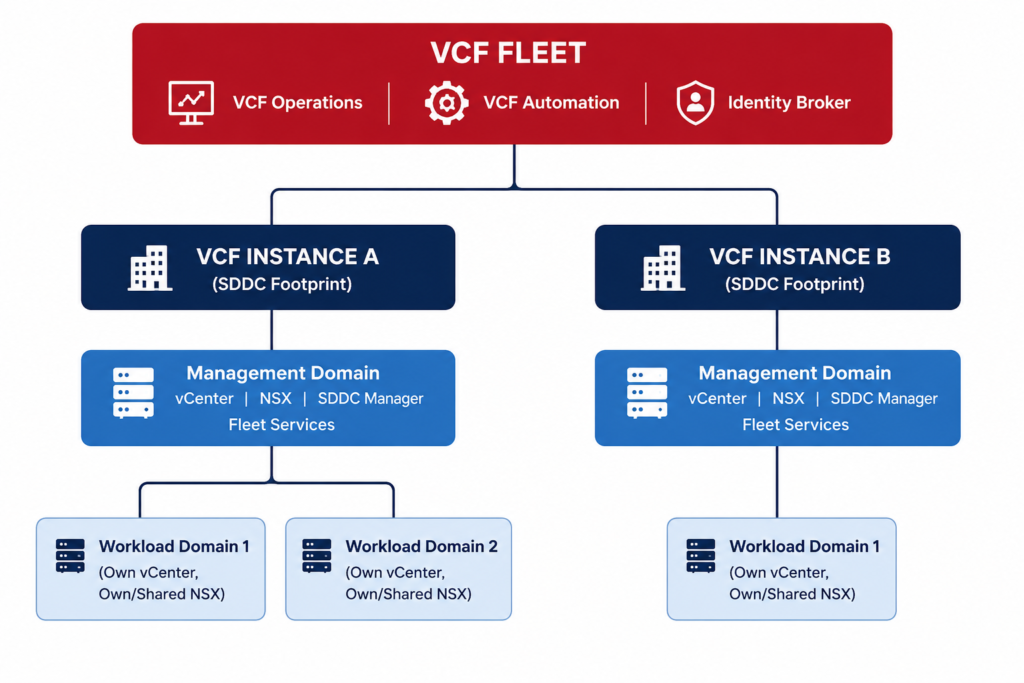
Read it as nesting, not as synonyms. The fleet is the outermost boundary. Inside it sit one or more instances. Each instance contains exactly one management domain and zero or more workload domains. Each domain contains one or more vSphere clusters. Private cloud is the program label on top, but fleet, instance, and domain are what you actually operate.
| Term | What it is | Blast radius if it fails |
|---|---|---|
| Fleet | Shared services and governance boundary | Visibility, automation and lifecycle across every instance |
| Instance | A discrete SDDC footprint, own vCenter, NSX and SDDC Manager | Instance level lifecycle |
| Management domain | Required domain, hosts management, plus fleet services on the first instance | Instance lifecycle, and fleet services if it is the first instance |
| Workload domain | Lifecycle and isolation unit for tenant workloads | Tenant workloads directly |
| vSphere cluster | Compute and storage unit inside a domain | Only that cluster |
Fleet is shared services, not a shared vCenter
This is the one people get wrong. A fleet is the scope for the shared, fleet-level components: VCF Operations, VCF Operations fleet management, VCF Automation, and the VCF Identity Broker that backs VCF SSO. It is a governance and shared-services boundary, not a single pane of vCenter. The first instance you deploy hosts those fleet services in its management domain. Add a second instance and it joins the same fleet, consuming the same Operations and Automation rather than running its own. That is the mechanism behind the single-private-cloud experience introduced in Part 1.
Instance versus domain
An instance is a discrete SDDC footprint: its own management domain plus workload domains, each with their own vCenter, NSX, and SDDC Manager. An instance is not a tenant boundary by default. The domain is where isolation actually lives. A workload domain commonly carries its own vCenter, its own vCenter SSO domain, and NSX that you can choose to dedicate or share. The domain is your lifecycle unit and your blast radius. When you reason about what breaks when, reason at the domain level.
That failure model is worth teaching the whole team. A fleet-services outage costs you visibility, governance, automation, and lifecycle workflows. It does not delete vCenters or power off ESX hosts. An instance or management-domain outage costs instance-level lifecycle. A workload-domain outage is the layer that actually touches tenant workloads. Three very different blast radiuses, three different change-control conversations.
The most expensive version of this I watched play out was a scheduling mistake, not a technical one. A team booked a management domain upgrade as a routine vCenter change window and told app owners there was no workload impact. They were right about the VMs, nothing powered off. What they missed is that this was the first instance in the fleet, so the same window took fleet Operations and Automation down for about three hours mid change. Every self service request across two other instances that shared those services simply stopped. Nobody lost a VM, everybody lost their provisioning pipeline, and the change review afterward ran longer than the upgrade itself. The habit that came out of it is simple: label the window by the layer it touches, not by the appliance you happen to click.
A practical rule falls out of all this. Before any maintenance, write down which of the four layers you are touching and who feels it. Fleet services maintenance freezes provisioning and observability but leaves workloads running. Management domain maintenance affects instance lifecycle and, on the first instance, the fleet services with it. Workload domain maintenance is the only layer that reaches tenant workloads directly. If your change record names the appliance instead of the layer, rewrite it before you submit.
Host counts and how instances are born
A new VCF 9 management cluster requires 4 hosts, on vSAN, NFS, or VMFS on FC. The four-host floor exists so a host can enter maintenance mode without breaking vSAN quorum. Two of the brownfield pathways are more forgiving: converging an existing vCenter needs 3 vSAN-ready nodes or 2 hosts on external storage, and importing a vCenter as a workload domain has the same lower minimum. There are four ways to bring an instance into being: deploy a new instance as a new fleet, expand an existing fleet with another instance, converge a non-VCF vCenter into a management cluster, or import a vCenter as a workload domain. We cover choosing between them in the adoption-paths decision guide.
One convergence caveat shapes a lot of designs: an existing vCenter with NSX already installed is not supported for converging to a management domain on 9.0.0, where NSX is freshly deployed during conversion. That single rule pushes many brownfield NSX shops toward the import path instead.
Single fleet or many
A fleet can be one instance or many. The instinct is to build one fleet to rule everything, because shared Operations and Automation are convenient. Resist that instinct when you have regulated business units or hard isolation requirements. A single shared fleet-services layer is a single shared dependency for your entire program’s provisioning and governance. If you need real separation, stand up a second fleet up front. Retrofitting SSO and identity separation after the fact is the genuinely painful design change to unwind, and detailed sizing of the management domain that carries those services is covered in the reference architecture deep-dive.
Identity and SSO are a fleet decision
The fleet boundary is also your identity boundary, and that is the part people underweight at design time. The VCF Identity Broker backs VCF SSO at the fleet level, which means the authentication and authorization story is shared across every instance in the fleet. Workload domains can still carry their own vCenter SSO domain, so there is isolation below the fleet, but the fleet-wide identity plane is a single shared dependency. If two business units need genuinely separate identity, audit, and governance, that is the strongest argument for a second fleet rather than a second instance. Splitting identity after the fact, once provisioning and RBAC are wired through a shared broker, is the design change I least like to do under a deadline.
VCF 9.0 component set, named
It helps to know exactly what a VCF 9.0 instance is made of, because the names appear throughout the consoles and the release notes. At GA the stack is vCenter, ESX, NSX, SDDC Manager, VCF Operations with its Operations Fleet Management and Operations Collector, VCF Automation, and the VCF Identity Broker, all carrying 9.0.0.0 component versions. The single instances in a management domain are vCenter, SDDC Manager, the Fleet Manager, and the Operations Collector. The components you cluster for HA are NSX Manager, VCF Operations, VCF Automation, and Operations for Logs, each as a three-node set. Keeping that inventory straight is what lets you reason about which failures touch which layer, which is the whole point of learning the hierarchy in the first place.
Why the consolidated label faded
If you came from VCF 5.x you will reach for the consolidated and standard architecture terms. VCF 9 leans on the domain model instead and dropped the consolidated label because it caused confusion. The supported topology is now described two ways: combine management and workload in a single cluster, or separate them into a management domain plus workload domains. The substance is unchanged, a small or constrained environment can still collapse everything into one cluster with resource pools, but the framing moved to the domain. When you write a customer design, describe what the clusters and domains do rather than reaching for the old label, and confirm any terminology against the current design guide so your deliverable matches the console the customer will actually see.
Where teams get the vocabulary wrong
Three naming mistakes account for most of the confusion I see in design reviews. The first is calling an instance a fleet. People draw one box, label it the fleet, and forget that the fleet is the shared services layer that can span several instances. When they later add a second site they discover it should have joined the existing fleet, not started a new one, and the identity plane is already wired the wrong way.
The second is treating a workload domain as a tenant boundary. A domain gives you a lifecycle and blast radius boundary, and it can carry its own vCenter SSO domain, but it is not automatic multi tenancy. If two business units must not see each other, that is a design decision about identity and governance, not a side effect of putting them in separate domains.
The third is scheduling change control at the vCenter level. In VCF 9 the meaningful units are the domain and the fleet services layer, not the vCenter appliance. Book your windows against those, describe the blast radius in the change record, and the review will go faster because the reviewer can see exactly who is affected.
The vocabulary confusion that cost me a design review was treating instance and domain as the same word. Someone on the team had drawn four workload domains and called them four instances, and finance had budgeted fleet services four times over because they assumed each one carried its own Operations and Automation. We caught it on the whiteboard when the appliance count refused to add up, but not before the wrong figure had already reached a slide. Get instance and domain straight before anyone counts appliances, because the two words drive completely different footprints and the mistake hides inside a diagram that looks perfectly reasonable.
How to whiteboard a VCF 9 design
Whiteboard the fleet, instances, and domains explicitly before you size a single host, and label every change window with the layer it touches. The most expensive mistake is conflating fleet and instance, then scheduling maintenance at the vCenter level, because you end up underestimating both the blast radius and the shared-dependency risk. For regulated tenants, pay the second-fleet tax now. For everyone else, one fleet with cleanly separated workload domains is the pragmatic default. Which layer in your design carries the most shared risk today, and is that on purpose?
References
- VCF Blog: Deployment Pathways for VMware Cloud Foundation 9
- Broadcom TechDocs: Building Your Private Cloud Infrastructure (VCF 9)
- VCF Blog: Planning a Successful VCF 9.0 Deployment
About The Author







 DrJha
DrJha