

Home Lab · Kubernetes · Generative AI · Platform Engineering
I run several small AI applications for real users. They live on free hosting, they work, and I have never seen their infrastructure. This is the blueprint for rebuilding all of it on one 20 GB laptop, layer by layer, with a free open-source tool at every layer, so I can learn how a production platform is actually put together: cluster, delivery, security, observability, AI serving, backup and cost. Beside every open-source pick there is a drop-down of the enterprise products that do the same job, so the lab maps directly onto what customers buy. A build log at the end records what actually happened as each phase lands.
My applications are DrJhaGPT Pro (a technical-training studio grounded in my own articles), the Neevalay educator and parent bots, and a few smaller tools. They are Streamlit apps written in Python. They run on Streamlit Community Cloud, keep their data in Supabase, and get their model answers from Groq. Total monthly cost: zero. Total visibility into the platform underneath: also zero.
That is fine for a hobby. It is not fine if you want to understand how an enterprise runs the same thing, because an enterprise does not have a “Deploy” button. It has a cluster, a pipeline, a registry, an identity provider, a secrets vault, a policy engine, three kinds of telemetry, a backup schedule and a bill. I want to build all of that at home, break it, fix it, and then be able to draw it for a customer.
Step 0 · HardwareWhat one laptop can actually do
Before choosing tools, the honest inventory. Everything below was read from the machine with two PowerShell commands (Get-ComputerInfo and Get-CimInstance Win32_VideoController).
| Spec | This laptop | What it means for the lab |
|---|---|---|
| CPU | Intel i5-1155G7, 4 cores / 8 threads | Give the Linux side 6 threads. I will run one phase’s stack at a time, not everything at once. |
| RAM | 20 GB | 12 GB to Linux, 8 GB stays with Windows. Everything below fits in 12 GB only if stacks not being studied are scaled to zero. |
| GPU | Intel Iris Xe (shared memory) | No usable GPU. Local models run on CPU at 2 to 4 tokens per second. Groq and Gemini remain the fast tier, reached through the same gateway. |
| Disk | 459 GB, 111 GB free | Tight. Images, models and replicated volumes want 60 to 80 GB. Free up to 150 GB before the AI phase. |
| OS | Windows 11 Home, WSL2 present | Home edition has no Hyper-V manager, but WSL2 is a full Linux VM and that is all we need. |

Memory cap lives in one file, C:Users<you>.wslconfig. On a small machine the “experimental” line matters: it hands idle RAM back to Windows. (Older guides also set sparseVhd=true; WSL 2.7 disabled that because of a corruption risk, so leave it out.)
[wsl2]
memory=12GB
processors=6
swap=4GB
localhostForwarding=true

[experimental]
autoMemoryReclaim=gradualLayoutWhere everything sits
Why k3d and not minikube or Docker Desktop’s built-in Kubernetes: k3d runs the lightweight k3s distribution as Docker containers, one per node, so you get a real multi-node cluster. That is what lets you practise draining a node, replicating storage across nodes and spreading pods with anti-affinity. A full rebuild is one command and about ninety seconds.
Layer mapEvery layer: what I have today, the free pick, and the enterprise equivalent
This table is why I wrote the post. Groups follow my Kubernetes Stack Builder, so each row is one question a platform team has to answer. Column two is the truth about today. Column three is what goes into the lab, all free and open source. Column four is a drop-down: pick any product a customer might name and the line underneath tells you where it fits and what it replaces.
Reading the drop-downs: the first entry in each list is the one I would name first in a VMware or Nutanix shop; the rest are the usual alternatives in Red Hat, SUSE and public-cloud estates. “Same” in the enterprise column means the open-source tool is what enterprises actually run, often with a paid support contract.
| Layer | Current (today) | Open source, no cost (the lab) | Enterprise version |
|---|---|---|---|
| Foundation where the cluster runs | |||
| Host / hypervisor | None of mine. Streamlit Community Cloud runs the app on its own servers. | WSL2 Ubuntu 24.04 + Docker EngineA full Linux VM inside Windows 11 Home; Docker Desktop’s engine or a native install. | |
| Kubernetes distribution | None. Streamlit Cloud hides the runtime completely. | k3d (k3s in Docker), 1 server + 2 agentskind is the vanilla-upstream alternative; k3s is what runs on the edge for real. | |
| Operator console / CLI | Streamlit Cloud dashboard, GitHub web UI. | kubectl, helm, k9s, kustomizek9s is the day-2 console; learn to live in it. | |
| Cluster plumbing traffic, names, certificates, disks, network | |||
| Ingress / load balancer | Streamlit Cloud’s front door; I never see it. | Traefik (ships with k3s), later ingress-nginxInstall both once to learn why they differ. | |
| DNS and hostnames | A public *.streamlit.app name plus a wrapper page on my domain. |
sslip.io wildcard namesargocd.127.0.0.1.sslip.io resolves with zero configuration. |
|
| TLS certificates | Streamlit and Hostinger issue them; I have never held one. | cert-manager with my own CA issuerImport the CA into Windows once; every lab URL gets a green lock. | |
| Persistent storage | Supabase Postgres and its storage bucket, both cloud. | local-path (built in), then LonghornLonghorn gives replicated volumes, snapshots and backup to S3. | |
| Container network (CNI) | Invisible. | Cilium (replacing flannel)eBPF networking, NetworkPolicy and Hubble flow visibility. | |
| Security & policy who, what secrets, which rules | |||
| Identity / SSO (OIDC) | Supabase Auth plus my own role tables; one login per app. | KeycloakArgo CD, Grafana, Gitea, Open WebUI and the apps all log in through it. | |
| Secrets management | Streamlit Cloud’s secrets box and a local .env file. |
OpenBao + External Secrets OperatorSealed Secrets is the simpler first step. | |
| Admission policy | None. Anything could be deployed. | Kyverno“No untagged images”, “no root containers”, “resource limits required”. | |
| Image scanning (supply chain) | None. Streamlit builds the image; I never scan it. | Trivy in CI + Trivy Operator in-clusterHarbor bundles Trivy if you want the enterprise registry feel. | |
| Runtime threat detection | None. | FalcoAlerts when a pod spawns a shell or touches /etc/shadow. | |
| Code and secret scanning | None in the pipeline (GitHub’s basic push protection only). | Gitleaks + Semgrep as pipeline stepsFail the build if an API key is committed. | |
| Posture and benchmarks | None. | kube-bench + PolarisA CIS score for your own cluster, then fix the findings. | |
| Delivery from a git push to a running pod | |||
| Git and CI | GitHub + GitHub Actions (a nightly index refresh). | Gitea with Actions runnerGitHub-Actions-compatible workflows, one small container. | |
| Container registry | None. Streamlit Cloud builds and keeps the image. | Gitea registry, then HarborHarbor adds scanning, signing, replication and quotas. | |
| GitOps | None. A push to main deploys straight to production. |
Argo CD (app-of-apps)Spine of the lab. Every other row is a folder it syncs. | |
| Progressive delivery | None. Every deploy is all-or-nothing. | Argo RolloutsCanary 10% of users, watch the error rate, promote or roll back. | |
| Packaging | A requirements.txt; no image, no chart. |
Helm chart per app + Kustomize overlaysOne chart, three values files: lab, staging, prod. | |
| Dependency updates | Manual, when I remember. | RenovateOpens a pull request when a chart or base image bumps. | |
| Operate see it, alert on it, back it up, pay for it | |||
| Metrics and alerting | None. I find out from users. | kube-prometheus-stack (Prometheus, Grafana, Alertmanager)Two-day retention keeps it under 1.5 GB. | |
| Logs | Streamlit Cloud’s log tail, gone on restart. | Loki + Alloy collectorSingle-binary mode; query with the same Grafana. | |
| Traces | None. | Tempo + OpenTelemetry CollectorInstrument one Streamlit request end to end. | |
| LLM observability | None. I do not know which prompts cost what. | LangfusePrompts, tokens, latency and cost per user and per tool. | |
| Backup and DR | Supabase’s daily backup; I have never restored one. | Velero backing up to MinIODelete a namespace, restore it, time it. | |
| Cost (FinOps) | Zero rupees, and zero idea what it would cost. | OpenCostPer-namespace cost even on a laptop, with pretend prices. | |
| Chaos and resilience | None. | Chaos MeshKill pods, inject latency, watch the alerts fire. | |
| AI platform the model, the gateway, the memory | |||
| Model serving (inference) | Groq API (Llama-3.3-70B), Gemini as failover. Free tier. | Ollama on CPU with a 1.5B to 3B modelSlow but real; vLLM waits for a GPU. Groq stays the fast tier. | |
| AI gateway | None. Each app calls Groq directly with its own key. | LiteLLM proxyOne OpenAI-style endpoint routing to Ollama, Groq or Gemini, with keys, quotas and cost per team. | |
| Vector database | pgvector on Supabase (32,000 chunks) plus a keyword index. | pgvector on CloudNativePGSame schema as today, on a Postgres I operate. Qdrant is the dedicated alternative. | |
| Object storage (S3) | Supabase storage bucket for uploaded PDFs. | MinIOPDFs, Velero backups, Longhorn backups, model files. | |
| Chat / test UI | My own Streamlit pages. | Open WebUIA ChatGPT-style front end for the gateway, for testing models and RAG. | |
| Data pipelines | A nightly GitHub Action rebuilds the index. | Argo Workflows (cron)PDF ingestion becomes a Kubernetes job, not a script. | |
| Application the thing users actually see | |||
| App hosting | Streamlit Community Cloud (one container, hidden). | Helm chart on k3d, behind Traefik, with SSOSame Python; a Dockerfile and a chart are the only additions. | |
| Application database | Supabase Postgres (users, roles, library, attendance). | CloudNativePG + PostgRESTPostgres operated as Kubernetes objects; PostgREST gives the same REST API Supabase does. | |
Order of workSix weekends, one folder each
Order matters more than tools. Each phase adds one group from the table and ends with a test you can actually run, so you know it is finished. Each phase is also a folder in the GitOps repository, which is what makes switching one off later a one-line change.
Cluster and first app
InstallWSL2 Ubuntu, Docker, k3d, kubectl, helm, k9s. A Dockerfile and a small Helm chart for DrJhaGPT Pro.
Done whenkubectl get nodes shows three Ready nodes and https://drjhagpt.127.0.0.1.sslip.io answers a question.
Delivery
InstallGitea with an Actions runner and its registry, Argo CD, the homelab repository laid out as app-of-apps.
A git push changes the running app and you never typed kubectl apply. From here on, nothing is installed by hand.
Observability
Installkube-prometheus-stack, Loki with Alloy, Tempo with the OpenTelemetry collector, one Grafana dashboard for the app, Alertmanager wired to ntfy.
Done whenYou delete the app pod and your phone buzzes within a minute, with the log line that explains why.
Security
InstallKeycloak as the single login, OpenBao with External Secrets holding the Groq and Supabase keys, Kyverno policies, Trivy and Gitleaks in the pipeline, cert-manager with your own CA.
Done whenAn image with a critical CVE fails the build, an untagged image is refused at admission, and every console opens with the same login.
AI platform
InstallOllama with a 3B model, LiteLLM, CloudNativePG with pgvector, MinIO, Langfuse, Open WebUI, and the PDF ingestion as an Argo Workflows cron.
Done whenDrJhaGPT answers through LiteLLM from the local model, falls back to Groq when told to, and Langfuse shows the cost of each question.
Day 2
InstallCilium in place of flannel, Longhorn, Velero to MinIO, Argo Rollouts, Chaos Mesh, kube-bench, OpenCost.
Done whenYou delete the apps namespace and restore it from Velero, run a 10% canary and roll it back, and can read the CIS score of your own cluster.
What “nothing by hand” looks like
Phase 2 is the one that changes how you work. After it, every change follows the same loop, and every later phase only adds a gate or a sensor to it.
Memory budget
| Stack | RAM at rest | Note |
|---|---|---|
| k3d cluster (3 nodes) | 1.5 GB | k3s is small, which is why I picked it. |
| Gitea + Argo CD | 1 GB | Always on. They are the lab. |
| Monitoring (trimmed) | 1.5 GB | Two-day retention, single-binary Loki, no Grafana persistence. |
| Keycloak + OpenBao | 1.3 GB | Keycloak is a Java process, so give it a real memory limit. |
| Ollama with a 3B model | 2.5 to 4 GB | Biggest single tenant. Scale to zero when not studying AI. |
| Postgres, MinIO, Langfuse, LiteLLM | 1.5 GB | |
| My apps | 1 GB | Streamlit is heavier than it looks. |
| Total | about 10 to 11.5 GB | Inside the 12 GB cap, with no headroom. Run phases 3 to 6 as profiles you switch on and off. |
What to leave out, on purpose
Kubeflow, KServe, Backstage, Istio and GitLab are all real production tools. They are also each heavier than the whole rest of the lab, and none teaches anything the table above does not. Add them when the laptop becomes a second-hand server.
Day oneFirst three commands
Inside the Ubuntu terminal, once Docker is reachable. These are the first lines of bootstrap/ in the homelab repository. Everything after that comes from the repo.
# install k3d
curl -s https://raw.githubusercontent.com/k3d-io/k3d/main/install.sh | bash

# a 3-node cluster with ports 80 and 443 mapped to the laptop
k3d cluster create homelab --servers 1 --agents 2
  -p "80:80@loadbalancer" -p "443:443@loadbalancer"
  --k3s-arg "--disable=traefik@server:0"

kubectl get nodes
Disabling the bundled Traefik is deliberate: the ingress controller and the CNI are the first two things the GitOps repository will install, which is exactly the habit the lab is meant to build.
Build logWhat actually happened, phase by phase
Everything above was the plan. This is the record of building it, written so I can repeat it or understand it a year from now: for each phase, what went in, the steps in order, what broke with its cause and fix, and what I measured. This log also lives in the repository as docs/BUILD-LOG.md, next to a runbook for every incident and an architecture file. It survived, but almost every phase needed a fix the plan did not know about. Those fixes are the useful part.
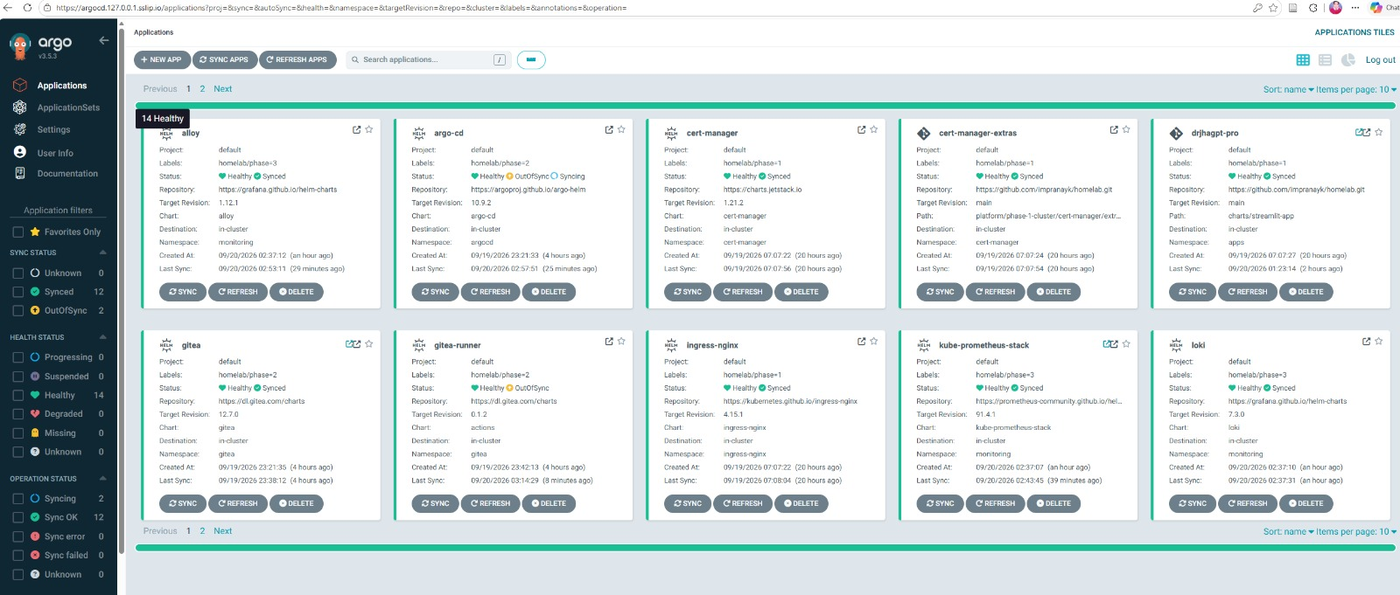
Phase 1: cluster and first app 19 Sep 2026, one evening
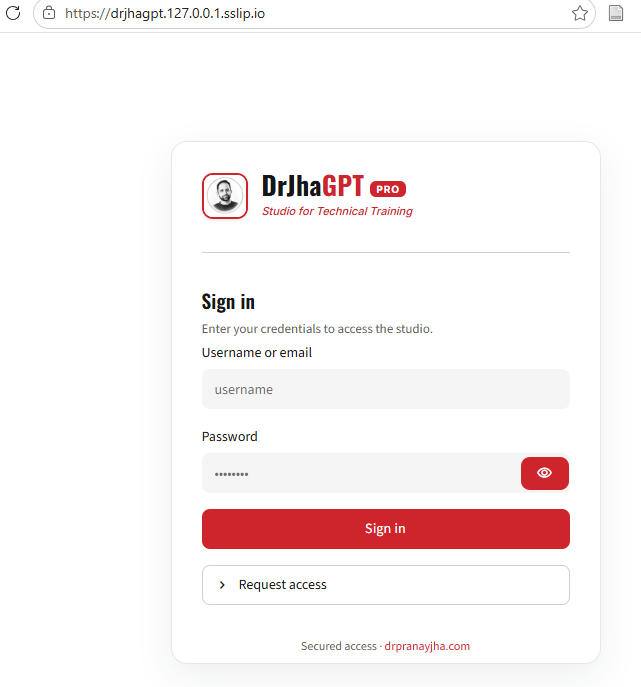
Outcome: a three-node Kubernetes cluster on the laptop, Argo CD reading this repository from GitHub, DrJhaGPT Pro running behind ingress with a certificate from the lab’s own CA, and one proven Git-only change.
What went in
| Component | Version | Purpose | Where |
|---|---|---|---|
| WSL2 + Ubuntu 24.04 | WSL 2.7.14, kernel 6.18 | the Linux VM everything runs in | bootstrap/wslconfig.example |
| Docker Engine | from Docker’s apt repo | container runtime, natively in Ubuntu | bootstrap/00-docker.sh |
| k3d / k3s | k3s v1.35.5 | 1 server + 2 agents as containers, ports 80/443, local registry | bootstrap/k3d-homelab.yaml, 01-cluster.sh |
| Argo CD | chart 10.9.2 | GitOps controller, app-of-apps | bootstrap/10-argocd.sh, clusters/homelab/ |
| ingress-nginx | chart 4.15.1 | the front door | platform/phase-1-cluster/ingress-nginx |
| cert-manager + lab CA | chart 1.21.2 | certificates for every hostname | platform/phase-1-cluster/cert-manager (+ extras/ca-issuer.yaml) |
| drjhagpt-pro | Streamlit app | the first workload | charts/streamlit-app, apps/drjhagpt-pro |
Steps, in order
-
Cap the Linux VM and install Ubuntu (PowerShell). Wrote
.wslconfigwith 12 GB, 6 threads, 4 GB swap andautoMemoryReclaim=gradual. Updated WSL, then installed the distro; the 24.04 name is only accepted after the update.wsl --update wsl --install -d Ubuntu-24.04 wsl --set-default Ubuntu-24.04; wsl --shutdown -
Docker Engine inside Ubuntu. Docker Desktop failed with “Unexpected WSL error … provisioning docker WSL distros” (too old for WSL 2.7). Quit it and installed the engine natively. The
dockergroup only applies to a new shell.bootstrap/00-docker.sh newgrp docker docker run --rm hello-world -
Clone the repo and fix the script bits. Committed from Windows, the scripts had lost their executable bit.
git clone https://github.com/impranayk/homelab.git ~/homelab && cd ~/homelab chmod +x bootstrap/*.sh git update-index --chmod=+x bootstrap/*.sh # so it never recurs -
Tools. k3d, kubectl, helm, k9s and the argocd CLI.
bootstrap/00-tools.sh -
Cluster. One server, two agents, ports 80/443 mapped to the laptop, a registry at
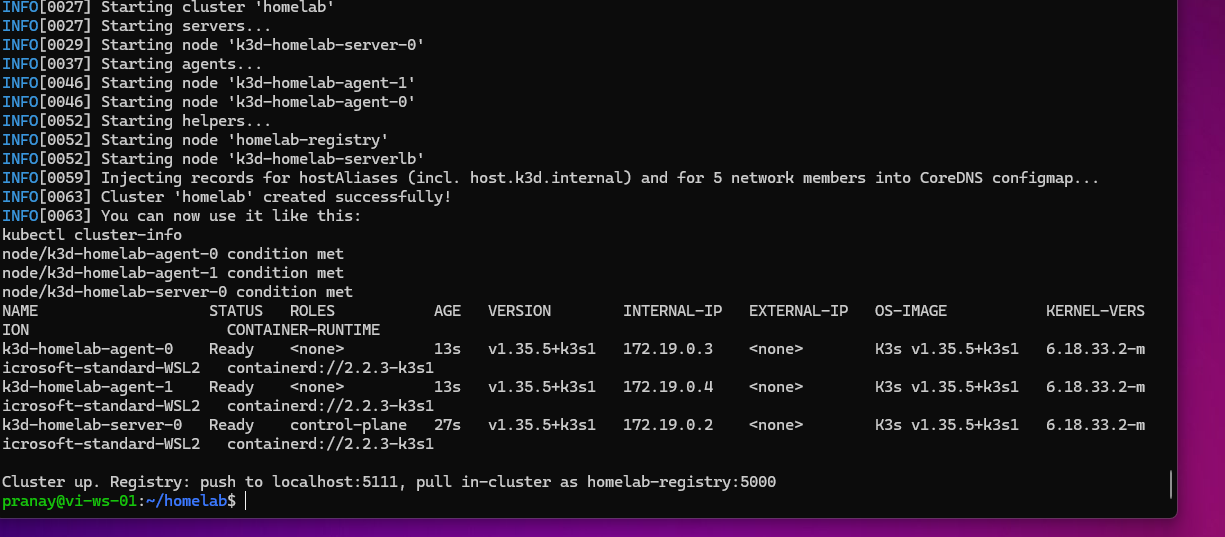
localhost:5111(in-clusterhomelab-registry:5000), Traefik disabled so ingress comes from Git. Three nodes Ready in 63 seconds.bootstrap/01-cluster.sh kubectl get nodes -
Argo CD and the root app. Helm installs Argo CD once; the root Application points it at this repo. Within two minutes it had installed cert-manager, the CA and ingress-nginx on its own. Only the app stayed Degraded, waiting for its Secret and image.
bootstrap/10-argocd.sh kubectl -n argocd get applications -w -
Secrets. Random platform passwords are generated locally; the app’s real keys go into one env file in
KEY=valueform (Streamlit Cloud shows them as TOML with quotes; the quotes must go). Files still containingREPLACEare skipped.bootstrap/21-gen-secrets.sh nano secrets/apps.drjhagpt-pro-env.env bootstrap/20-secrets.sh -
First image, built by hand. Cloned the app repo inside Ubuntu (GitHub login reused from the Windows Git Credential Manager), added the Dockerfile and a
.dockerignore, built and pushed. Its waiting pod pulled it and went Running. Streamlit reads its keys from environment variables here, so nosecrets.tomlwas needed.git config --global credential.helper "/mnt/c/Program Files/Git/mingw64/bin/git-credential-manager.exe" git clone https://github.com/impranayk/drjhagpt-ent.git ~/drjhagpt-ent cp ~/homelab/apps/drjhagpt-pro/Dockerfile ~/drjhagpt-ent/ && cd ~/drjhagpt-ent printf '.gitn.streamlit/secrets.tomln.envn' > .dockerignore docker build --build-arg APP_FILE=streamlit_app.py -t localhost:5111/drjhagpt-pro:dev . docker push localhost:5111/drjhagpt-pro:dev kubectl -n apps get pods -w -
Trust the lab CA. Exports the CA certificate from the cluster and installs it in the Windows root store (UAC prompt). Green lock on every lab URL, and login works against the same Supabase project as the live app.
bootstrap/30-trust-ca.sh -
One-rule test. Added
LAB_PHASE: "1"underenv:inapps/drjhagpt-pro/values.yaml, committed, pushed. Argo CD went Synced → OutOfSync → Progressing → Healthy and the new pod carried the variable. Nothing was applied by hand.git add -A && git commit -m "drjhagpt-pro: add LAB_PHASE env" && git push kubectl -n argocd get app drjhagpt-pro -w kubectl -n apps exec deploy/drjhagpt-pro -- printenv LAB_PHASE # prints 1

What broke and the fix
| Symptom | Cause | Fix |
|---|---|---|
Invalid distribution name: 'Ubuntu-24.04' |
WSL 2.1.5’s catalogue only had generic Ubuntu |
wsl --update first |
wsl: Sparse VHD support is currently disabled |
WSL 2.7 disabled sparseVhd (corruption risk) |
removed the line from .wslconfig |
| Docker Desktop “Unexpected WSL error” | old Docker Desktop vs new WSL | native Docker Engine (00-docker.sh) |
permission denied ... docker.sock after install |
group membership not in the current shell | newgrp docker (or reopen) |
bootstrap/00-docker.sh: Permission denied |
executable bit lost in a Windows commit | chmod +x, then git update-index --chmod=+x |
git commit refused: “Author identity unknown” |
fresh Ubuntu | git config --global user.name/user.email (GitHub address) |
Verified by
kubectl get nodes (3 Ready), kubectl -n argocd get applications (root, cert-manager,
cert-manager-extras, ingress-nginx, drjhagpt-pro all Synced/Healthy), the app answering a question
at its lab URL, and the LAB_PHASE round trip.
Phase 2: delivery 20 Sep 2026
Outcome: the app’s source lives in the lab’s own Gitea; a pipeline in the cluster scans, builds, scans and pushes the image; the running version is chosen by a tag in this repository.
What went in
| Component | Version | Purpose | Where |
|---|---|---|---|
| Argo CD (self-managed) | chart 10.9.2 | Argo CD now manages its own Helm release | platform/phase-2-delivery/argo-cd |
| Gitea | chart 12.7.0 | git hosting, registry (unused for now), Actions | platform/phase-2-delivery/gitea |
| Gitea Actions runner | chart actions 0.1.2 |
runs CI jobs, with a Docker-in-Docker sidecar | platform/phase-2-delivery/gitea-runner |
| build workflow | Gitleaks → docker build → Trivy → push | .gitea/workflows/build.yaml (copied into the app repo) |
Steps, in order
-
Switch phase 2 on. One line in
phases.yaml, push, refresh the root app. Two new Applications:argo-cd(self-management) andgitea.sed -i 's/"2": { enabled: false }/"2": { enabled: true }/' clusters/homelab/phases.yaml git add -A && git commit -m "phase 2 on" && git push kubectl -n argocd annotate app root argocd.argoproj.io/refresh=normal --overwrite -
Gitea would not render. Argo CD reported “The actions sub-chart has been outsourced to a dedicated chart”: chart 12 moved the runner out, and it bundles Bitnami Postgres/Valkey images whose old tags are no longer served. Rewrote the values for a laptop: SQLite, in-memory cache and session, level queue, bleve indexer, all four database sub-charts off,
Recreatestrategy, unlimited body size on the ingress for image pushes. Gitea came up. Logged in ashomelabwith the generated password.kubectl -n argocd get app gitea -o jsonpath='{.status.conditions}' grep password secrets/gitea.gitea-admin.env -
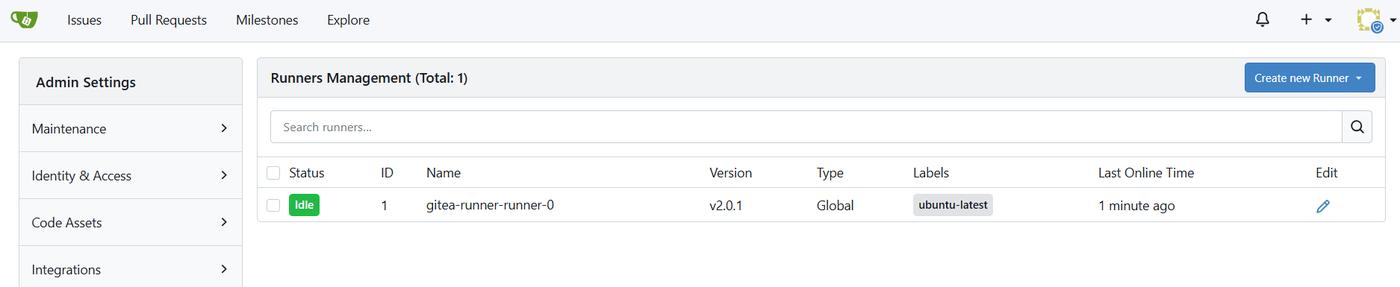
Actions runner. Added the
gitea-runnercomponent (chartactions0.1.2). It needs a registration token from the running Gitea; stored it as a secret, switched the component on. Its pod reached2/2(runner + Docker-in-Docker) and appeared in Site Administration → Runners as Idle, labelubuntu-latest.TOKEN=$(kubectl -n gitea exec deploy/gitea -c gitea -- gitea --config /data/gitea/conf/app.ini actions generate-runner-token) echo "runner-token=$TOKEN" > secrets/gitea.gitea-runner-token.env && bootstrap/20-secrets.sh sed -i '/name: gitea-runner/,/chart:/ s/enabled: false/enabled: true/' clusters/homelab/components.yaml git add -A && git commit -m "gitea-runner on" && git push -
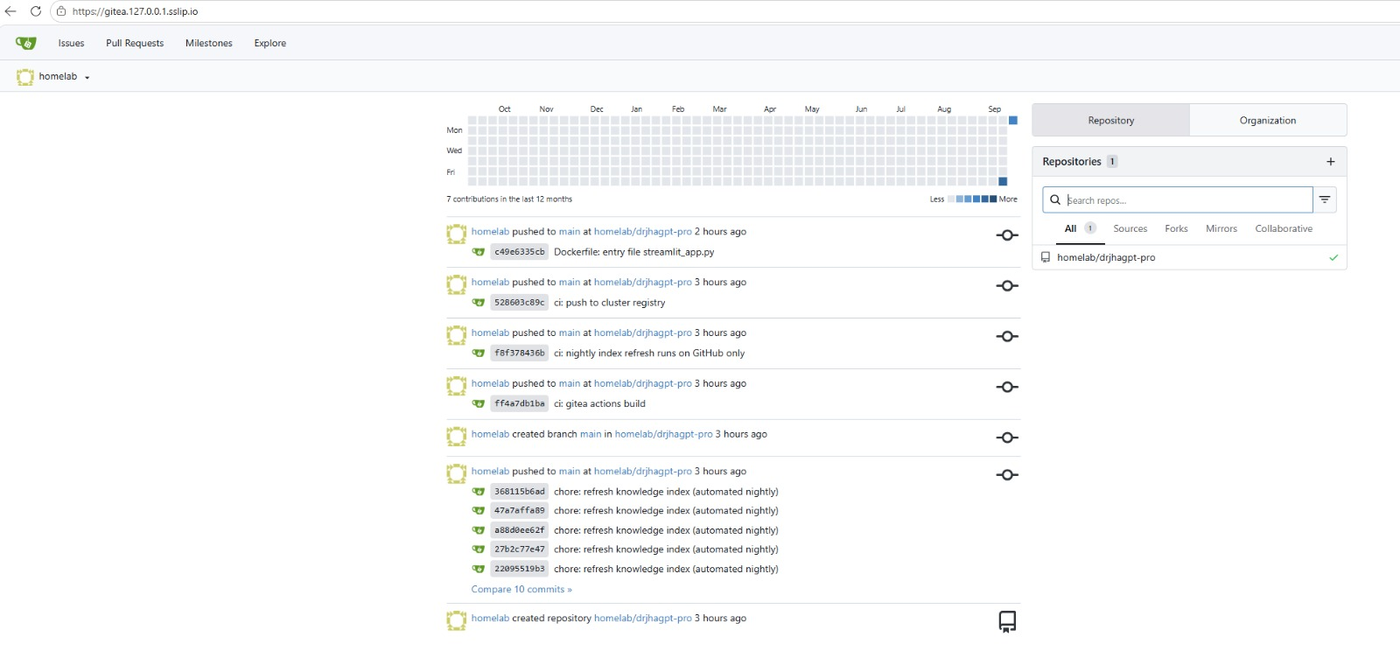
App repo into Gitea. Created
homelab/drjhagpt-proin the Gitea UI first (push-to-create is off), then pushed the existing clone to it: 554 MB, mostly index data and history.cd ~/drjhagpt-ent git remote add gitea https://gitea.127.0.0.1.sslip.io/homelab/drjhagpt-pro.git git push gitea main -
Pipeline. Two repository secrets in Gitea (
REGISTRY_USER,REGISTRY_TOKEN), the workflow file copied into the app repo, pushed. That push queued the first run.mkdir -p ~/drjhagpt-ent/.gitea/workflows && cp ~/homelab/.gitea/workflows/build.yaml ~/drjhagpt-ent/.gitea/workflows/ git add .gitea Dockerfile .dockerignore && git commit -m "ci: gitea actions build" && git push gitea main -
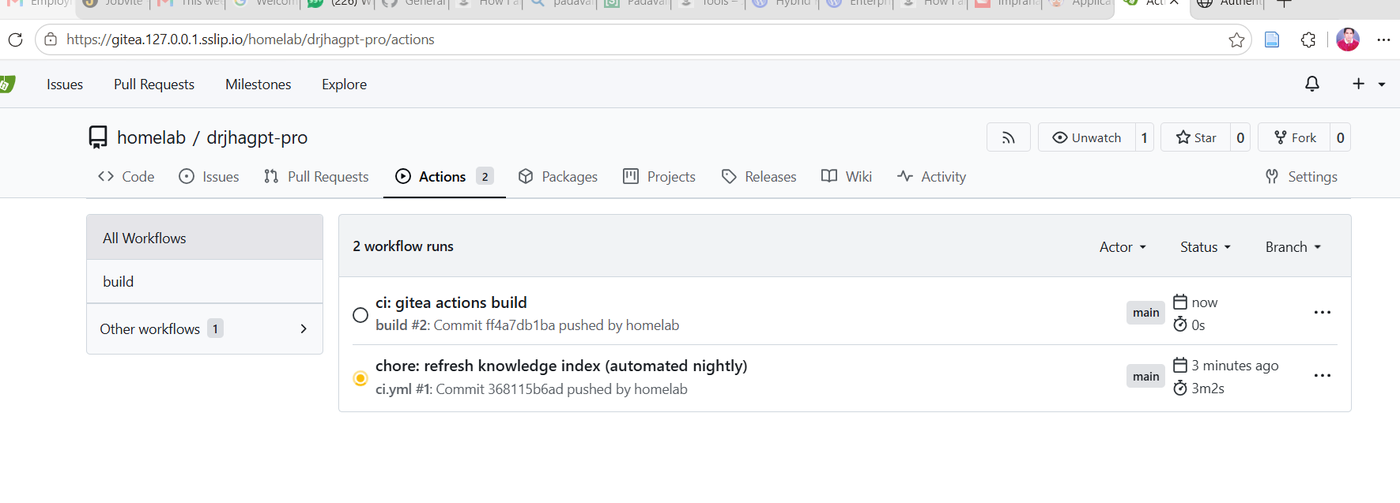
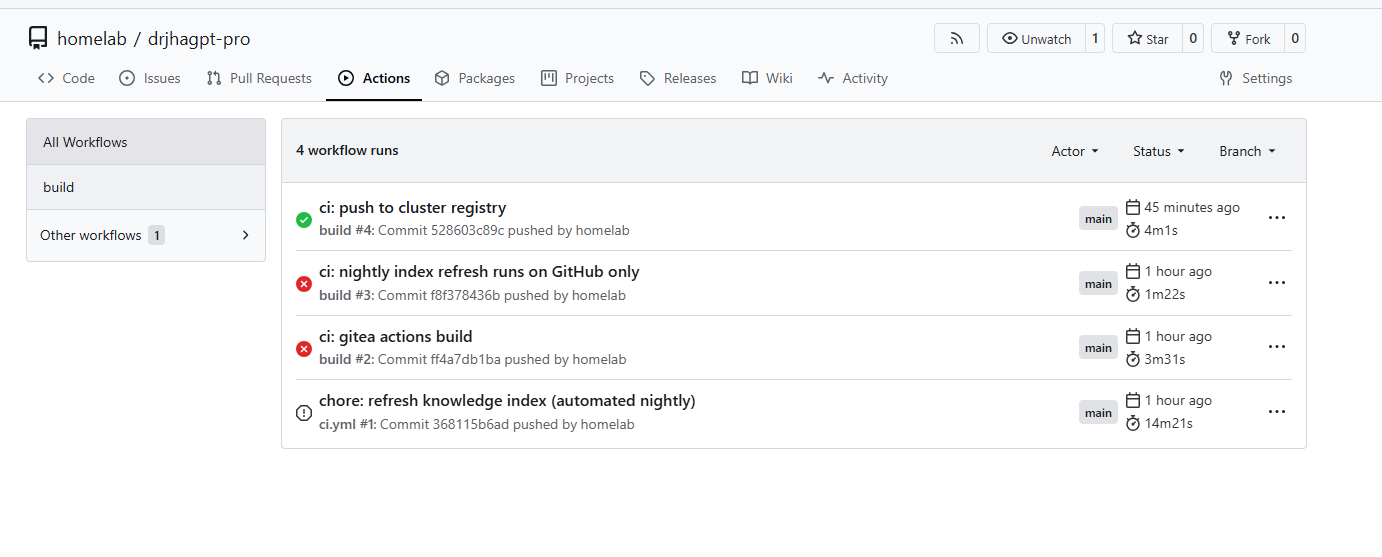
A stranger on the runner. Run #1 was the app repo’s existing GitHub test workflow (
.github/workflows/ci.yml, pytest and a retrieval eval); Gitea Actions runs those too. It held the single runner for 14 minutes. Cancelled it and made the job GitHub-only.# in .github/workflows/ci.yml, at job level, above runs-on: if: github.server_url == 'https://github.com' -
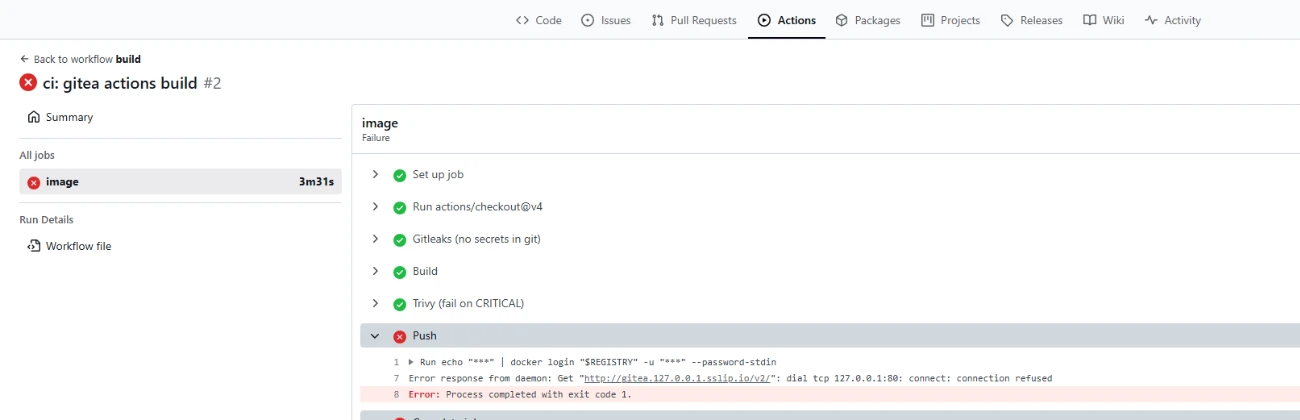
Run #2: three gates passed, the push failed. Gitleaks clean, build 1m48s, Trivy 1m07s with no CRITICAL findings, then “dial tcp 127.0.0.1:80: connect: connection refused”. Inside Docker-in-Docker the lab hostname resolves to the DinD container itself. Changed the workflow to push to the cluster registry (pods can resolve it because k3d puts it in CoreDNS), gave DinD
--insecure-registry=homelab-registry:5000, dropped the login step. -
Run #4 green end to end. Image
homelab-registry:5000/drjhagpt-pro:528603cin the registry. -
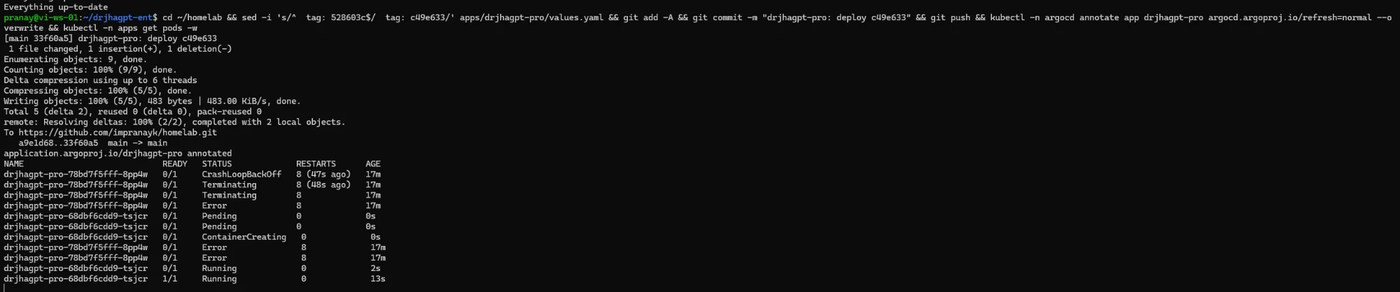
Deploy by tag, and the first bad deploy. Set
image.tag: 528603cin the app values, pushed. Its new pod crash-looped: “File does not exist: app.py”. My Dockerfile copy in the app repo, made before the entry-file fix, still defaulted toapp.py. WithRecreate, the app was down until the next commit. Copied the corrected Dockerfile (run #5 green), setimage.tag: c49e633, pod Running, image confirmed.kubectl -n apps logs deploy/drjhagpt-pro --tail=5 sed -i 's/^ tag: 528603c$/ tag: c49e633/' apps/drjhagpt-pro/values.yaml && git add -A && git commit -m "deploy c49e633" && git push kubectl -n apps get deploy drjhagpt-pro -o jsonpath='{.spec.template.spec.containers[0].image}' -
A cached wrong password. One
git push giteafailed to authenticate because the Windows credential manager had stored a bad password for the Gitea host. Cleared it and pushed again.printf 'protocol=httpsnhost=gitea.127.0.0.1.sslip.ion' | git credential reject
What broke and the fix
| Symptom | Cause | Fix |
|---|---|---|
Gitea ComparisonError about check-actions-not-present.yaml |
chart 12 moved the runner out | separate gitea-runner component |
| Bitnami Postgres/Valkey images not pullable | Bitnami stopped serving old tags | SQLite + memory cache for the lab |
Push to create is not enabled (403) |
repo did not exist in Gitea | create it in the UI first |
| Build queued at 0 s for 7+ minutes | single runner busy with the GitHub test workflow | cancel; if: github.server_url == ... |
Push: connection refused to 127.0.0.1:80 |
lab hostname resolves to DinD itself | push to homelab-registry:5000, --insecure-registry |
New pod CrashLoopBackOff, app.py missing |
stale Dockerfile default | ARG APP_FILE=streamlit_app.py |
Authentication failed on git push gitea |
wrong cached credential | git credential reject |
Measured
kubectl top nodes after phases 1+2: 1555 + 850 + 3852 MiB ≈ 4.7 GB across the three nodes.
Docker-in-Docker in the runner is the unexpected item.
Phase 3: observability 20 Sep 2026
Outcome: metrics, logs and dashboards for everything in the cluster; alert rules evaluating; one real problem found and fixed from a log query.
What went in
| Component | Version | Purpose | Where |
|---|---|---|---|
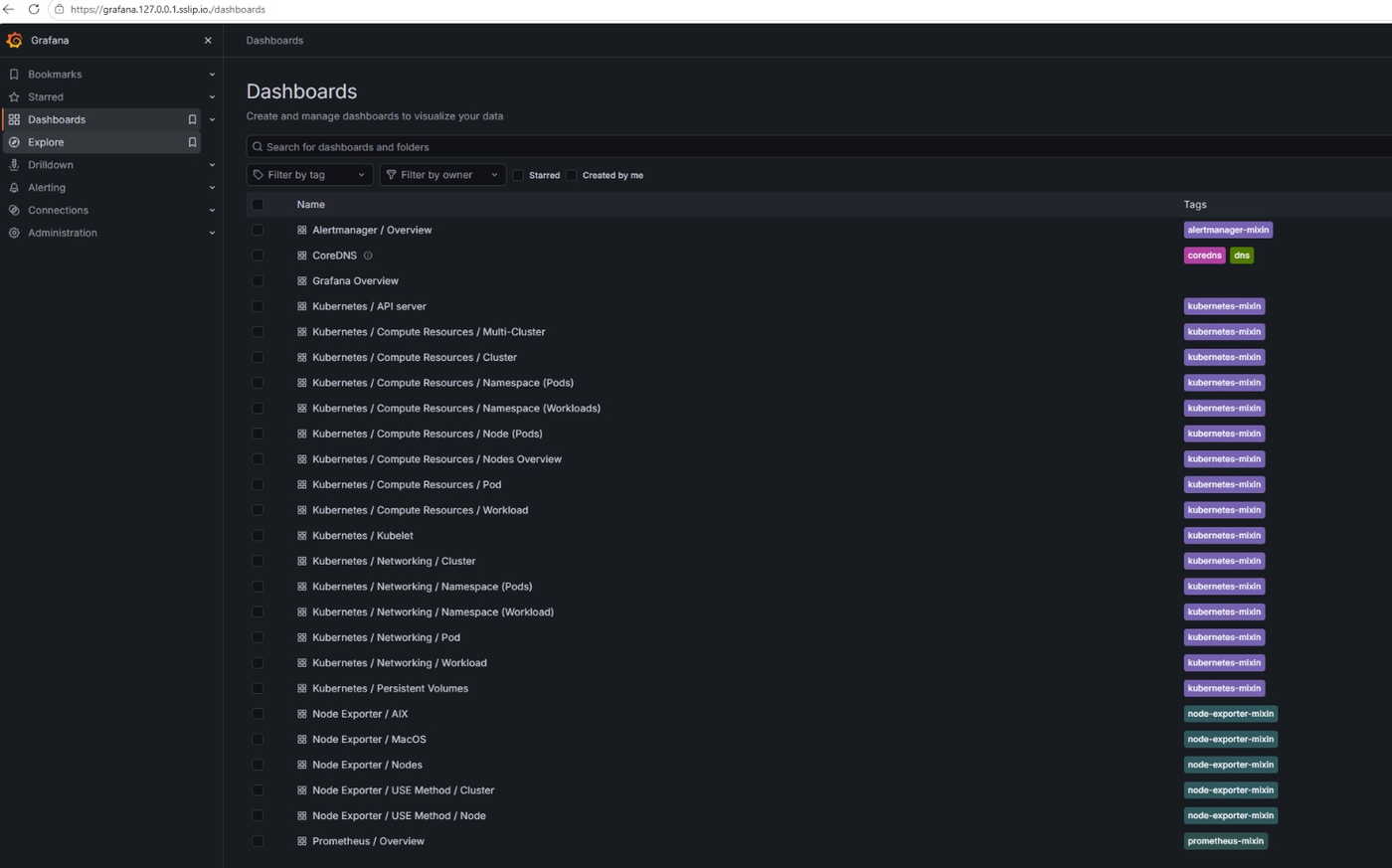
| kube-prometheus-stack | chart 91.4.1 | Prometheus (2-day retention), Alertmanager, Grafana, exporters | platform/phase-3-observe/kube-prometheus-stack |
| Loki | chart 7.3.0 | log store, single-binary, filesystem, 48 h | .../loki |
| Alloy | chart 1.12.1 | DaemonSet that tails every pod’s log into Loki | .../alloy |
| Tempo | chart 1.24.4 | trace store | .../tempo |
| OpenTelemetry collector | chart 0.173.1 | OTLP in, Tempo + Prometheus out | .../opentelemetry-collector |
| ntfy + ntfy-alertmanager | plain manifests | push notifications, Alertmanager bridge | .../ntfy/extras/ntfy.yaml |
Steps, in order
-
Switch phase 3 on. Same one-line change in
phases.yaml. Six Applications appeared.sed -i 's/"3": { enabled: false }/"3": { enabled: true }/' clusters/homelab/phases.yaml git add -A && git commit -m "phase 3 on" && git push kubectl -n argocd annotate app root argocd.argoproj.io/refresh=normal --overwrite -
First look at the pods. Two crashing (
ntfy-alertmanagerin Error,opentelemetry-collectorin CrashLoopBackOff), Alloy ×3 still creating, Prometheus, Grafana, Loki, Tempo and ntfy coming up.kubectl -n monitoring get pods -
Read the two crash logs. ntfy’s bridge said “line 7: quoted string not allowed after atom”: it reads scfg directives, not YAML. Rewrote its ConfigMap and mount path. OTel’s collector said “‘exporters’ unknown type: prometheus”: the
-k8simage is a slim build without that exporter. Switched tootel/opentelemetry-collector-contrib. Both Running after the next sync.kubectl -n monitoring logs deploy/ntfy-alertmanager --tail=15 kubectl -n monitoring logs deploy/opentelemetry-collector --tail=15 -
A hook that looked stuck.
kube-prometheus-stacksat at “waiting for completion of hook admission-create” for a couple of minutes after the Job had already completed. It resolved on its own. -
Alloy’s config syntax. “expected TERMINATOR, got ILLEGAL”: the configuration language wants one attribute per line, no
;. Rewrote it. Crash-looping pods do not pick up a new ConfigMap until deleted; after that,2/2on all three nodes.kubectl -n monitoring logs ds/alloy -c alloy --tail=15 kubectl -n monitoring delete pod -l app.kubernetes.io/name=alloy -
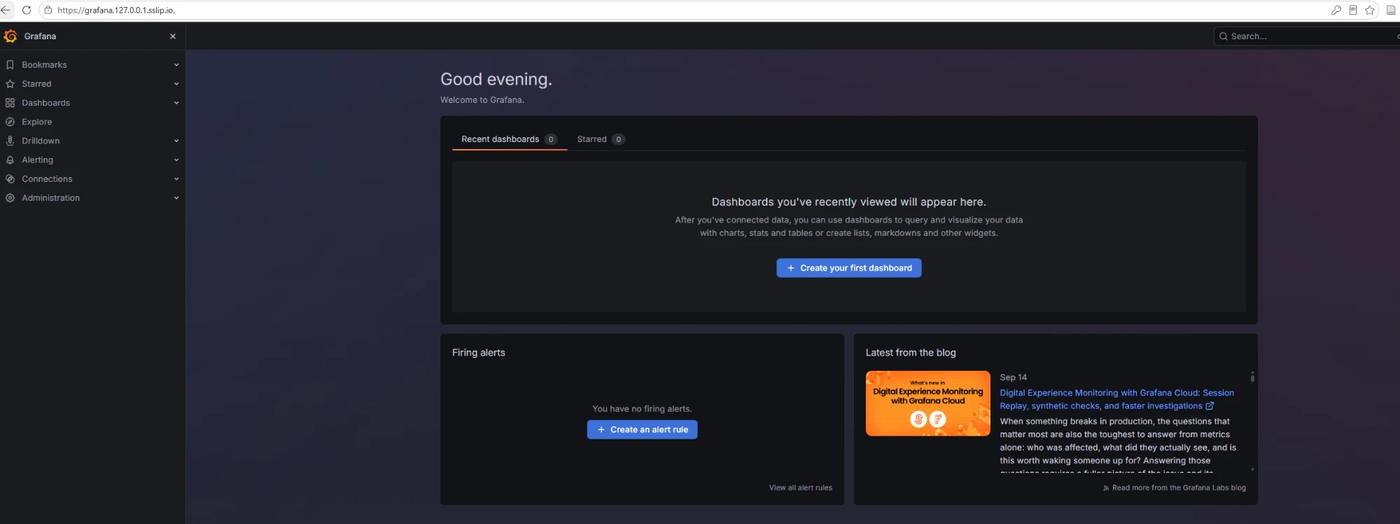
Grafana. Up at https://grafana.127.0.0.1.sslip.io with the generated admin password. Edge said “Not secure” although the
grafana-tlscertificate was Ready: the browser had kept a connection open from before the certificate existed. Restarting the browser fixed it.kubectl -n monitoring get certificate grep admin-password secrets/monitoring.grafana-admin.env -
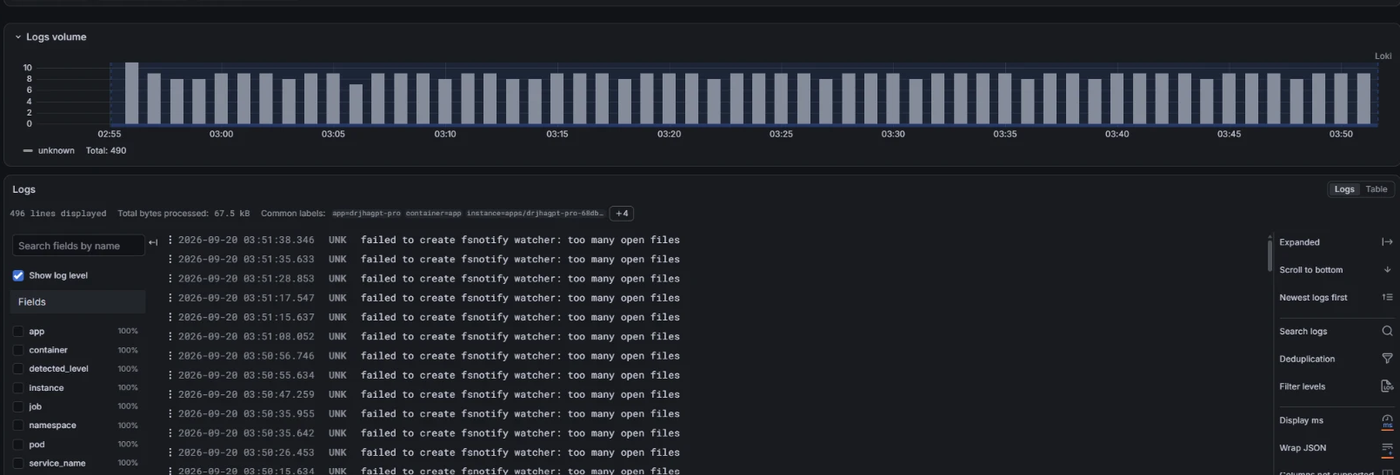
First Loki query, first real find. Explore → Loki →
{namespace="apps"}: 496 lines in an hour, all “failed to create fsnotify watcher: too many open files”, steadily, for hours. -
Wrong fix first. Blamed Streamlit’s development file watcher, set
STREAMLIT_SERVER_FILE_WATCHER_TYPE=nonein the chart, redeployed. Nothing changed on the histogram. Wrong hypothesis, discarded. (The env stays in the chart; it is right for a container, just not the cause.) -
Right fix. That line is the kubelet’s, emitted into the log stream Alloy tails through the API. WSL’s kernel ships
fs.inotify.max_user_instances=128; three nodes plus a log shipper exhaust it. Raised it on the Ubuntu host, persisted it, and added it tobootstrap/01-cluster.sh. At 03:58 the histogram went flat.sudo sysctl -w fs.inotify.max_user_instances=8192 fs.inotify.max_user_watches=1048576 printf 'fs.inotify.max_user_instances=8192nfs.inotify.max_user_watches=1048576n' | sudo tee /etc/sysctl.d/99-homelab.conf kubectl -n apps logs deploy/drjhagpt-pro --since=60s | grep -c fsnotify # 0

What broke and the fix
| Symptom | Cause | Fix |
|---|---|---|
ntfy bridge Error |
config written as YAML | scfg directives, key config, --config /etc/ntfy-alertmanager/config |
OTel collector CrashLoopBackOff |
-k8s image lacks the Prometheus exporter |
-contrib image |
Alloy CrashLoopBackOff |
River syntax (; on one line) |
one attribute per line; delete pods to reload |
| Grafana “Not secure” in Edge | stale connection with nginx’s placeholder cert | restart the browser |
| fsnotify spam in every pod log | WSL inotify limit (kubelet message) | sysctl on the host; in 01-cluster.sh |
Still open from phase 3
- Phone alerts: the ntfy bridge points at the in-cluster ntfy, which the phone cannot reach.
Switch
base-urltohttps://ntfy.shwith an unguessable topic (see the comment inntfy.yaml). - Traces: the collector and Tempo are up; the app does not send any yet (OpenTelemetry SDK, ~10 lines).
Measured
Phases 1-3 at rest: ≈ 6.3 GB across the three nodes.
Phase 4: security, first attempt 20 Sep 2026
Outcome: the laptop hung; recovered; three root causes found; the phase is being brought back one component at a time.
What was switched on at once
external-secrets 2.10.0, OpenBao 0.29.5, Keycloak (keycloakx 7.3.2), Kyverno 3.9.1 + the three house policies + the pod-security baseline, Trivy Operator 0.36.0, Falco 9.1.0. Eight Applications in one push.
What happened, in order
-
All eight at once. Set
"4": { enabled: true }, pushed. Pods started. Within minutes the laptop stopped responding. Hard reboot. -
Cluster came back by itself. Docker starts with Ubuntu, the k3d containers restart with Docker. Switched phase 4 off in Git immediately, before everything finished restarting.
docker ps --format '{{.Names}} {{.Status}}' && kubectl get nodes && free -g sed -i 's/"4": { enabled: true }/"4": { enabled: false }/' clusters/homelab/phases.yaml git add -A && git commit -m "phase 4 off (memory)" && git push -
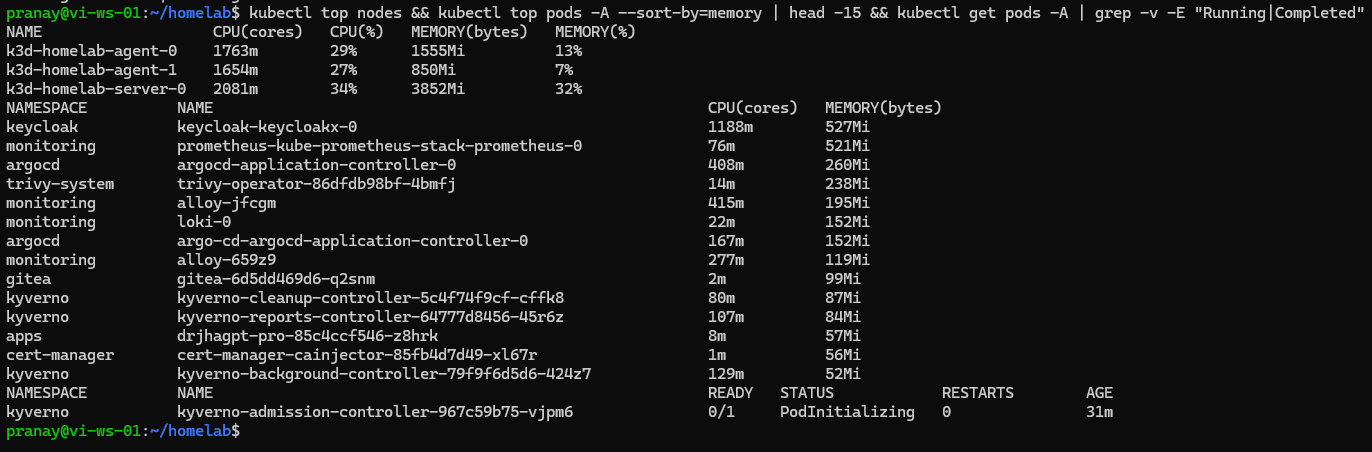
What was eating the machine. Keycloak at 1188m CPU and 527 MiB during JVM start-up; Trivy about to launch a scan job per image; and two Argo CD application controllers in the list,
argocd-application-controller-0andargo-cd-argocd-application-controller-0. There should be one.kubectl top nodes && kubectl top pods -A --sort-by=memory | head -15 -
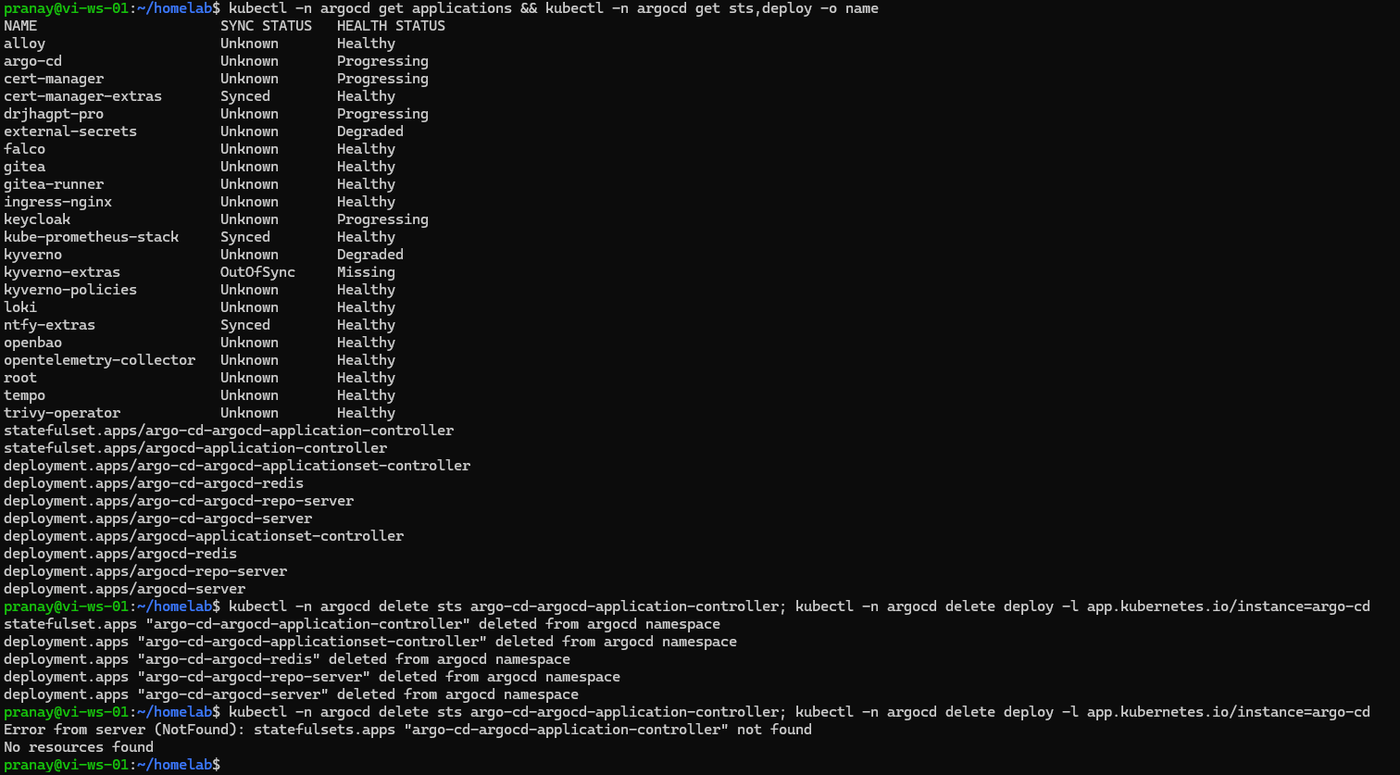
A second, complete Argo CD. Server, repo-server, redis, applicationset controller and controller, all duplicated under
argo-cd-argocd-*. Cause: the self-managing Application rendered with Helm release nameargo-cd(the component name) while the bootstrap had installed releaseargocd. It had been running since phase 2 and explained the OutOfSync flapping I had waved away. Deleted the duplicate workloads, then its Services and one ConfigMap.kubectl -n argocd get sts,deploy -o name kubectl -n argocd delete sts,deploy,svc -l app.kubernetes.io/instance=argo-cd kubectl -n argocd delete cm argo-cd-argocd-redis-health-configmap -
API stopped answering.
kubectltimed out with memory fine (5 GB free, no swap). Kyverno’s admission controller was stillPodInitializingbut its nine webhooks were registered, so every API write waited on a webhook that could not answer. Deleting the webhooks helped only briefly: Kyverno re-creates them while it runs. Scaled Kyverno and Keycloak to zero, then removed the webhooks for good.kubectl -n kyverno scale deploy --all --replicas=0 && kubectl -n keycloak scale sts --all --replicas=0 kubectl delete validatingwebhookconfiguration,mutatingwebhookconfiguration -l webhook.kyverno.io/managed-by=kyverno -
Every Application
Unknown. Root’s condition told the story in four acts: “dial tcp 10.43.190.59:8081: connection refused” (the deleted duplicate repo-server Service; restarted the controller) → “name resolver error: produced zero addresses” (the sharedargocd-cmd-params-cmhad been overwritten by the duplicate withrepo.server: argo-cd-argocd-repo-server:8081andredis.server: argo-cd-argocd-redis:6379; patched it back, restarted controller, server and applicationset controller) → “failed to get git client … lookup argo-cd-argocd-redis” (the repo-server had not been restarted; restarted it) → “failed to list refs … Client.Timeout” (the repo-server was just slow after restarting; agit ls-remotefrom inside the pod worked).kubectl -n argocd get app root -o jsonpath='{.status.conditions}' kubectl -n argocd patch cm argocd-cmd-params-cm --type merge -p '{"data":{"repo.server":"argocd-repo-server:8081","redis.server":"argocd-redis:6379"}}' kubectl -n argocd rollout restart sts/argocd-application-controller kubectl -n argocd rollout restart deploy/argocd-server deploy/argocd-applicationset-controller deploy/argocd-repo-server kubectl -n argocd annotate app root argocd.argoproj.io/refresh=hard --overwrite -
Argo CD pruned phase 4 itself. Root went OutOfSync/Progressing with no error and removed the eight Applications. Deleted the empty namespaces by hand (Argo CD never deletes namespaces). Memory back to 2.2 + 2.3 + 3.2 GB.
kubectl delete ns external-secrets keycloak kyverno trivy-system -
What changed in the repo.
releaseName: argocdon theargo-cdcomponent (the template now honours it); every phase-4 component individuallyenabled: falseexcept the secrets pair; Keycloak JVM capped at 384 MB with a 640 MiB limit; Kyverno webhooksfailurePolicy: Ignore; Argo CD repo-server limit 1 GiB (it had been OOM-killed ten times during the reboot storm); three PrometheusRules inkube-prometheus-stack/extras/homelab-rules.yaml, the first one namedDuplicateArgoCDController.

Second attempt, planned order
external-secrets+openbao(on by default now): init and unseal OpenBao, move the app keys in, replace the plain Secrets withExternalSecrets.keycloak: realmhomelab, clients for Argo CD, Grafana, Gitea; single login.kyverno, thenkyverno-extrasandkyverno-policies: Audit first, Enforce once the apps pass.trivy-operatorwithscanJobsConcurrentLimit: 1.falcolast, alone, watched: its eBPF driver on the WSL kernel is the least-tested piece.- Harbor as the registry, so the pipeline pushes to a registry that scans on push.
Disclosure: DrJhaGPT Pro and the Neevalay bots are my own tools. Product names in the drop-downs are the vendors’ current names at the time of writing; several of the VMware products have been renamed under VCF 9 and the older Aria and Tanzu names are given in brackets where people still use them. Memory figures are what I measured on this laptop and will differ on yours.
About The Author








 DrJha
DrJha