

Generative AI · Infrastructure · Kubernetes · Solution Architecture
One AI application, followed end to end from a solution architect’s chair: how it runs today without a GPU, what VRAM and quantization really mean, what a GPU would and would not change, why token limits disappear, where Kubernetes fits, and the sizing worksheet, bill of materials and three-year cost an architect actually has to produce.
Answers questions on VMware Cloud Foundation, Kubernetes and AI infrastructure by reading my content first, then writing an answer.
I built a tool called DrJhaGPT Pro. It answers questions about VMware Cloud Foundation, Kubernetes and AI infrastructure by first reading my own articles and manuals, then writing an answer. The industry calls this pattern RAG, retrieval-augmented generation. It uses a 70-billion-parameter Llama model, runs 24×7, costs me nothing, and I do not own a GPU.
That contradiction bothered me. I design infrastructure for a living, and here was an AI application whose infrastructure I could not draw. So I asked the questions I would normally be embarrassed to ask in a customer meeting. This post is those questions, in the order I asked them, arranged along the lifecycle of one application.
Inference
Using a model that already exists: you send it text, it sends text back.
Training / fine-tuning
Building or changing the model itself. 10 to 100 times the hardware.
When someone says “you need an H100 for AI”, they are usually mixing these two up.
Map Start hereThe lifecycle of one AI application
A solution architect does not think in products; they think in phases with a deliverable at the end of each. Here is how the rest of this post lines up with that lifecycle. If you only read one diagram, read this one.
- Day 0 · DiscoverWhat does the business need, and what may the data never do?DeliverableRequirements sheet (the ten inputs)Question 8, Step 0
- Day 0 · DesignWhich layers exist, and what runs at each?DeliverableLayer diagram and product bill of materialsQuestions 1, 2, 3
- Day 0 · SizeHow many GPUs, how much memory, disk, power? What does it cost over three years?DeliverableSizing worksheet, hardware BOM, TCOQuestions 4, 5, 8
- Day 1 · BuildHow do the pieces get deployed and wired together?DeliverableKubernetes manifests, runbookQuestions 6, 7
- Day 2 · RunWho watches it, patches it, backs it up?DeliverableOperations modelQuestion 7 rules 5 to 8; Question 8 Step 8
- EvolveHow do we swap the model, add users, move to a second site?DeliverableRoadmapQuestion 9
Q1 DesignIs a RAG tool “an application”? Where does it sit in the stack?
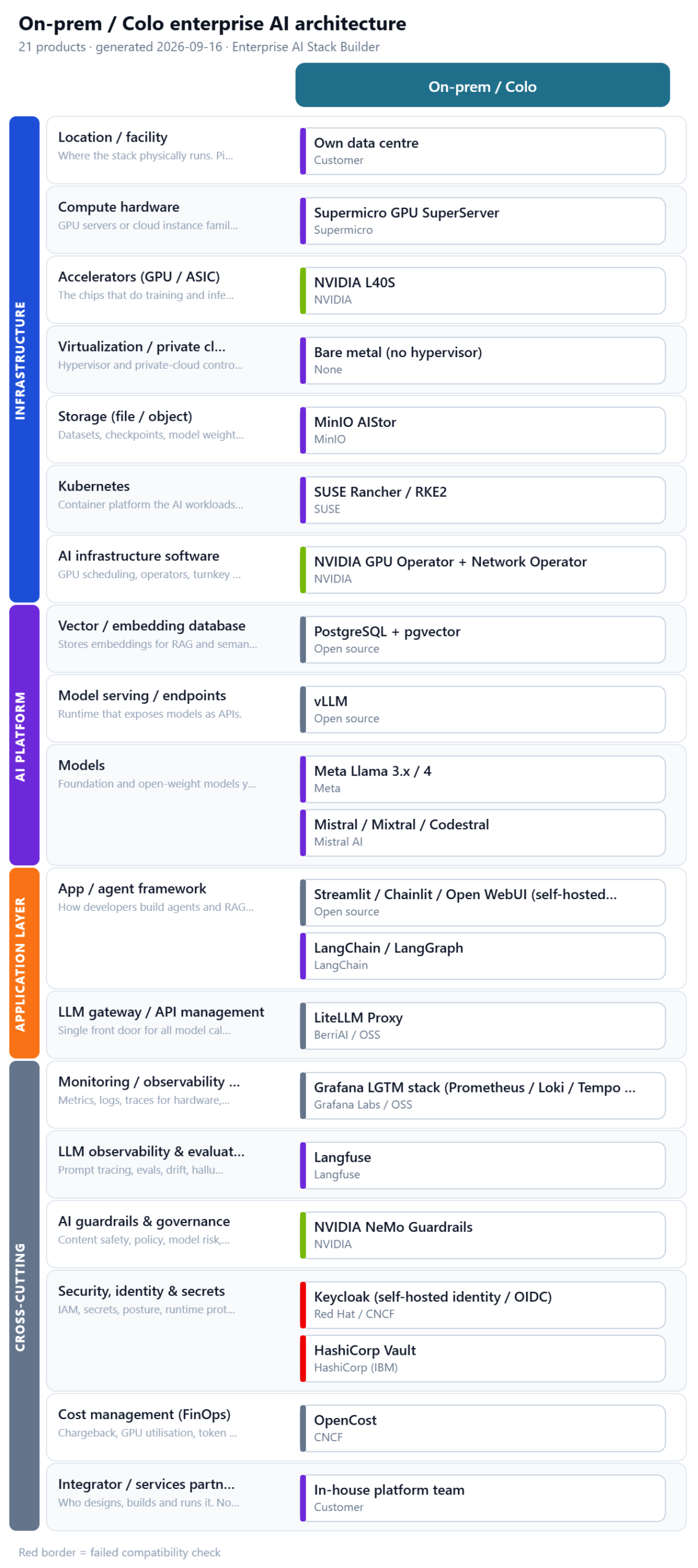
Yes. It sits at the top. An enterprise AI stack is a set of layers, and a RAG tool lives in the application layers and consumes everything underneath. Once I laid my own tool over those layers, the whole picture became obvious, and so did what I was renting rather than running.
By code, the tool is already about 60% open source. What is SaaS is the serving (Groq), the database and identity (Supabase) and the hosting (Streamlit Cloud). Keep that split in mind; it is the answer to almost every later question.
A side note on “open source”
If your goal is “open source at every layer”, check the model licence. For an internal tool it rarely matters; for something you publish as “fully open source”, it does.
Q2 DesignHow is it running at all if I don’t have an A100 or H100?
Because the model is not running on my hardware. It is running on Groq’s.
- finds the relevant paragraphs in my index
- tiny embedding model on CPU
- bundles paragraphs + question into a prompt
When someone asks my tool a question, the app sends the prompt as text over the internet to Groq’s API. Everything heavy happens in their building. My side only runs the small pieces: the web page, the search over my index, and a tiny embedding model that is happy on a CPU.
Q3 DesignWhat do “VRAM” and “quantized” actually mean?
VRAM is the memory on a GPU card. To answer even one question, the entire model must sit in that memory at the same time. That is the whole constraint.
What the “70B” actually is
The 70B in Llama-3.3-70B means 70 billion parameters. A parameter is one learned number inside the neural network; “weights” means the same numbers. The whole model is, quite literally, a very long list:
parameter 1              →   0.0134
parameter 2              →  -0.2841
parameter 3              →   1.7283
parameter 4              →   0.0047
   ...
parameter 70,000,000,000 →  -0.9182
Training is the process that finds those 70 billion values. Inference is using them. Nothing else is stored in the model file; when you download “the model” you are downloading this list.
How big is the list?
How many bytes you spend per number is called the precision. Models are trained and normally served at 16-bit (FP16 or BF16), 2 bytes each:
Pedantic but useful: 140 GB here is decimal gigabytes (140 × 10⁹ bytes). GPU spec sheets quote binary gibibytes; 140 GB is about 130 GiB. The gap is 7%, roughly the difference between “fits” and “does not fit” on a tight card, so keep the units straight.
No single card holds 140 GB. An A100 or H100 has 80 GB, so you need two, wired together, which is where the “you need A100s” folklore comes from.
The weights are only the first line of the memory bill
A common mistake is to stop here and say “I need a 140 GB GPU”. The weights are the fixed cost. Serving also needs memory that grows with use:
The red block, the KV cache, is the one that decides the GPU count in real deployments. Question 8 puts numbers on it.
Quantization is storing each weight in 4 bits instead of 16: a rounded, compressed copy of the same model. You lose a little precision; in document Q&A it is usually hard to notice.
Q4 SizeIf I buy a GPU, what will improve? How will it differ from today?
The answers will not get better. A GPU changes where the model runs and who controls it, not how good it is.
The answer I least expectedSo the honest reasons to self-host are four, and “better answers” is not one of them:
A client whose manuals cannot leave the building: DPDP Act, RBI, defence.
No per-minute or per-day caps; the card is yours around the clock.
Air-gapped sites, or anywhere the internet is not guaranteed.
An architect who has stood up Private AI end to end is a different profile from one who calls an API.
The break-even nobody shows you
Groq’s paid tier for a 70B model is on the order of $0.60 to 0.80 per million tokens (check the current price sheet; it changes). A single-GPU server with an L40S-class card is roughly $18,000 to 24,000, before power, cooling and the person who looks after it.
How long would a $21,000 server take to pay for itself against the API bill it replaces?
Most internal tools never get near the middle row. If the reason to buy is cost, do this sum first. If the reason is privacy, the sum does not matter, and that is a perfectly good reason.
RAG changes which model you need
Because a RAG tool hands the model the relevant paragraphs, the model does not have to know the answer; it has to read and write well. That lowers the bar considerably.
An 8B model needs about 6 GB of VRAM quantized. That runs on a laptop.
- Must the documents or prompts stay on-prem by contract or regulation?
- Are you hitting API quotas every week?
- Do you need it to work offline or in an air-gapped site?
- Do you have someone who will patch and monitor it?
- Is the goal to learn and demonstrate the stack?
Q5 SizeIf I buy a GPU, will I still hit token limits?
No. Token limits are a business rule, not a property of the model.
Groq is sharing a fixed pool of hardware among thousands of users. To stop one person hogging it, and to nudge people toward paid plans, they cap each key: so many requests per minute, so many tokens per minute, so many per day. When the limit “expires after a while”, that is simply their meter resetting. Paid plans raise the caps; they never remove them.
On your own card there is no meter. The only limit is physics: how much work the card can do per second. The experience flips:
Two things feel like limits but are not quotas:
VRAM is finite
The conversations being processed also live in GPU memory, so a 48 GB card running a quantized 70B handles a few long conversations at once, not dozens. Push past that and the server queues or rejects the request.
Rented cloud GPUs
A rented GPU has no token limit either, but it has an hourly bill. You are limited by how long you leave it switched on.
Q6 BuildWhere does Kubernetes come into this?
Self-hosted, my tool becomes five programs that must run all the time: the Streamlit app, the vLLM model server, Postgres with pgvector, Keycloak for login, and later Grafana and Langfuse. Each is a container, a packaged program. Something has to start them, restart them when they crash, connect them to each other, and put each one on a machine with the right resources.
That something is Kubernetes. If you know vSphere, you already know the model:
You describe what you want in YAML (“one vLLM pod with one GPU, one Streamlit pod, a Postgres pod with a 50 GB disk, expose Streamlit on this hostname”) and Kubernetes makes it true and keeps it true. That is its entire job.
But you do not need Kubernetes yet
docker compose
One server and a training team. Same result with far less to learn; a first working version in an afternoon.
Kubernetes
Several servers, automatic failover, many apps sharing the same GPUs, or one deployment that works on-prem and in cloud. Also the right thing to practise on.
Q7 Build and runWhat are the rules for running GPUs on Kubernetes?
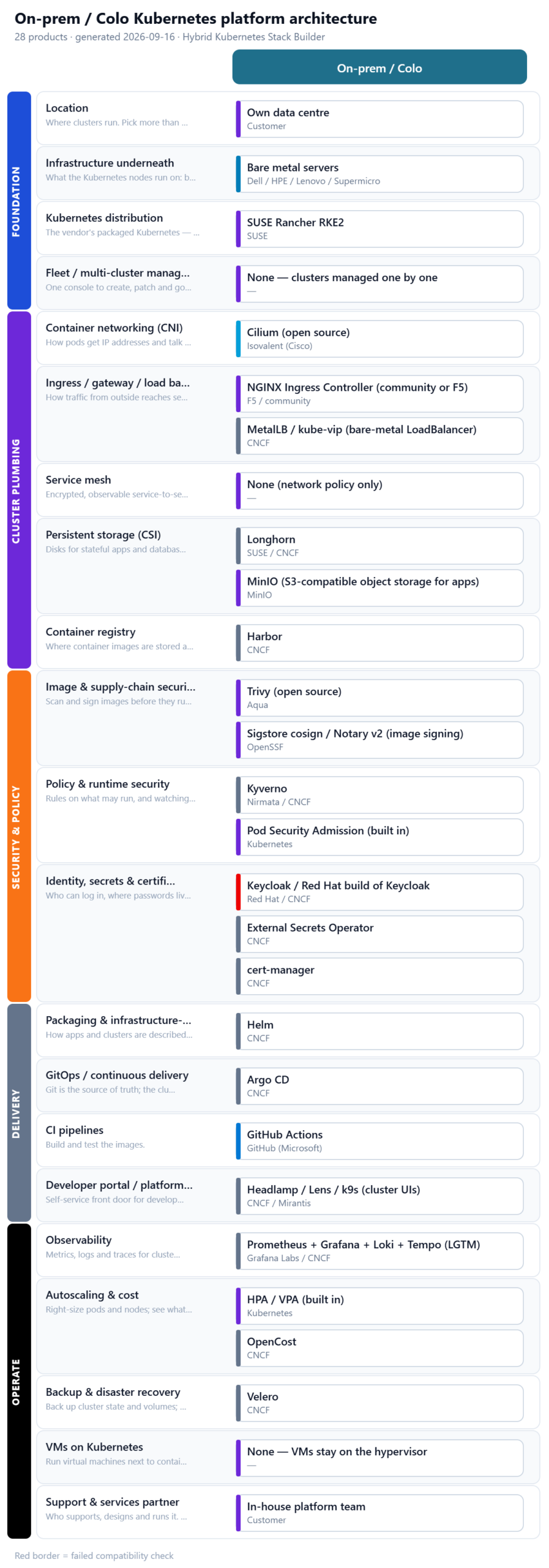
Kubernetes does not understand GPUs out of the box. You add a few pieces once, then follow a handful of rules for every workload.
Setup, once per cluster
- 1GPU nodesServers with the cards, joined to the cluster, usually in their own node pool.
- 2NVIDIA driverOn those nodes.
- 3Container ToolkitLets a container see the GPU.
- 4Device PluginTells Kubernetes “this node has 2 GPUs” so it can count them.
- 5DCGM exporterGPU metrics into Prometheus.
- NVIDIA GPU Operator: installs 2 to 5 in one step
That is why the GPU Operator appears in every Private AI reference architecture, and why my stack builder warns you if you pick NVIDIA GPUs and Kubernetes without it.
Eight rules for every GPU workload
No request, no GPU, even on a GPU node.
in the YAML belowOne or two, never half; one GPU belongs to one pod. Sharing (time-slicing, MIG, NVIDIA Run:ai) is an add-on. Think vGPU profiles versus passthrough.
Taint the GPU nodes; only pods that tolerate it may land, or Postgres will occupy your $12,000 node while vLLM waits. A “must run on hosts in group” DRS rule.
in the YAML belowLabel nodes by GPU type and use a nodeSelector; a quantized 70B must land on the 48 GB card, not the 24 GB one.
in the YAML belowvLLM downloads 35 to 40 GB on first start. Put it on a PersistentVolume or the pod re-downloads after every restart.
in the YAML belowOne GPU, one vLLM pod; “scale to three” needs three GPUs. Scaling the CPU-only Streamlit pod is fine.
in the YAML belowvLLM has no authentication by default. It becomes http://vllm:8000/v1 inside the cluster; the app talks to it, the world talks to the app.
Loading 40 GB takes minutes; without a long startup grace period Kubernetes declares it dead and restarts it in a loop.
in the YAML belowRules 1, 3, 4, 5, 6 and 8 in one place:
apiVersion: apps/v1
kind: Deployment
metadata: { name: vllm }
spec:
  replicas: 1                          # rule 6: one GPU, one server
  selector: { matchLabels: { app: vllm } }
  template:
    metadata: { labels: { app: vllm } }
    spec:
      nodeSelector: { gpu: l40s }      # rule 4: land on the 48 GB card
      tolerations:                     # rule 3: allowed onto the tainted GPU node
        - key: nvidia.com/gpu
          operator: Exists
          effect: NoSchedule
      containers:
        - name: vllm
          image: vllm/vllm-openai:latest
          args: ["--model", "<a 4-bit checkpoint of Llama-3.3-70B>", "--max-model-len", "16384"]
          resources:
            limits: { nvidia.com/gpu: 1 }   # rule 1: ask for the GPU
          volumeMounts:
            - { name: weights, mountPath: /root/.cache/huggingface }
          startupProbe:                # rule 8: minutes, not seconds
            httpGet: { path: /health, port: 8000 }
            failureThreshold: 60
            periodSeconds: 10
      volumes:
        - name: weights
          persistentVolumeClaim: { claimName: model-weights }   # rule 5
And the one line that changes in the application: the base URL that used to point at Groq now points at http://vllm:8000/v1. vLLM and Ollama both speak the same OpenAI-style API, so the rest of the code does not know the difference.
Q8 SizeWhat does a solution architect need to size and price this?
Everything above is the why. This section is the worksheet: the calculations I would put in front of a customer before a single purchase order. One worked example runs all the way through so the arithmetic is visible; change the inputs and the method stays the same.
The chain to keep in your head
Every sizing conversation about an LLM platform, whether the vendor is NVIDIA, Nutanix, VMware or nobody, walks the same chain left to right. If you remember one line from this post, remember this one:
Each arrow is a decision that constrains the next. Model and precision make the memory arithmetic. Concurrency and context make the KV cache arithmetic. Memory plus measured throughput gives the GPU count. The GPU count decides the node pool and scheduling rules. The serving engine (vLLM, NIM, NAI) turns the GPUs into a URL. The application only ever sees the URL.
How to answer it in a room
Someone asks: “how would you size GPUs for a 70B model?”
“70 billion times 2 bytes, 140 GB.”
“Parameter count and precision give the weight memory, about 140 GB at FP16 or 40 GB at 4-bit. I add the KV cache from context length and concurrent users, plus engine overhead. That total and a measured tokens-per-second figure at the target latency tell me whether it is one quantized card, two in tensor-parallel, or an 80 GB class GPU. Then N+1 and the node pool, and only then the software on top.”
- Users and peak concurrent users (people mid-question at the same moment)
- Peak queries per hour and queries per day
- Tokens per query: input (system prompt + retrieved chunks + question) and output
- Longest context you must support (a 40-page manual pasted in is about 30,000 tokens)
- Latency target: first word within N seconds, full answer within M seconds
- Model(s) and precision, and whether you will keep more than one loaded
- Data classification: what may leave the network, what may not
- Availability: is downtime during patching acceptable? (decides N+1)
- Corpus size for RAG: documents, pages, growth per year
- Growth: users and tokens at 12 and 36 months
Step 1Tokens per day (drives the API comparison)
2,000 × (3,000 + 500) = 7 million tokens/day ≈ 154 million/month (22 working days)
At about $0.70 per million tokens on a paid API that is ≈ $110 to 140 per month, ≈ $1,300 to 1,700 a year. Keep that number; it is the yardstick everything else is measured against.
Step 2GPU memory: weights
| Precision | Bytes / parameter | Llama 70B | Llama 8B |
|---|---|---|---|
| FP32 | 4 | ≈ 308 GB | ≈ 35 GB |
| FP16 / BF16 (native) | 2 | ≈ 154 GB | ≈ 18 GB |
| FP8 / INT8 | 1 | ≈ 77 GB | ≈ 9 GB |
| INT4 (AWQ / GPTQ) | 0.5 | ≈ 40 GB | ≈ 5 GB |
These are the Question 3 figures with the 1.1 runtime factor applied, which is why 140 GB shows as 154 GB here. Use this table for sizing and the earlier bars for explaining.
Step 3GPU memory: the KV cache (the part everyone forgets)
Every conversation being processed keeps a running memory of its tokens on the GPU, the KV cache. Its size per token depends on the model’s architecture:
| Model | Layers | KV heads | Head dim | KV / token (FP16) | 16k-token context |
|---|---|---|---|---|---|
| Llama-3.x 70B | 80 | 8 | 128 | ≈ 320 KB | ≈ 5.1 GB per conversation |
| Llama-3.x 8B | 32 | 8 | 128 | ≈ 128 KB | ≈ 2.0 GB per conversation |
For the worked example, 20 concurrent conversations averaging 3,500 tokens each:
Step 4Add them up, pick the card
40 + 22 + 2 = 64 GB
That does not fit on one 48 GB card. The options, in order of cost (bar = the card’s memory; black = weights, red = room left for conversations):
About 7 concurrent at 3,500 tokens, or one 16k conversation.
About 48 concurrent average conversations, or about 10 at 16k. Fits with headroom.
Faster, far more expensive per card, and needs a data-centre-class server.
Cheapest by a mile, if the quality is acceptable for document Q&A.
2× L40S. The KV cache, not the weights, made the decision. The most common sizing mistake I see: sizing for the model and forgetting the conversations.
Step 5Throughput and latency (measure, don’t guess)
20 × 500 ÷ 30 s ≈ 333 tokens/second across all users
A GPU’s real throughput depends on model, precision, batch size and context length, and the numbers change every quarter. Do not size from a vendor slide. Rent the exact card for an hour, load the exact model, and run vLLM’s own benchmark (vllm bench serve) with your token profile. If the measured aggregate tokens per second at your concurrency beats the required figure with 30% margin, the card count from Step 4 stands; if not, add GPUs or reduce the model. One hour of rental replaces a year of regret.
Step 6Storage
40 GB × 3 versions kept, on fast NVMe: load time = read speed.
size per model × versions kept600k chunks × (≈3 KB vector + 2 KB text) × 1.5. Provision 100 GB and stop worrying.
chunks × (dims × 4 B + text + metadata) × 1.51,000 PDFs × 5 MB.
as-is2,000 × 3,500 × 4 B × 90 days.
queries × tokens × ~4 B × retention daysMinIO or an existing S3-compatible target.
2 × (DB + docs + logs) + weights onceNVMe, mirrored.
everything above × 2 for growthThe lesson: RAG storage is trivial. A million chunks is a few gigabytes. The only storage that matters for performance is the NVMe the weights load from.
Step 7CPU, RAM, network, power
1.5 × 40 + 64 ≈ 124, rounded up to the next standard size.
≥ 1.5 × model weights + 64 GBvLLM 8 to 16 cores; Postgres 4; Keycloak 2; observability 4; app 4; OS/K8s 4.
sum of the services100 GbE / InfiniBand is only for multi-node training.
25 GbE per inference node2 × 350 W + 500 W server, about 10,500 kWh a year.
L40S 350 W · H100 PCIe 350 W · H100 SXM 700 WStandard 32 A feed. An 8-GPU HGX is 6 to 8U and about 10 kW: a rack-power conversation.
2U for a 2-GPU serverStep 8Availability
One server means downtime for every kernel patch, driver update and model swap. If that is not acceptable, the BOM doubles (a second server, N+1) and Kubernetes starts to earn its keep: it drains one node while the other serves. For a training team a maintenance window is usually fine. For a customer-facing product, budget for two.
Step 9Software: what is licensed by what unit
| Layer | Open-source route ($0) | Commercial route | Licensed per |
|---|---|---|---|
| Kubernetes | K3s / RKE2 / upstream | OpenShift, VKS (inside VCF), NKP | Core / socket / node |
| GPU software | NVIDIA GPU Operator + vLLM | NVIDIA AI Enterprise (NIM, support) | Per GPU per year (list ≈ US$4,500) |
| GPU scheduling | Device plugin (whole GPUs) | NVIDIA Run:ai (fractions, quotas) | Per GPU |
| Vector DB | pgvector / Milvus / Qdrant | Zilliz Cloud, Pinecone | Per vCU / per pod |
| Identity | Keycloak | Entra ID, Okta | Per user |
| Observability | Prometheus / Grafana / Langfuse | Datadog, Dynatrace | Per host / per GB |
| Backup | Velero | Veeam Kasten, Portworx Backup | Per node |
| Guardrails | NeMo Guardrails | Vendor content-safety APIs | Per call |
For the example I take the open-source route everywhere and add NVIDIA AI Enterprise as an option line. It is what a customer buys when they want a phone number to call at 2 a.m., and it is what the VMware / Nutanix / HPE / Dell bundles include.
Step 10The bill of materials
Step 11Three-year TCO versus the API
open-source route
For this organisation the API is roughly nine times cheaper. The self-hosted BOM is justified by exactly one input from Step 0, “documents may not leave the premises”, and nothing else. If that rule is real, $53,000 is the price of compliance. If it is not, buy nothing. A good architect writes both sentences in the proposal.
Step 12The cheap variant, for contrast
Same organisation, but the team accepts an 8B model for document Q&A after a two-week trial on the API. Weights 5 GB + KV 9 GB = 14 GB, so one 24 GB card (an RTX 6000-class workstation GPU, or one L40S with room for a second model). Server ≈ $7,000 to 11,000 all-in.
The model choice moved the bill by $32,000; nothing else in the design changed. Run the quality trial before the sizing exercise, not after.
- Ten inputs from Step 0 signed off by the business, not assumed by IT
- Model quality trial done on the API with real documents; size decided after
- VRAM = weights + KV cache + headroom, at peak concurrency and longest context
- Throughput measured on a rented identical GPU with
vllm bench serve, 30% margin - N+1 decision written down with the maintenance window it implies
- Three-year TCO side by side with the API, break-even stated in tokens per day
- The one requirement that justifies self-hosting named in the first paragraph of the proposal
- Licence units confirmed with vendors (core / GPU / node / user), never from a blog
- Model licence checked (open weights vs open source) against how the tool will be distributed
- Power, rack-U and network ports confirmed with the data-centre team
The Enterprise AI Stack Builder produces the product-level bill of materials (the “what”) for any design you click together; this section is the sizing behind it (the “how many”). Together they are the two halves of a solution document.
Q9 Run and evolveSo what would I actually do, and tell a client?
It works, it is free at my volume, and the model quality is the ceiling for that model wherever it runs.
If you want hands-on experience, and in infrastructure you should, take one of the two cheap routes below.
The change to the application is a base URL. The change to your life is everything else in this post.
Ollama on your laptop
An 8B model that shows you the whole self-hosting flow. Weaker answers, fine for learning.
ollama run llama3.1:8bRent a GPU, run vLLM
The same quantized 70B as Groq, on hardware you control. Switch it off when done.
docker run --gpus all -p 8000:8000 \
  -v ~/.cache/huggingface:/root/.cache/huggingface \
  -e HUGGING_FACE_HUB_TOKEN=$HF_TOKEN \
  vllm/vllm-openai:latest \
  --model <a 4-bit AWQ/GPTQ checkpoint of Llama-3.3-70B> \
--max-model-len 16384When you do self-host: drivers, operators, storage, backup, monitoring, patching. That is not a complaint; that is the job, and it is the job infrastructure people already know how to do.
Day 2 and beyond: what “run” and “evolve” look like
Put the layer stack from Question 1 next to the TCO from Question 8. Whether you buy a vendor “Private AI” bundle or assemble it yourself, you should be able to point at every layer and say what runs there, why, and what it costs over three years.
Both diagrams in this post came from two free tools on this site. Load the “Open-source RAG studio” template and you are looking at the self-hosted version of the tool you just read about.
Glossary, with the everyday equivalent
Disclosure: DrJhaGPT Pro is my own tool. Groq’s free tier, pricing and limits are as observed at the time of writing and change frequently; treat every dollar figure above as an order of magnitude, not a quote. Hardware and people costs are Indian list prices converted at roughly ₹85 to the US dollar. The KV-cache formula uses Llama-3’s published architecture and differs for other model families.
About The Author








 DrJha
DrJha