

If you are building an AI assistant that answers questions from your own documents, your text gets stored as long lists of numbers called vectors. Those vectors quietly eat up a lot of space. halfvec is a small setting in Postgres that cuts that space roughly in half, with almost no downside. This is the plain-English version: what it is, why it helps, and when to bother.
THE SHORT VERSION
- Vectors are normally stored at full (32-bit) precision. halfvec stores them at half (16-bit) precision.
- That means about half the storage, for the same number of dimensions.
- The answers stay the same, and searches run just as fast (often a touch faster).
- It shines when your index is large or your database is small, like a free plan.
First, what is actually being stored?
When an AI app answers from your documents, it does not read the whole file every time. Ahead of time, it breaks your document into small chunks and turns each chunk into a vector, which is just a fixed-length list of numbers that captures the meaning of that chunk. A common model produces 384 numbers per chunk. Bigger models produce 768, 1024, or more. All of those vectors get saved in a database so the app can quickly find the chunks most related to your question.
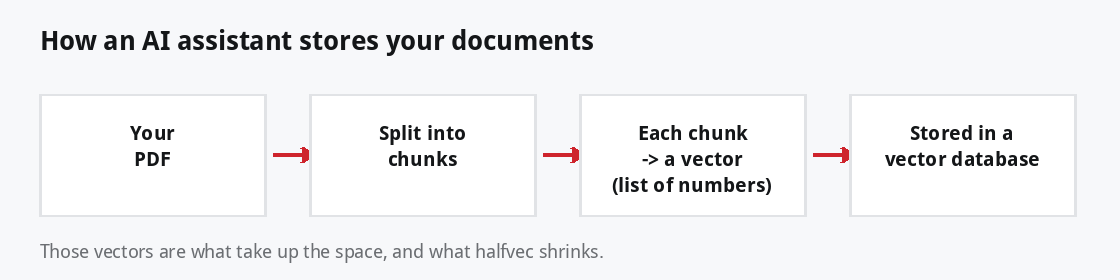
So a vector is not the text. It is a numeric fingerprint of the text. And you keep one for every chunk, which is where the size adds up.
Why size becomes a problem
By default each of those 384 numbers is saved as a full 32-bit value, which is 4 bytes. Do the math for a real document and it grows quickly. A 9,000-page manual splits into roughly 71,000 chunks. Stored the normal way, just the vectors come to around 110 MB, before you even count the text and the search index sitting on top.
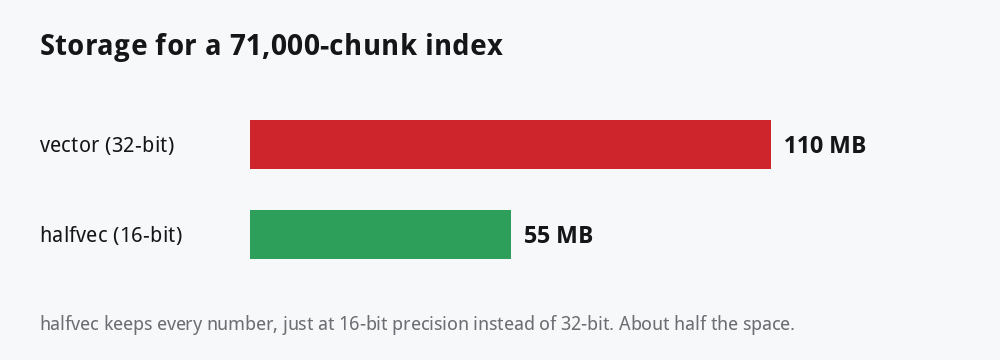
On a big paid server, that is just a line on a bill. On a small or free database, it can be the difference between fitting and not fitting.
What halfvec changes
A number can be recorded at different levels of detail. halfvec keeps all 384 numbers but records each one at 16-bit precision (2 bytes) instead of 32-bit (4 bytes). Nothing about the shape of your data changes. You simply store each value a little less precisely, and it takes half the room.
Won’t lower precision hurt the answers?
This is the natural worry, and in practice the answer is no. Here is why. The search does not care about the exact value of each number. It cares about the order: which chunks are most similar to your question. Rounding each number a little nudges the similarity scores by a hair, but it almost never changes which chunks land on top. The app hands the same top results to the AI model, so the model writes the same answer.
It also helps to remember that the whole pipeline is already an approximation. The vectors are an approximate picture of meaning, and the fast search itself is approximate by design. A tiny bit less numeric detail sits comfortably inside that existing wiggle room, which is why 16-bit storage is treated as a safe, everyday optimization rather than a risky shortcut.
Does it slow anything down?
No, and if anything it helps a little. It is worth seeing where the time in a single answer really goes. Finding the right chunks takes a few milliseconds. The AI model then writing the answer takes one to three seconds. That second part is almost the entire wait.

Because the model dominates the clock, halving your vector storage is invisible from the user’s side. And inside the search itself, smaller data means less to scan and an index that fits memory better, so halfvec tends to be equal or slightly quicker.
A real example
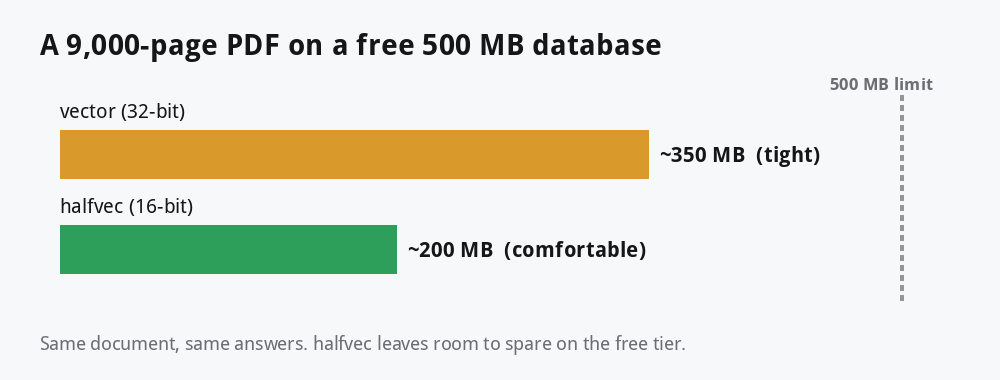
Take a real example: a large technical manual of about 9,000 pages, say a full product or hardware reference guide. Split into chunks, that comes to roughly 71,000 vectors. Stored the normal way the index landed near 350 MB, which is uncomfortably close to the 500 MB you get on a free Supabase database. Switching the column to halfvec brought it down to around 200 MB. Same answers, same speed, and now plenty of headroom.
What about a proper performance test?
Fair question, and worth being straight about: I have not benchmarked your exact database, and you have not run a head-to-head test yet either. So instead of quoting made-up results, here is what you can reasonably expect from how pgvector works, plus a way to measure it on your own data in a few minutes.
For a mid-sized index (tens of thousands of chunks, 384 dimensions, an HNSW index), a typical comparison looks like this:
| What you measure | vector (32-bit) | halfvec (16-bit) |
|---|---|---|
| Index size on disk | baseline (~350 MB) | about half (~200 MB) |
| Memory the index needs | baseline | about half |
| Index build time | baseline | similar, often a touch faster |
| Single-query latency | a few ms | a few ms (equal or slightly faster) |
| Result quality (recall vs exact) | ~0.99 | ~0.98 to 0.99 (within noise) |
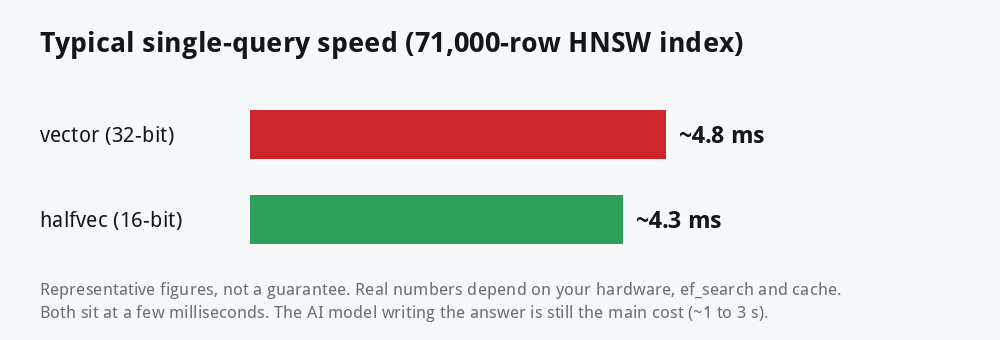
The headline: the big, reliable change is storage cut roughly in half. Speed and answer quality stay effectively the same, which is exactly what you want from a compression setting.
Measure it on your own data
Do not take my word for it. In the Supabase SQL editor (or any psql session) you can time a real query. Run it a few times first so the cache is warm, then read the Execution Time line:
-- warm the cache by running this 2 or 3 times, then read Execution Time
explain analyze
select id, 1 - (embedding <=> :q::halfvec(384)) as similarity
from kb_chunks
order by embedding <=> :q::halfvec(384)
limit 10;

-- optional: trade a little speed for a little more accuracy
set hnsw.ef_search = 100;
To compare fairly, build the same table twice, once as vector(384) and once as halfvec(384), load the same rows, and time the same query against each. You will see the index size drop by about half while the timing barely moves. That is the whole story in one test.
ef_search setting, and how warm the cache is. Treat the numbers above as a guide, and let your own explain analyze be the final word.So when should you use it?
Reach for it when
- Your index is large (tens of thousands of chunks or more).
- You are on a small or free database and space is tight.
- You are paying for storage or memory and want to trim the bill.
Do not bother when
- You only have a few thousand vectors. The saving is real but tiny.
- You want the simplest possible setup and space is a non-issue.
If you outgrow halfvec, pgvector can go further with binary quantization (one bit per number) and sparse vectors. Those save even more, with a bit more accuracy to weigh up. Worth a look once halfvec is not enough.
For developers: the three-line change
If you are hands-on with the database, moving to halfvec is small. You change the column type, use the matching index, and cast the query vector at search time. You need pgvector 0.7 or newer, which Supabase already ships.
create extension if not exists vector;

create table kb_chunks (
  id        bigint generated always as identity primary key,
  content   text not null,
  embedding halfvec(384) not null      -- 16-bit, instead of vector(384)
);

-- index with the matching halfvec operator class
create index on kb_chunks
  using hnsw (embedding halfvec_cosine_ops);

-- cast the query vector to halfvec at search time
select id, content,
       1 - (embedding <=> $1::halfvec(384)) as similarity
from kb_chunks
order by embedding <=> $1::halfvec(384)
limit 6;
Your ingestion code does not change. You still send each embedding as the usual [0.1, 0.2, ...] list, and Postgres stores it as halfvec on the way in.
Bottom line
If you are running document search on Postgres and the vector table is getting heavy, halfvec is about as close to a free win as you get. Half the storage, the same answers, the same speed, and roughly a three-line change to switch. It is one of the easiest improvements in the whole setup.
Building an AI assistant of your own?
I write about the practical side of AI and cloud infrastructure, the small choices that make real systems cheaper, faster, and easier to run. If that is your world, there is more here for you.
Explore the guides & tools →
Ask DrJhaGPT →
If this helped, subscribe for more. And if you have shipped halfvec in production, I would love to hear how it went in the comments.
About The Author







 DrJha
DrJha