

VCAP-VKS Exam Series · Part 35 · VMware Cloud Foundation 9.0
Thirty-four parts of this series went through the 3V0-24.25 blueprint one objective at a time. Reading is not what gets you through an advanced exam, so this part is the other half: a workbook of 170 tasks in build order. Start at task 1 with nothing, finish at task 170 having built, operated, broken and repaired a vSphere Kubernetes Service environment. Each task carries the objective it covers.
FirstWhat this exam actually is
Worth being precise about, because it changes how you practise. Exam 3V0-24.25 leads to VMware Certified Advanced Professional – VKS, and the published guide gives these facts:
| Item | Detail |
|---|---|
| Questions | 60 |
| Time | 135 minutes, including extra time for non-native English speakers |
| Pass mark | 300 out of 500, scaled |
| Question types | Multiple choice, multiple selection, build-list, matching, drag-and-drop, point-and-click, hot-area |
| Delivery | Proctored, through Pearson VUE |
| Product version | VCF 9.0 |
| Candidate profile | 6 to 12 months working with VKS components |
Source: the official exam guide for 3V0-24.25, published by Broadcom. Read it yourself before you book, and read it again a week before you sit. Everything below is written against the objectives in that document.
Two quirks in the published blueprint are worth knowing, because your score report refers to objective numbers. There are two objectives numbered 2.5, one for Kubernetes releases and content libraries and one for CNIs, NSX objects and TLS. Section 3 jumps from 3.4 to 3.6, with no 3.5. In the workbook below I call the second 2.5 by the label 2.5b so the mapping stays unambiguous.
SecondWhere to actually run these tasks
A nested VCF 9 lab is not a laptop exercise. Single-host nested builds that people actually run tend to start around 192 to 256 GB of memory and several terabytes of flash, and Holodeck asks for more again. Check current sizing before you buy anything. Three realistic routes:
- VMware Hands-on Labs, free, in a browser, nothing to install.
HOL-2633-01-VCF-Lis the one to do first, because it is on 9.0 and covers Supervisor, namespaces, VM Service, vSphere Pods and VKS clusters in one sitting. For the deepest Kubernetes content go toHOL-2702-01-VCF-L, which is on 9.1. Note that VMware is retiring the VCF 9.0 lab series and replacing it: the platform labHOL-2610-01-VCF-Lis nowHOL-2704-01-VCF-L, and the operations labHOL-2610-03-VCF-Lis nowHOL-2711-01-VCF-L. Search the catalogue by topic rather than by code, because these numbers are mid-migration. - A work or customer environment, for whatever your role already authorises you to do.
- Your own laptop, for the tasks that are plain Kubernetes rather than VCF. That is a surprisingly large share: sections I to P below are mostly reproducible on a small k3d or kind cluster, and practising ingress, certificates, registry secrets, volume expansion, Velero, autoscaling and a service mesh there costs nothing.
ThirdOne table to learn before anything else
Your workload networking choice decides which platform load balancers are available to you. Several objectives in sections 1, 2 and 3 rest on this relationship, so learn it until you can write it from memory.
| Workload network | Load balancer options | Note |
|---|---|---|
| vSphere Distributed Switch | Foundation Load Balancer or Avi | No NSX. A load balancer is still required for the Kubernetes API and workload traffic. |
| NSX segments | NSX load balancer or Avi | Each namespace consumes NSX objects, so object count grows with namespace count. |
| NSX VPC | Avi, or the NSX Edge load balancer when Avi is not detected | Default and recommended for the full stack, and the supported network stack for VCF Automation. |
Foundation Load Balancer is new in VCF 9: a native layer 4 load balancer, one or two virtual machines in an active and passive pair, included with both VMware vSphere Foundation and VCF entitlements, available only with vDS networking, and deliberately limited in scale and in services. Given a networking model, you can strike out any answer whose load balancer is not in that row, which is the fastest way I know to narrow a networking question.
Workbook170 tasks, in build order
Sections A to P build the environment and then take it apart. Section Q is the whole thing again from nothing, against the clock. Numbers in grey at the right are the exam objectives, so a weak score report points you straight back at a group of tasks.
Tasks in section A are written on paper. Everything from B onward is performed. Where your environment cannot do a task, write the procedure out instead and move on; procedures are what build-list questions test.
Write each answer down. One page total.
- 1A customer has no NSX licence. State the workload network and the load balancer you will use for the Supervisor.1.3›
- 2State the load balancer that will be used on an NSX VPC deployment where Avi has not been deployed.2.2›
- 3List every valid workload network and load balancer pairing available in VCF 9.0.1.3›
- 4A design must publish 300 virtual services. State the Avi Controller size and the minimum number of Service Engines per Supervisor.3.1›
- 5State what changes about Supervisor functionality if the Avi Controller is deployed in the smallest size.3.1›
- 6Draw the ingress path and the egress path for a pod in a VPC-backed namespace. Name every hop.3.3›
- 7State how a workload in a namespace is given a predictable source address when it reaches an external database.3.3›
- 8For each of these, decide VM or container and give one line of justification: a per-socket licensed legacy application, a stateless web front end, a GPU training job, a vendor appliance.1.1›
- 9State what a zonal Supervisor across three vSphere Zones protects against, and what it requires of your storage policies.1.3›
- 10List everything that must exist in a vSphere Namespace before a developer can deploy a virtual machine into it.2.1›
- 11State which decisions made at Supervisor enablement cannot be changed afterwards without redeployment.3.4›
- 12Write the enablement sequence for a Supervisor as an ordered list of steps, from prerequisites to first namespace.3.4›
- 13Enable a Supervisor on a single vSphere cluster using vDS networking and the Foundation Load Balancer.4.1›
- 14Record the management network, workload network, and the ingress and egress ranges you assigned.2.2›
- 15Verify the Supervisor is running and record how many control plane virtual machines were created.2.1›
- 16Enable a Supervisor using NSX segment networking with the NSX load balancer.4.1›
- 17Enable a Supervisor using NSX VPC networking with Avi.4.1›
- 18Configure a zonal Supervisor across three vSphere Zones.4.2›
- 19Configure a single-node Supervisor suitable for an edge site.2.1›
- 20Download the Kubernetes CLI tools from the Supervisor and install both the kubectl vSphere plugin and the VCF CLI.4.5›
- 21Create a VCF CLI context to the Supervisor and confirm you can list namespaces.4.5›
- 22Log in to the same Supervisor using kubectl vsphere login and compare the contexts you now hold.4.5›
- 23Change the Supervisor control plane size and record what the change affects.2.1›
- 24Locate the Supervisor certificate and record where it would be replaced.2.5b›
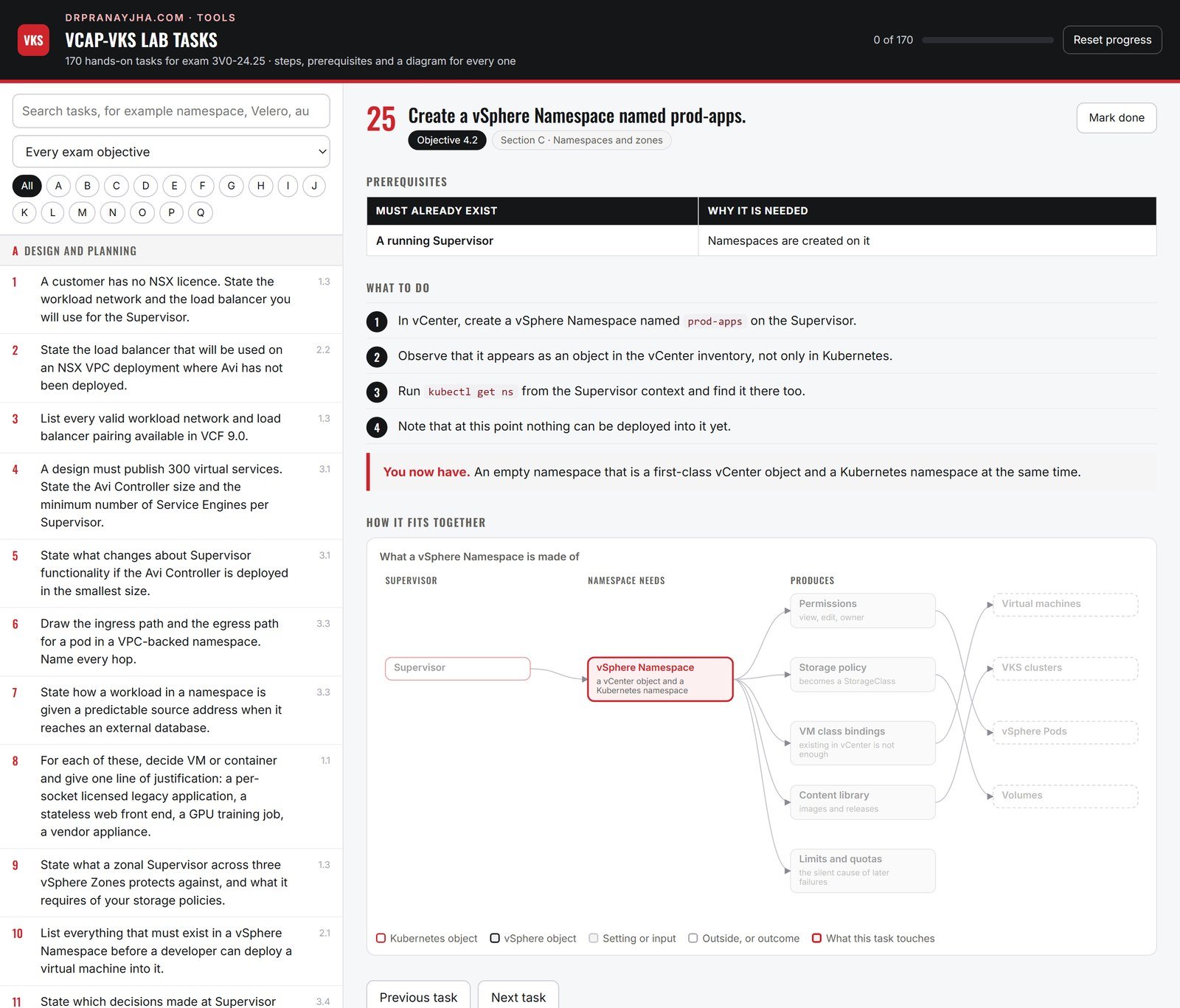
- 25Create a vSphere Namespace named prod-apps.4.2›
- 26Assign a storage policy to prod-apps and confirm the resulting StorageClass is visible from kubectl.2.3›
- 27Bind two VM classes to prod-apps, one small and one large.4.2›
- 28Associate a content library with prod-apps.2.5›
- 29Apply a CPU, memory and storage limit to prod-apps.4.2›
- 30Apply an object limit that caps the number of VKS clusters allowed in prod-apps.4.2›
- 31Create a second namespace named dev-apps with a different storage policy and a single VM class.4.2›
- 32From the Resources view of prod-apps, list every object type a namespace can contain.4.2›
- 33Verify that a VM class bound to prod-apps is not usable from dev-apps.5.2›
- 34Delete dev-apps and record what happened to the objects inside it.4.2›
- 35Recreate dev-apps and confirm it is placed across your zones as expected.4.2›
- 36Grant a user view permission on prod-apps and confirm what they can and cannot do.2.4›
- 37Grant a second user edit permission on prod-apps.2.4›
- 38Grant a group owner permission on prod-apps.2.4›
- 39Configure an external identity provider as the identity source and log in as a federated user.2.4›
- 40Log in to a VKS cluster as a vCenter Single Sign-On user with kubectl.2.4›
- 41Retrieve the cluster administrator kubeconfig from the namespace secret and use it to access the cluster.2.4›
- 42Create a Kubernetes RoleBinding inside a VKS cluster that grants a Single Sign-On user the edit role in one namespace only.2.4›
- 43Apply a Pod Security policy or admission configuration to a VKS cluster namespace and prove a privileged pod is refused.2.5b›
- 44Create a subscribed content library for Kubernetes releases and synchronise it.2.5›
- 45List every Kubernetes release now available to prod-apps.2.5›
- 46Create a local content library and import a Kubernetes release into it manually.2.5›
- 47Attach the local library to a namespace and confirm the release is offered there.2.5›
- 48Document the full sequence for making Kubernetes releases available at an air-gapped site.2.5›
- 49Identify a Kubernetes release that is not compatible with your current Supervisor version and record how you can tell.5.2›
- 50Create a content library for virtual machine images and import one image for use with VM Service.2.5›
- 51Create a virtual machine in prod-apps through VM Service using a YAML manifest.4.3›
- 52Attach a second network interface and a persistent volume to that virtual machine.4.3›
- 53Set a cloud-init user data block on a VM Service virtual machine so it is configured at first boot.4.3›
- 54Expose the VM Service virtual machine through a load balancer service.4.12›
- 55Deploy a vSphere Pod in prod-apps.4.3›
- 56Record where the vSphere Pod runs and where a VKS cluster pod runs, and state the difference.1.1›
- 57Delete the vSphere Pod and confirm the host-level object is removed.4.3›
- 58Attempt to create a virtual machine using a VM class that is not bound to the namespace, and record the error.5.2›
- 59List the Supervisor Services currently installed.4.4›
- 60Download and install the Harbor Supervisor Service.4.4›
- 61Log in to Harbor and create a project.4.4›
- 62Install the Contour Supervisor Service.4.4›
- 63Install the External DNS Supervisor Service and configure it against a DNS zone.4.4›
- 64Install the Velero Supervisor Service.4.4›
- 65Install the CA Cluster Issuer service and issue a certificate from it.2.5b›
- 66Upgrade one Supervisor Service to a newer version.4.10›
- 67Uninstall one Supervisor Service and confirm its objects are removed.4.4›
- 68Record where you check that a service version is compatible with your Supervisor version.4.10›
- 69Write a VKS cluster manifest for a cluster named vks-01 with one control plane node and two workers.4.14›
- 70Provision vks-01 in prod-apps using kubectl.4.5›
- 71Monitor the provisioning and list the cluster, machine and virtual machine objects as they appear.4.5›
- 72Log in to vks-01 and confirm all nodes are Ready.4.5›
- 73Export a kubeconfig for vks-01 using the VCF CLI cluster plugin.4.5›
- 74Provision a second cluster vks-02 using the VCF CLI rather than kubectl.4.5›
- 75Provision a cluster with three control plane nodes and record the difference in the machine objects.4.5›
- 76Provision a cluster with two node pools that use different VM classes.4.5›
- 77Provision a cluster that uses Calico instead of the default CNI.2.5b›
- 78Provision a cluster with a specified default StorageClass.4.11›
- 79Provision a cluster with an additional trusted certificate authority supplied in the specification.2.5b›
- 80Delete vks-02 and confirm every object it created has been removed.4.5›
- 81Expose an application in vks-01 using a Service of type LoadBalancer and record the address assigned.4.12›
- 82Deploy an ingress controller in vks-01 and publish an application through it over HTTPS.4.12›
- 83Create a NetworkPolicy that denies all traffic to a namespace, then allow one source.2.5b›
- 84Replace the certificate presented by an application with one signed by your own certificate authority.2.5b›
- 85Prove that a pod in vks-01 can resolve cluster DNS and reach an external address.5.2›
- 86Record which load balancer served your LoadBalancer service and what its limits are.3.1›
- 87Configure egress so that traffic leaving the namespace uses a known source address.3.3›
- 88Deploy a workload that requires layer 7 routing rules and confirm whether your load balancer can serve it.3.1›
- 89List the StorageClasses available inside vks-01 and state where each came from.2.3›
- 90Create a PersistentVolumeClaim that binds dynamically, and attach it to a pod.4.11›
- 91Write a file to the volume, delete the pod, recreate it, and prove the data survived.4.11›
- 92Expand the PersistentVolumeClaim and confirm the filesystem inside the pod grew.4.11›
- 93Create a static PersistentVolume and bind a claim to it by hand.4.11›
- 94Create a claim that requests a StorageClass that does not exist, and record the event produced.5.2›
- 95Change the reclaim policy on a volume and record what now happens when the claim is deleted.4.11›
- 96Add a second storage policy to prod-apps and verify a new StorageClass appears.2.3›
- 97In a zonal Supervisor, deploy a workload to a zone whose datastores do not match the storage policy, and record the result.2.3›
- 98Push a container image to Harbor.4.8›
- 99Create a registry secret in a VKS namespace and deploy a workload that pulls from Harbor using it.4.8›
- 100Delete the registry secret and record the exact pod event produced.5.3›
- 101Deploy a workload from a registry whose certificate authority is not trusted, and record the error.5.3›
- 102Make that registry trusted for every node of the cluster and prove the pull now succeeds.5.3›
- 103Add a package repository to vks-01 and list the packages it offers.4.8›
- 104Install a standard package into vks-01 and verify it is running.4.8›
- 105Upgrade that package to a newer version.4.8›
- 106Uninstall the package and confirm its resources are gone.4.8›
- 107Deploy an application with a Deployment, a Service and an Ingress in one manifest, and reach it from outside the cluster.4.12›
- 108Scale the worker node pool of vks-01 from two nodes to four.4.5›
- 109Scale the pool back to two and record which nodes were removed.4.5›
- 110Change the VM class used by the worker node pool and record whether nodes were replaced or edited in place.4.6›
- 111Perform a rolling update of vks-01 to a newer Kubernetes release.4.6›
- 112During the update, record the point at which an old node is removed.4.6›
- 113Enable the cluster autoscaler on a node pool with a minimum of two and a maximum of five nodes.4.7›
- 114Create enough pending workload to force the autoscaler to add a node.4.7›
- 115Remove the workload and confirm the autoscaler scales the pool back down.4.7›
- 116Upgrade the autoscaler configuration to a different minimum and maximum.4.7›
- 117Deploy a pod with no resource requests, make it unschedulable, and record why the autoscaler does not help.4.7›
- 118Add a HorizontalPodAutoscaler to a deployment and drive load into it until it scales.5.5›
- 119Upgrade the Supervisor itself and record the order in which components are updated.4.10›
- 120Configure Velero against external S3-compatible object storage.4.13›
- 121Back up a single namespace in vks-01, including its persistent volumes.4.13›
- 122Delete that namespace and restore it from the backup.4.13›
- 123Restore the same backup into a namespace with a different name.4.13›
- 124Create a scheduled backup that runs nightly and confirm the schedule object exists.4.13›
- 125Point the backup location at a bucket that does not exist and record how the failure appears.4.13›
- 126Create a snapshot in a VKS cluster and restore from it.4.9›
- 127State what a snapshot does not protect you against, and which task in this section does.4.9›
- 128Install a service mesh into vks-01.3.6›
- 129Enable the mesh for one namespace and confirm what was injected into each pod.3.6›
- 130Prove that traffic between two services is now mutually authenticated.3.6›
- 131Shift traffic between two versions of a service using the mesh.3.6›
- 132State what the mesh gives you that your ingress controller does not.3.6›
Create each fault yourself where you can, then diagnose it from the symptom alone.
- 133A VKS cluster stays in Creating. Find the blocking condition and state the cause.5.1›
- 134Remove the VM class binding from a namespace, provision a cluster, and diagnose the failure.5.2›
- 135Remove the storage policy from a namespace, create a claim, and diagnose the failure.5.2›
- 136Request a Kubernetes release that is not in the content library and diagnose the failure.5.2›
- 137A namespace will not reach a ready state. Identify where you look first.5.1›
- 138A LoadBalancer service has no external address. Identify the cause and state which load balancer is in play.5.1›
- 139Exhaust the ingress address range and record how the next service fails.5.1›
- 140A pod cannot resolve DNS inside a VKS cluster. Diagnose it.5.2›
- 141A pod cannot reach the internet but can reach other pods. Diagnose it.5.2›
- 142Diagnose an ImagePullBackOff caused by a missing registry secret.5.3›
- 143Diagnose an ImagePullBackOff caused by an untrusted certificate authority.5.3›
- 144Diagnose an application failing with a certificate error while image pulls on the same node succeed.5.3›
- 145Collect the logs of the controllers responsible for cluster lifecycle on the Supervisor.5.1›
- 146Open a shell on a VKS cluster node using the node SSH key from the namespace secret.5.1›
- 147From a node, inspect the running containers and the images present.5.2›
- 148From a node, find the log that shows whether the node finished its initial configuration.5.2›
- 149Stall a cluster upgrade by removing available capacity, then recover it.5.4›
- 150Stall a cluster upgrade with a PodDisruptionBudget, then recover it.5.4›
- 151A Supervisor Service upgrade fails. State what you check before retrying.4.10›
- 152Single Sign-On login to a VKS cluster fails. Regain cluster administrator access.5.1›
- 153Produce a full diagnostic bundle for one namespace in a VKS cluster.5.1›
- 154Identify the three pods consuming the most memory across all namespaces.5.5›
- 155Find a container that is being CPU throttled while its node has spare capacity, and correct it.5.5›
- 156Add accurate requests and limits to a workload that has none, and show the scheduling behaviour change.5.5›
- 157Find a workload that cannot be scheduled and state whether the fix is the pod, the node pool, or the VM class.5.5›
- 158Deploy monitoring into a VKS cluster and produce a chart of node and pod utilisation.5.5›
- 159Forward VKS cluster logs to an external system.5.5›
- 160Using your own data, recommend a node pool size and VM class for the workload you have been running.5.5›
Do this in one sitting, from nothing, in under two hours. Repeat until it is routine.
- 161Enable a Supervisor with a stated networking model and load balancer.4.1›
- 162Create a namespace with a storage policy, two VM classes, a content library and a quota.4.2›
- 163Grant one user edit access to the namespace.2.4›
- 164Provision a VKS cluster with two node pools and a trusted certificate authority.4.5›
- 165Install Harbor and push an image to it.4.4›
- 166Deploy an application from that image with a persistent volume and an ingress, reachable over HTTPS.4.12›
- 167Enable autoscaling on the worker node pool.4.7›
- 168Back the application namespace up to external object storage.4.13›
- 169Upgrade the cluster to a newer Kubernetes release with no loss of service.4.6›
- 170Delete the namespace and restore the application from backup.4.13›
How to use itFour weeks, if that is what you have
Working at roughly ninety minutes on a weekday and three hours at the weekend, this divides cleanly:
| Week | Sections | Focus |
|---|---|---|
| 1 | A to E | Design decisions, Supervisor enablement, namespaces, identity, content libraries |
| 2 | F to J | Workloads, Supervisor Services, cluster provisioning, networking, storage |
| 3 | K to N | Registry and packages, lifecycle and autoscaling, backup, service mesh |
| 4 | O to Q | Troubleshooting drills, optimisation, then section Q twice against the clock |
Two pieces of advice about section O. Create each fault yourself before you diagnose it, because a fault you built is a fault you understand. And when an exam item asks for the first step, prefer the action that gathers evidence over the action that changes state: describe before you delete, read logs before you restart.
Work through it online: the interactive workbook. All 170 tasks with prerequisites, steps and a diagram for each one, searchable, filterable by section or objective, and it keeps your ticks.
Or take it with you: download the PDF (170 tasks, 8 pages). Print it, tick tasks off, and take the gaps back to the matching part of this series. Thirty-four earlier parts explain the objectives behind every task number here.
Sitting the VCF Administrator exam as well? Five of its objectives are the same as objectives 4.1, 4.4, 4.6, 4.8 and 4.10 here, word for word. Practise the rest with the VCAP-VCF Administrator lab tasks.
VKS is one of the five technology VCAPs. See where it sits in the complete VCF certification roadmap: all thirteen certifications with their codes and blueprints, the three year validity, and the order worth taking them in.
Exam details are from the published Broadcom exam guide for 3V0-24.25, last updated 14 November 2025, and are accurate at the time of writing. Broadcom revises blueprints and retires Hands-on Lab SKUs regularly, so confirm both before you book. Practice tasks here are my own, written from the published objectives; they are not exam content.
About The Author








 DrJha
DrJha