

VCAP-VCF Administrator · Exam 3V0-11.26 · VMware Cloud Foundation 9
Every objective in exam 3V0-11.26 is an administration objective. Read its blueprint and all sixty of them sit under Install, Configure, Administrate. This is an exam about operating VMware Cloud Foundation 9, which means your preparation should be hands on the product rather than time with the documentation. Hence this workbook of 262 tasks.
FirstWhat this exam actually is
Facts from the published exam guide, last updated 18 August 2026:
| Item | Detail |
|---|---|
| Exam | 3V0-11.26, leading to VMware Certified Advanced Professional – VMware Cloud Foundation Administrator |
| Questions | 60 |
| Time | 135 minutes, including extra time for non-native English speakers |
| Pass mark | 300 out of 500, scaled |
| Question types | Multiple choice, multiple selection, build-list, matching, drag-and-drop, point-and-click, hot-area |
| Delivery | Proctored, through Pearson VUE |
| Product version | VCF 9 |
| Testable objectives | 60, numbered 4.1 to 4.60 |
Source: the official exam guide for 3V0-11.26, published by Broadcom. Read it yourself before you book, and read it again a week before you sit. Everything below is written against the objectives in that document.
Worth understanding why that is, because it is easy to misread. VMware now uses one standard five-section frame for every exam blueprint, and an exam fills only the sections its objectives belong to. For 3V0-11.26 that is Install, Configure, Administrate, so objectives 4.1 to 4.60 all sit there and sections 1, 2, 3 and 5 are marked as having no testable objectives in this version.
Read that as a statement about emphasis, not about size. Design and troubleshooting are hardly absent from the job, they simply belong to their own exams in the same track: VCAP-VCF Architect, 3V0-12.26 covers plan and design, and VCAP-VCF Support, 3V0-13.26 covers troubleshooting. Each exam owns one part of the role, which keeps all three focused.
So what 3V0-11.26 asks is whether you can run the platform, and running it means storage, compute, networking, automation, operations and Kubernetes. One section, the whole product.
SecondWhere the objectives actually are
Counting the sixty objectives by subject tells you where to spend your weeks. I counted them so you do not have to:
| Area | Objectives | How many |
|---|---|---|
| vSAN and workload domain storage | 4.1 to 4.9 | 9 |
| vSphere: settings, VMs, networking, performance, security | 4.10 to 4.18 | 9 |
| Provider Management portal | 4.19 to 4.23 | 5 |
| VCF Automation organizations | 4.24 to 4.29 | 6 |
| Supervisor and vSphere Kubernetes Service | 4.30 to 4.34 | 5 |
| VCF Operations | 4.35 to 4.43 | 9 |
| Fleet lifecycle, identity and configuration drift | 4.44 to 4.47 | 4 |
| NSX | 4.48 to 4.60 | 13 |
Two things jump out of that table. NSX is the single largest area, at thirteen objectives, which is more than vSAN and more than Operations. And VCF Automation accounts for eleven once you add the Provider portal to the organizations, which is more than vSAN and more than Operations. If your day job is storage and compute, those two areas are where your preparation time belongs, regardless of how comfortable the vSAN objectives look.
ThirdWhere to run these tasks
A full VCF 9 fleet with vSAN, NSX, Automation and Operations is not a laptop exercise, and this exam touches all of it. Three honest routes:
- A work or customer environment, for whatever your role already authorises. This exam rewards it more than most, because much of the blueprint is day 2 administration on a running fleet rather than greenfield deployment.
- VMware Hands-on Labs, free and in a browser, for the areas you cannot reach at work. Check the current catalogue for VCF 9 labs covering storage, networking, automation and operations, and confirm the version each one runs before you rely on it.
- A nested lab, if you have the hardware. Be realistic: a nested build that exercises vSAN, NSX edges, Automation and Operations together needs serious memory and fast storage, and sizing guidance for a single-host nested VCF build starts in the region of 192 to 256 GB of memory and several terabytes of flash.
Where your environment cannot do a task, do not skip it. Write the procedure out instead, in order, and move on. Procedures written in order are exactly what a build-list question tests, and writing one costs you five minutes.
Workbook262 tasks, in build order
Sections A to T build a fleet and then operate it, in the order you would actually build one: storage first, because everything lands on it, then compute, then the network, then tenancy, then the Kubernetes layer, then operations and lifecycle. Section U is a set of timed drills. Numbers in grey at the right are the objectives, so a weak score report points you back at a group of tasks.
Section A is written on paper, before you change anything. Everything from B onward is performed.
Written tasks. One or two pages in total, done before anything is changed.
- 1Draw your fleet on one page: VCF Operations, VCF Automation, VCF Fleet Management, the Identity Broker, and every workload domain with its clusters. Mark which are management and which are workload.4.35›
- 2For each workload domain, record the storage it uses and whether that storage is vSAN, VMFS on FC, NFS, or vVols.4.3›
- 3State which VCF components are upgraded as a fleet and which are upgraded per domain.4.45›
- 4List the identity sources in use and record which component each one authenticates: Provider portal, organizations, vCenter, NSX.4.46›
- 5For one cluster, write down the current storage policy applied to its virtual machines and what that policy actually guarantees.4.9›
- 6State the difference between an Organization and a Project in VCF Automation, in one sentence each.4.22›
- 7State what a Namespace Class controls that a Project does not.4.28›
- 8Write the difference between Business Intent and Operational Intent in VCF Operations, and give one example of each.4.41›
- 9List which of your clusters could survive the loss of a site today, and what makes the rest unable to.4.2›
- 10Record your current capacity headroom per cluster from VCF Operations, and the date it projects you run out.4.38›
From here on everything is performed. Build the storage layer first, because everything else lands on it.
- 11Commission a set of hosts into the fleet and verify they appear as unassigned, ready for a domain.4.1›
- 12Deploy a new VI workload domain with a vSAN cluster as its first cluster.4.1›
- 13Record the vSAN mode used (ESA or OSA) and state what decided it.4.1›
- 14Add a second cluster to the same workload domain, again on vSAN.4.1›
- 15Deploy a workload domain cluster backed by VMFS on Fibre Channel instead of vSAN.4.3›
- 16Deploy a workload domain cluster backed by NFS.4.3›
- 17For the non-vSAN cluster, record what the platform does not manage for you that it would have managed on vSAN.4.3›
- 18Add a host to an existing vSAN cluster and confirm its disks are claimed as expected.4.1›
- 19Remove a host from a vSAN cluster cleanly, using the correct data evacuation mode.4.7›
- 20State the three data evacuation options on host maintenance mode and when each one is the right choice.4.7›
- 21Expand a vSAN cluster to the point where the default storage policy can no longer be satisfied, and record the error you get.4.9›
Storage policy is the control surface for everything above it. Work through this section before you build any workload.
- 22Create a vSAN storage policy with RAID-1 mirroring and failures to tolerate of 1.4.9›
- 23Create a second policy with RAID-5 erasure coding and record the minimum host count it needs.4.9›
- 24Create a RAID-6 policy and record its minimum host count.4.9›
- 25Compare the usable capacity reported for the same virtual machine under RAID-1, RAID-5 and RAID-6.4.9›
- 26Apply a new policy to a running virtual machine and watch the resynchronisation that follows.4.9›
- 27Create a policy that pins a workload to a specific storage tier or cluster using tags.4.9›
- 28Set a policy with a stripe width greater than 1 and state what it changes about object placement.4.9›
- 29Create a policy that reserves object space, and state the effect on reported free capacity.4.9›
- 30Change the default storage policy of a datastore and record which virtual machines are affected and which are not.4.9›
- 31Deliberately apply a policy a cluster cannot satisfy, read the compliance status, then correct it.4.9›
Operate the cluster you just built. Create each condition yourself before you fix it.
- 32Put a host into maintenance mode with full data migration and record how long evacuation takes.4.7›
- 33Read the vSAN Skyline Health checks and clear every warning you can.4.7›
- 34Run a vSAN proactive test and record what it proves and what it does not.4.7›
- 35Find the resynchronising objects view and state the three reasons an object resynchronises.4.7›
- 36Locate a virtual machine that is non-compliant with its policy and explain why from the object layout.4.7›
- 37Enable and then read vSAN performance service statistics for a cluster, a host and a virtual machine.4.7›
- 38Simulate a disk failure and watch the rebuild, recording the delay before rebuild begins and where that timer is set.4.7›
- 39Adjust the object repair timer and state why you would lengthen it.4.7›
- 40Read the capacity view and account for the difference between used, usable and reserved.4.7›
- 41Turn on and then interpret vSAN capacity reservations, both operations reserve and host rebuild reserve.4.7›
- 42Upgrade the on-disk format of a vSAN cluster and record what cannot be undone.4.7›
A stretched cluster is a different product from a standard cluster in day 2 terms. Build one and then operate it.
- 43Deploy a vSAN witness appliance and record the sizing you chose.4.2›
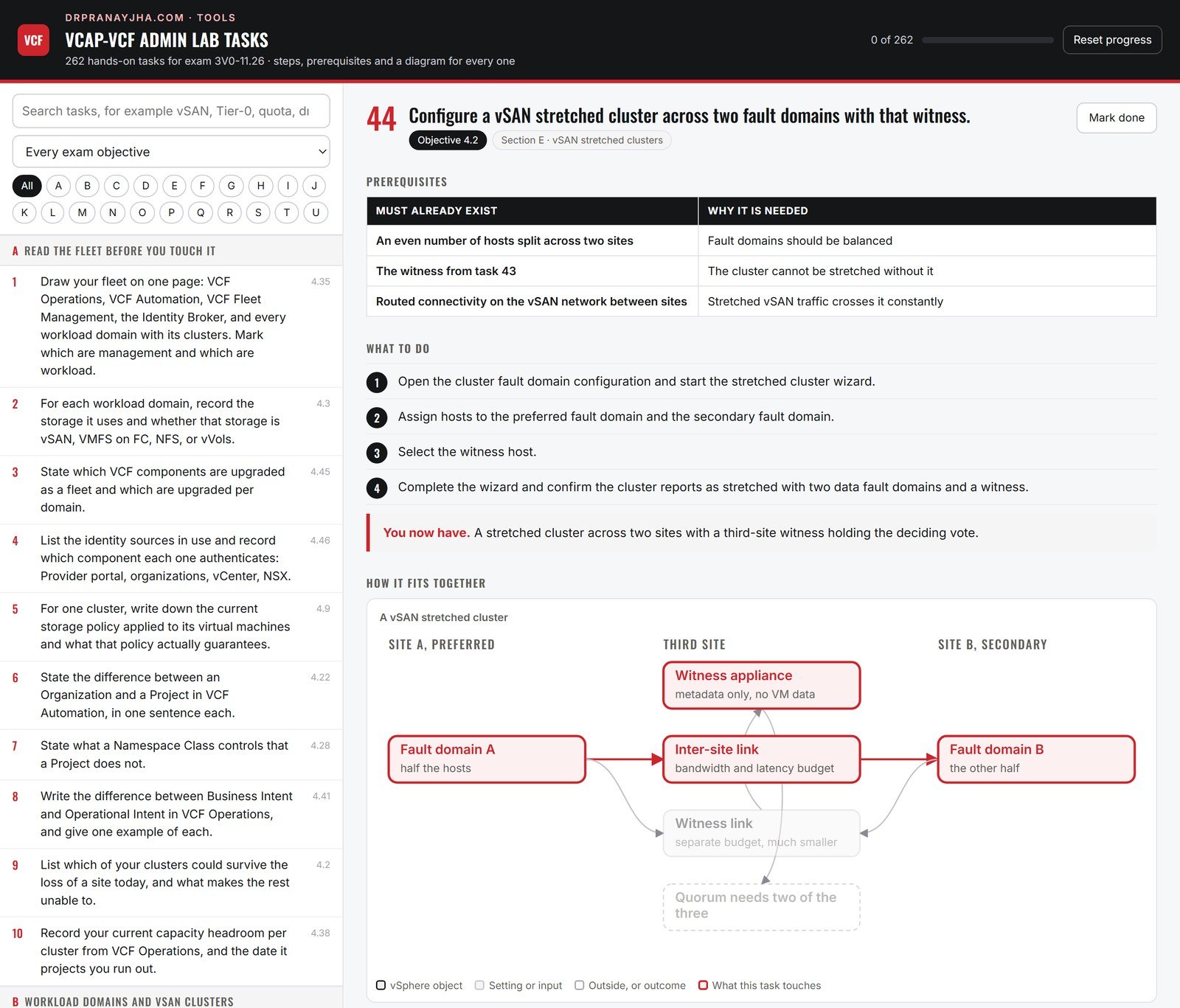
- 44Configure a vSAN stretched cluster across two fault domains with that witness.4.2›
- 45Record the bandwidth and latency requirements for the inter-site link and for the witness link.4.2›
- 46Create a storage policy with site disaster tolerance and secondary failures to tolerate, and apply it.4.2›
- 47State what happens to a virtual machine whose policy has site disaster tolerance set to none.4.2›
- 48Configure host and virtual machine affinity so a workload runs at a preferred site.4.8›
- 49Fail the witness and record what still works and what does not.4.8›
- 50Fail the preferred site and record the recovery behaviour of the virtual machines.4.8›
- 51Restore the failed site and watch the resynchronisation back.4.8›
- 52Change the preferred fault domain and record what moves.4.8›
- 53Replace a witness appliance on a running stretched cluster.4.8›
- 54Read the stretched cluster health checks and explain every one that is specific to stretching.4.8›
Capacity sharing, storage clusters, encryption and data protection, in that order.
- 55Configure vSAN cross-cluster capacity sharing between two clusters in the same domain.4.4›
- 56Mount a remote vSAN datastore on a client cluster and run a workload against it.4.4›
- 57Record the limits on how many client clusters a server cluster may serve.4.4›
- 58Build a vSAN storage cluster that provides capacity to compute-only clusters.4.4›
- 59State what a compute cluster consuming a vSAN storage cluster still needs locally.4.4›
- 60Enable vSAN data-at-rest encryption on a cluster with a key provider already configured.4.5›
- 61Configure a native key provider and record where the backup of its key must be kept.4.5›
- 62Enable vSAN data-in-transit encryption and record its performance cost.4.5›
- 63Perform a shallow rekey and then a deep rekey, and state the difference.4.5›
- 64Enable vSAN data protection and create a protection group with a snapshot schedule.4.6›
- 65Restore a virtual machine from a vSAN data protection snapshot.4.6›
- 66Clone a virtual machine from a protection group snapshot into a new virtual machine.4.6›
- 67State how vSAN data protection differs from a backup product, in one sentence.4.6›
The day-to-day surface of a workload domain.
- 68Configure an advanced setting on a cluster through the platform rather than directly on a host, and record why that matters in VCF.4.10›
- 69Configure DRS automation level and a migration threshold on a cluster, and state the effect of each step of the threshold.4.10›
- 70Configure vSphere HA admission control and record how much capacity it reserves.4.10›
- 71Set a host isolation response and explain the condition that triggers it.4.10›
- 72Create a virtual machine override that exempts one workload from a cluster setting.4.11›
- 73Deploy a virtual machine from a content library template into a workload domain.4.11›
- 74Hot-add CPU and memory to a running virtual machine and record what the guest actually sees.4.11›
- 75Configure a virtual machine with a reservation, a limit and shares, and state what each one does under contention.4.11›
- 76Create a VM-VM anti-affinity rule and a VM-host affinity rule, and state which one DRS may violate.4.11›
- 77Migrate a virtual machine between clusters with vMotion, then between datastores with Storage vMotion.4.11›
- 78Take a snapshot, grow the virtual machine, then consolidate and record the disk impact.4.11›
- 79Configure a virtual machine for high latency sensitivity and record what the platform reserves as a result.4.13›
Optimisation tasks. Measure first, change one thing, measure again.
- 80Find CPU ready time for a virtual machine and state the threshold at which it becomes a problem.4.13›
- 81Create CPU contention deliberately by overcommitting a cluster, then measure co-stop on a wide virtual machine.4.13›
- 82Right-size an over-provisioned virtual machine down and measure the change in ready time.4.13›
- 83Configure CPU affinity on a virtual machine, record what it breaks, then remove it.4.13›
- 84Explain NUMA placement for a virtual machine wider than one NUMA node, and show where to read its NUMA home node.4.13›
- 85Configure a virtual machine to be NUMA-aware with the correct cores-per-socket setting.4.13›
- 86Find memory ballooning, compression and swapping on a host and state the order in which they occur.4.14›
- 87Create memory pressure on a cluster and watch the reclamation techniques engage in order.4.14›
- 88Set a memory reservation on a critical virtual machine and record the effect on its swap file.4.14›
- 89Read the active, consumed and granted memory counters for a virtual machine and explain the difference.4.14›
- 90Check the vCenter appliance resource usage and state its deployment size and what that size limits.4.15›
- 91Increase the vCenter appliance size and record the steps and the outage involved.4.15›
- 92Review vCenter database health and the appliance file system usage, and clear what can be cleared.4.15›
- 93Configure vCenter appliance monitoring and state the three things most likely to degrade it.4.15›
Know where each number comes from before you trust it.
- 94Build a custom performance chart for a cluster showing CPU ready, memory ballooning and disk latency together.4.16›
- 95Set the statistics collection level and record the cost of raising it.4.16›
- 96Create a vCenter alarm on datastore usage and trigger it deliberately.4.16›
- 97Configure an alarm action that sends mail or runs a script, and verify it fired.4.16›
- 98Read esxtop on a host and identify CPU ready, memory state and disk latency fields.4.16›
- 99Find the storage latency figures for a datastore and separate device latency from kernel latency.4.16›
- 100Review the vCenter task and event logs for one change and reconstruct who did what.4.16›
- 101Forward ESX host logs to VCF Operations for Logs and prove a log line arrives.4.16›
- 102Build a log query that finds every host that entered maintenance mode in the last day.4.16›
- 103Export a performance report for a cluster over a week and state what you would show a capacity owner.4.16›
Identity and encryption inside the workload domain.
- 104Create a custom vCenter role with the minimum privileges for an operator who may only power virtual machines on and off.4.17›
- 105Assign that role at a folder and prove the permission does not leak to a sibling folder.4.17›
- 106Configure a global permission and state how it differs from an inventory permission.4.17›
- 107Enable lockdown mode on a host and record what still has access.4.17›
- 108Configure the ESX host firewall for one service and verify from a client.4.17›
- 109Review and then rotate ESX host certificates.4.17›
- 110Configure a key provider for VM encryption and record its trust relationship with vCenter.4.18›
- 111Encrypt a virtual machine and record what becomes impossible afterwards.4.18›
- 112Decrypt a virtual machine and confirm the encrypted disks are gone.4.18›
- 113Enable virtual TPM on a virtual machine and state what it requires of the key provider.4.18›
- 114Configure UEFI secure boot on a virtual machine and on a host.4.18›
- 115Configure a vSphere Trust Authority cluster and state the role of the attestation service.4.18›
- 116Attest one workload host against the trust authority and read the result.4.18›
The vSphere networking surface, before NSX is involved.
- 117Create a distributed port group with a specific VLAN and apply it to a virtual machine.4.12›
- 118Configure teaming and failover on an uplink group and test it by failing one uplink.4.12›
- 119Enable and read a port mirroring session on a distributed switch.4.12›
- 120Enable NetFlow on a distributed switch and send it to a collector.4.12›
- 121Configure traffic shaping on a port group and measure the effect.4.12›
- 122Configure Network I/O Control shares for vSAN, vMotion and virtual machine traffic.4.12›
- 123Enable LLDP or CDP and read the physical switch port a host uplink lands on.4.12›
- 124Configure a VMkernel adapter for vMotion on its own TCP/IP stack.4.12›
- 125Raise the MTU end to end for one traffic type and verify it with a ping that forbids fragmentation.4.12›
- 126Export a distributed switch configuration, change it, then restore the export.4.12›
Edge clusters, gateways, segments and VRFs. Build it in this order.
- 127Record the process to deploy an NSX Edge cluster into a workload domain, including the form factor and the requirements it imposes.4.50›
- 128Deploy an NSX Edge cluster and verify both transport node tunnels come up.4.50›
- 129State what an Edge cluster is required for that a host transport node cannot do.4.50›
- 130Create a Tier-0 gateway in active-active mode and record what that rules out.4.51›
- 131Create a Tier-0 gateway in active-standby mode and configure a stateful service on it.4.51›
- 132Configure BGP on a Tier-0 gateway to a pair of upstream routers and verify the sessions.4.51›
- 133Configure route redistribution on the Tier-0 and prove a segment prefix reaches the physical network.4.51›
- 134Create a VRF on the Tier-0 and record what it inherits from the parent gateway and what it does not.4.52›
- 135Attach two tenants to two separate VRFs and prove their routes stay separate.4.52›
- 136Create a Tier-1 gateway, attach it to the Tier-0, and enable route advertisement.4.54›
- 137Create an overlay logical segment on the Tier-1 and attach a virtual machine to it.4.53›
- 138Create a VLAN-backed segment and state when you would use one instead of overlay.4.53›
- 139Move a Tier-1 gateway between Edge clusters and record the traffic impact.4.54›
- 140Record the process steps for deploying NSX Federation across two sites, naming the Global Manager and what it owns.4.48›
- 141State which objects are stretched by Federation and which stay local.4.48›
Everything the fabric carries.
- 142Configure DHCP on a segment using a local DHCP server on the Tier-1.4.56›
- 143Configure a DHCP relay to an external server and verify a lease.4.56›
- 144Configure source NAT on a Tier-1 so a workload leaves with a predictable address.4.57›
- 145Configure destination NAT to publish one internal service, and state when you would use NAT instead of a load balancer.4.57›
- 146Create an NSX Project and assign it to a tenant.4.58›
- 147Create objects inside the Project and prove a tenant administrator cannot see another Project.4.58›
- 148Create an NSX VPC inside a Project.4.55›
- 149Create a VPC connectivity profile and attach it, recording what it controls.4.55›
- 150Create a private subnet and a public subnet in the VPC and record the address source of each.4.55›
- 151Expose a workload in the VPC externally and trace every hop it takes.4.55›
- 152Configure a distributed firewall rule inside the VPC and prove it is enforced at the virtual machine.4.55›
- 153Configure a gateway firewall rule on the Tier-0 and state where it is enforced instead.4.49›
- 154Create a security group based on tags and use it in a firewall rule.4.49›
- 155Configure an IP discovery and a segment security profile, and state what each prevents.4.49›
Day 2 for the network.
- 156Configure syslog export from NSX Manager to VCF Operations for Logs.4.60›
- 157Configure an NSX Manager backup to an SFTP target and run one on demand.4.60›
- 158Restore an NSX Manager from backup in a lab and record the restore order.4.60›
- 159Take an NSX support bundle and record what it contains.4.60›
- 160Check NSX Manager cluster health and the status of each transport node.4.60›
- 161Replace or renew an NSX certificate and record what must be re-registered afterwards.4.60›
- 162Integrate NSX with VCF Operations for Networks and confirm topology appears.4.59›
- 163Run a path trace between two virtual machines in VCF Operations for Networks and read every hop.4.59›
- 164Integrate NSX with an external identity source and log in as a mapped user.4.59›
- 165Use Traceflow between two virtual machines and identify the rule that drops a packet.4.59›
VCF Automation from the provider side. Build this before any organization exists.
- 166Configure the identity provider for the Provider Management portal and log in as a federated user.4.19›
- 167Record what breaks if the identity provider is unavailable, and what still works.4.19›
- 168Create a provider content library and publish an item into it.4.20›
- 169Subscribe an organization to the provider content library and prove the item appears.4.20›
- 170Add a virtual machine image and a Kubernetes release to the provider content library.4.20›
- 171Configure access control in the Provider portal: assign a provider administrator and a read-only operator.4.21›
- 172Create a custom provider role and prove the boundary of one privilege you excluded.4.21›
- 173Create a new Organization and record every decision the creation wizard asks for.4.22›
- 174Create a second Organization of a different type and state the difference.4.22›
- 175Enable the Provider Consumption Organization and record what it is for.4.23›
- 176Configure the Provider Consumption Organization to deploy one workload, and state why this is different from a tenant organization.4.23›
- 177Assign infrastructure to an organization and prove it cannot see another organization.4.22›
VCF Automation from the tenant side.
- 178Configure an identity provider inside a VCF All Apps organization.4.24›
- 179Map a directory group to an organization role and log in as a member.4.24›
- 180Configure access control inside the organization: an organization owner, a project member, a viewer.4.25›
- 181Create a custom organization role and test exactly what it can and cannot do.4.25›
- 182Create a Project and assign users, a region and a quota to it.4.26›
- 183Set a project quota, exhaust it, and record the error a user receives.4.26›
- 184Create a second Project and prove isolation between the two.4.26›
- 185Create a governance policy that restricts which machine sizes may be deployed.4.27›
- 186Create a lease policy that expires a deployment, and watch it expire.4.27›
- 187Create an approval policy and approve a request through it.4.27›
- 188Create a Namespace Class that defines the limits for a class of namespace.4.28›
- 189Deploy a namespace from that Namespace Class and verify the limits it inherited.4.28›
- 190Create a VPC from the organization and record which NSX objects were created for it.4.29›
- 191Create a VPC connectivity profile at organization level and attach two VPCs to it.4.29›
- 192Publish a catalog item from a blueprint and request it as an ordinary user.4.26›
The Kubernetes surface of this exam. Four of these objectives are shared with the VKS exam.
- 193Create a Supervisor cluster using NSX VPC networking with Avi.4.30›
- 194Create a Supervisor cluster using NSX segment networking.4.30›
- 195Create a Supervisor cluster using vDS networking with the Foundation Load Balancer.4.30›
- 196Record which load balancer options are valid for each of the three networking choices.4.30›
- 197Create a multi-zone Supervisor across three vSphere Zones and state what it protects against.4.30›
- 198Install the Harbor Supervisor Service and verify it serves images.4.31›
- 199Install the external-dns Supervisor Service and prove a record is created.4.31›
- 200Uninstall a Supervisor Service cleanly and record what is left behind.4.31›
- 201Upgrade a Supervisor Service to a newer version.4.34›
- 202Upgrade the Supervisor itself and record the order in which components move.4.34›
- 203Provision a VKS cluster and record the objects the Supervisor created for it.4.32›
- 204Perform a rolling update of a VKS cluster to a newer Kubernetes release.4.32›
- 205Change a VKS cluster configuration, such as a node pool size or VM class, and watch the rollout.4.32›
- 206Deliberately start a rolling update that cannot complete, read why, and recover.4.32›
- 207Add a package repository to a VKS cluster and install a standard package from it.4.33›
- 208Create a registry secret and pull an image from a private registry into a VKS cluster.4.33›
- 209Point a VKS cluster at a private registry with a self-signed certificate and make the pull succeed.4.33›
Operations is a large slice of this exam. Work through it with a live fleet.
- 210Complete a full day 2 pass in VCF Operations: review alerts, capacity, compliance and cost for one cluster.4.35›
- 211Add or re-register a vCenter adapter in VCF Operations and verify collection.4.35›
- 212Find the reclaimable resources view and list idle, powered-off, orphaned and snapshot waste.4.36›
- 213Reclaim one idle virtual machine and record the capacity returned.4.36›
- 214Delete an orphaned disk found by reclamation and verify the datastore reflects it.4.36›
- 215Find the rightsizing recommendations and read how the figure was derived.4.37›
- 216Rightsize one oversized virtual machine and verify the recommendation clears.4.37›
- 217State what rightsizing will not do for a workload with a reservation.4.37›
- 218Run a what-if scenario adding 50 virtual machines of a given profile and read the date capacity runs out.4.38›
- 219Run a what-if scenario removing a host, and one adding a cluster.4.38›
- 220Run a workload placement what-if that compares on-premises with a cloud target.4.38›
- 221Configure cost drivers in VCF Operations with your own hardware and licence figures.4.39›
- 222Produce a cost per virtual machine figure and explain each component of it.4.39›
- 223Configure a chargeback or showback report for one project.4.39›
- 224Create a custom policy with your own thresholds and apply it to one cluster only.4.40›
- 225Change the policy a group of objects inherits and prove the change took effect.4.40›
- 226Clone the default policy, modify one symptom definition, and record what it changes.4.40›
The parts of Operations that act rather than report.
- 227Configure an Operational Intent on a cluster and state what it is allowed to change.4.41›
- 228Configure a Business Intent and state the difference from the Operational Intent you just set.4.41›
- 229Set a consolidation intent and watch the recommended moves.4.41›
- 230Create a Business Application grouping several virtual machines across clusters.4.42›
- 231Read the health, capacity and cost of that Business Application as one object.4.42›
- 232Add a tier to the Business Application and record what changes in its dashboards.4.42›
- 233Create an alert definition from a symptom you define yourself.4.43›
- 234Create a symptom based on a metric threshold, and one based on a property.4.43›
- 235Configure an alert notification to email or a webhook and trigger it deliberately.4.43›
- 236Suppress an alert for a maintenance window and verify it stays quiet.4.43›
- 237Cancel or close an alert and record the difference.4.43›
The last build section. These are the tasks that touch the whole fleet at once.
- 238Record the process steps for scaling VCF Fleet Management, including what is added and in what order.4.44›
- 239Check the current fleet inventory and verify every component reports in.4.44›
- 240Download a bundle for an upgrade and verify its depot connectivity and signature.4.45›
- 241Run an upgrade prechecks pass and resolve every failure before proceeding.4.45›
- 242Upgrade one component of the fleet and record the order the platform enforced.4.45›
- 243State the correct upgrade order for the fleet, from the first component to the last.4.45›
- 244Upgrade a workload domain after the management domain and record what changed in the sequence.4.45›
- 245Configure VCF SSO through Identity and Access Management and log in with a federated account.4.46›
- 246Map an external group to a fleet-level role and verify the permissions it grants.4.46›
- 247Record what still authenticates locally after SSO is configured, and why that matters in an outage.4.46›
- 248Create a configuration drift baseline in VCF Operations.4.47›
- 249Change a setting deliberately, then find it reported as drift.4.47›
- 250Remediate the drift and verify the baseline reports compliant again.4.47›
- 251Export a drift report for one domain and state what you would do with it.4.47›
Do this section twice in the last week, from a clean start, timing yourself.
- 252From an unassigned set of hosts, deploy a workload domain with a vSAN cluster. 30 minutes.4.1›
- 253Create a RAID-5 policy and apply it to a running virtual machine. 10 minutes.4.9›
- 254Deploy an Edge cluster, a Tier-0, a Tier-1 and a segment, and get a virtual machine on the network. 40 minutes.4.50›
- 255Create a Project in NSX, a VPC inside it, and publish one workload. 25 minutes.4.55›
- 256Create an Organization, a Project and a Namespace Class, and deploy a namespace. 30 minutes.4.26›
- 257Create a Supervisor with NSX VPC and Avi, then provision a VKS cluster. 45 minutes.4.30›
- 258Install Harbor as a Supervisor Service and push one image. 20 minutes.4.31›
- 259Run a what-if scenario and produce a cost per virtual machine figure. 15 minutes.4.38›
- 260Create a drift baseline, break it, find it and fix it. 20 minutes.4.47›
- 261Run upgrade prechecks across the fleet and resolve every failure. 30 minutes.4.45›
- 262Write the whole fleet build order from memory, from commissioning hosts to a running tenant workload. 15 minutes.4.44›
How to use itSix weeks, if that is what you have
This is a larger workbook than the VKS one, because it is a larger exam. At roughly ninety minutes on a weekday and three hours at the weekend, it divides like this:
| Week | Sections | Focus |
|---|---|---|
| 1 | A to D | Fleet layout, workload domains, vSAN clusters, storage policies, day 2 |
| 2 | E to F | Stretched clusters, capacity sharing, encryption, data protection |
| 3 | G to K | Cluster settings, CPU and memory, monitoring, security, vSphere networking |
| 4 | L to N | NSX fabric, services, VPCs, tenancy and day 2. Largest area, give it the week |
| 5 | O to Q | Provider portal, organizations and projects, Supervisor and VKS |
| 6 | R to U | VCF Operations, intents, fleet lifecycle, drift, then section U twice |
Two pieces of advice. In the storage and networking sections, create every fault yourself before you diagnose it, because a fault you built is a fault you understand. And when an item asks for the first step, prefer the action that gathers evidence over the action that changes state: read the health view before you remediate, check the compliance status before you change the policy, run prechecks before you upgrade.
Work through it online: the interactive workbook. All 262 tasks with prerequisites, steps and a diagram for each one, searchable, filterable by section or objective, and it keeps your ticks.
Fifty-six diagrams cover the lot, from how a storage policy becomes an object layout to where a firewall rule is actually enforced. If a task makes sense but you cannot picture what it builds, the diagram is the part to read.
Or take it with you: download the PDF (262 tasks, 11 pages). Print it, tick tasks off on paper, and bring the gaps back to the online version.
Sitting VKS as well? Objectives 4.30 to 4.34 here are the same five objectives as in exam 3V0-24.25, word for word. Practise them with the VCAP-VKS lab tasks.
Administrator is the broad one of the three role VCAPs. See where it sits in the complete VCF certification roadmap: all thirteen certifications with their codes and blueprints, the three year validity, and the order worth taking them in.
Exam details are from the published Broadcom exam guide for 3V0-11.26, last updated 18 August 2026, and are accurate at the time of writing. Broadcom revises blueprints regularly, so confirm the current version before you book. Practice tasks here are my own, written from the published objectives; they are not exam content.
About The Author








 DrJha
DrJha